
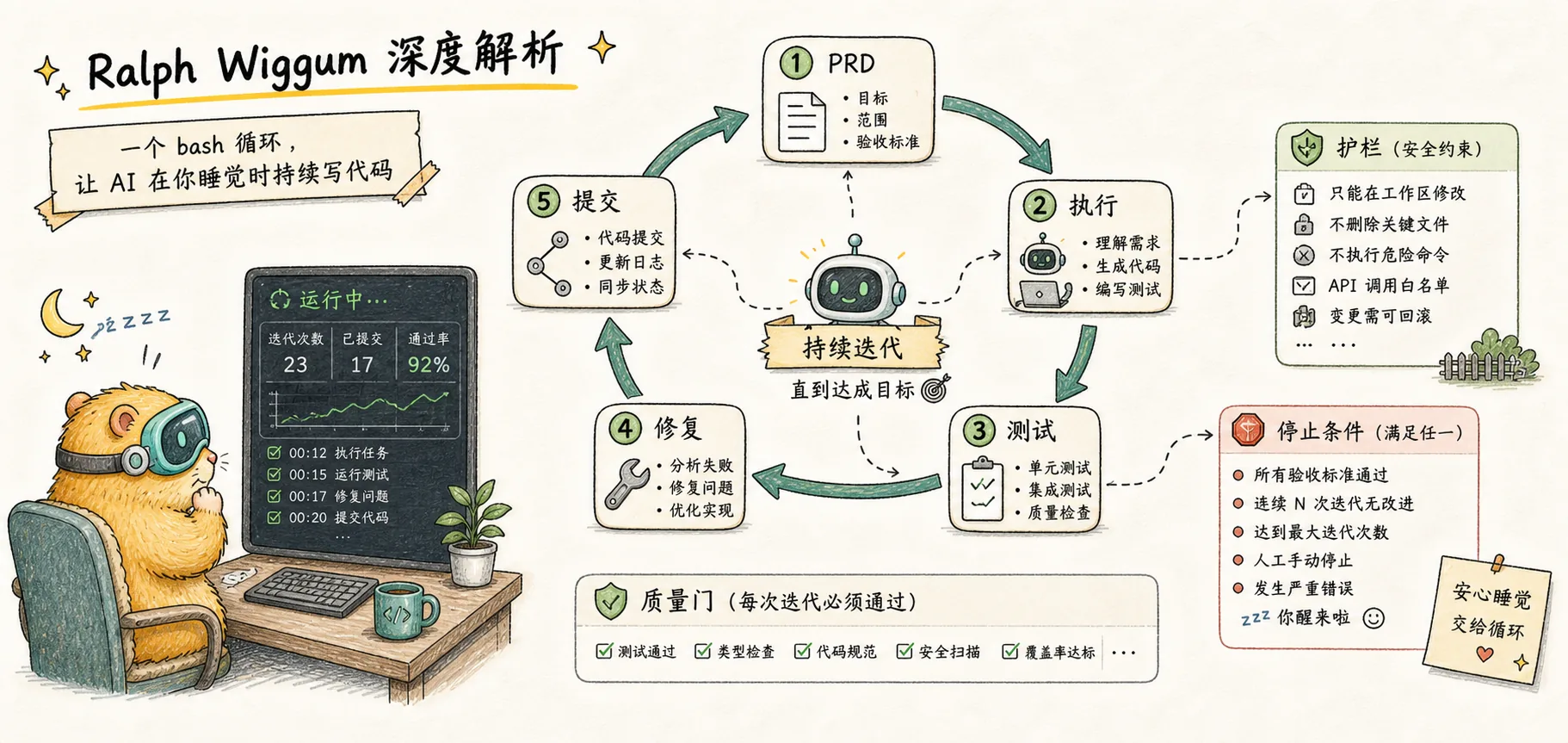
Ralph Wiggum Deep Dive
Understanding the core principles of Ralph technique — why a simple bash loop can let AI write code while you sleep
Introduction
Assign tasks to AI before leaving work, and wake up to usable code the next morning — this dream sounds like it would require complex Agent clusters and sophisticated orchestration systems. Yet the hottest AI programming technique of 2025 boils down to this single line:
while :; do cat PROMPT.md | claude ; doneAn infinite loop that repeatedly feeds tasks to Claude. This is Ralph Wiggum. It's embarrassingly simple, yet someone actually used it to complete a project originally quoted at $50,000 for just $297 in API costs.
Why does such a simple approach actually work? And when Anthropic released an official plugin, why did the inventor Geoffrey Huntley say "This isn't it"?
What Is Ralph

The name comes from a character in The Simpsons. Ralph Wiggum is the police chief's son — the most "innocent" person in the show. He doesn't quite understand what he's doing, but he never stops. His signature line "I'm helping!" unexpectedly captures the essence of this technique: Naive and relentless persistence.
An AI development methodology whose core principle is infinite loop + fresh context each time. The AI repeatedly attempts the same task, starting each iteration from a clean state and seeing previous work results through the file system.
There's an important distinction here: Ralph is a methodology, not a tool. Just as "Agile" is a methodology rather than a specific piece of software, Ralph describes a way of working. Different implementations can vary dramatically in effectiveness — we'll discuss this in detail later.
Why Ralph Is Needed: The Context Rot Problem
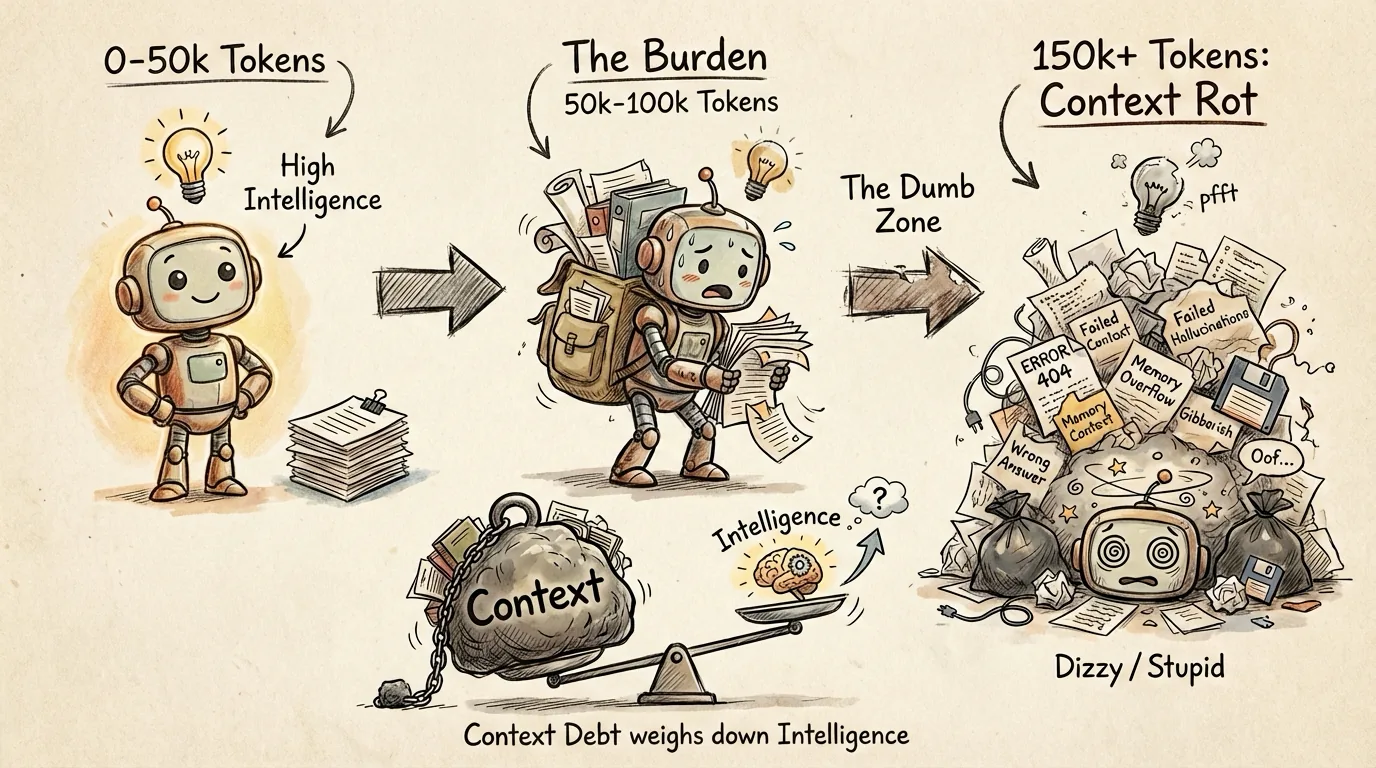
To understand why Ralph works, you first need to understand the problem it solves.
How AI "Gets Dumber"
When using Claude for complex tasks, you may have experienced this: the conversation starts smoothly — Claude understands accurately and executes well. But as the conversation grows longer, it becomes "sluggish" — forgetting important information, repeating the same mistakes, declining in code quality, and even producing inexplicable hallucinations.
This isn't because the AI isn't smart enough. The problem is that the context window has been polluted.
Imagine this scenario: you ask Claude to write a feature, and it fails the first time. You say "fix this," it tries but fails again. After ten back-and-forth exchanges, Claude's context is stuffed with: nine failed code attempts, nine sets of error messages, and a mountain of no-longer-relevant discussion. Finding the key information among all this noise becomes increasingly difficult.
The Dumb Zone
Geoffrey Huntley and the community discovered a phenomenon they call the "Dumb Zone":
| Context Size | Performance |
|---|---|
| 0 - 50k tokens | Peak performance |
| 50k - 100k tokens | Good, slight degradation |
| 100k+ tokens | Noticeable degradation, starts ignoring instructions |
| 150k+ tokens | Severe degradation |
There's no precise threshold, but the rule of thumb is: start worrying when context reaches about half capacity. For Claude's 200k token window, beyond 100k tokens you may be working with an AI that's "gotten dumber."
Accumulated Context Is a Liability
Here's a counterintuitive insight: accumulated context isn't an asset — it's a liability.
We're accustomed to thinking that better memory is always better, and more retained information is always better. But in the world of large language models, this intuition is wrong. The longer the conversation, the more "negative information" clutters the context: failed code, irrelevant discussions, corrected misunderstandings. These don't just take up space — they also scatter the AI's "attention."
How Ralph Works
Once you understand Context Rot, Ralph's solution becomes clear: if accumulated context is the problem, don't accumulate it.
Ralph is built on three pillars:
1. Fresh Session
At each loop iteration, a brand new Claude instance is launched with a completely clean context window. This isn't just "clearing conversation history" — accumulated state might still persist that way. It means completely terminating the current process and starting a new one.
This means Claude is at peak performance at the start of each iteration. No previous errors to haunt it, no stale discussions to distract it.
This is why the loop must run outside of Claude Code — the bash loop needs to control the lifecycle of the Claude process.
2. Files as the Source of Truth
If each iteration starts with fresh context, how does the AI know what was done before? The answer: through the file system, not conversation history.
The spec and the implementation plan are the source of truth, not the previous conversation.
Key files:
- PRD/spec file — Defines goals, feature lists, success criteria
- IMPLEMENTATION_PLAN.md — Task breakdown and progress tracking
- progress.txt — Free-form log; each iteration appends what it learned
- Git history — Proof of code changes
At the start of each iteration, Claude reads these files to understand goals and progress. What it sees is a carefully organized state snapshot, not chaotic conversation history.
3. Feedback Loop
Clean context and persistent state alone aren't enough. If the AI writes buggy code and commits it, errors will accumulate.
The feedback loop serves as an automated quality gate:
- TypeScript type checking — Immediate feedback on type correctness
- Unit tests — Verify that features meet expectations
- CI/CD — Ensure code builds and integrates properly
If tests fail, the code isn't committed, and Claude sees the failure messages. The next iteration's fresh Claude instance will attempt to fix the issue.
For more on building a comprehensive quality assurance system, I shared my five-layer defense approach in My Claude Code Quality Control Workflow: Hooks automation, testing strategy, AI Review, Pre-commit, and GitHub integration.
Human on the Loop
Geoffrey Huntley repeatedly emphasizes a conceptual distinction:
| Human in the Loop | Human on the Loop |
|---|---|
| Babysitting | Supervisory management |
| AI waits for your confirmation at every step | You set goals and boundaries, AI runs autonomously |
| You are the bottleneck in the workflow | You check progress occasionally |
This is like supervising an intern. You don't stand next to them watching every line of code. You give them the task, the boundaries, the validation criteria, then let them do it.
In practice, there are two modes:
- AFK mode: Start it before leaving work, go home and sleep, check results in the morning
- Human-in-the-loop mode: Pause to review after each iteration, suitable for complex or uncertain tasks
What Tasks Are Suitable for Ralph
Ralph isn't a silver bullet. Its core strength is "iterate until success," which makes it suited for specific types of tasks.
Suitable Tasks
| Scenario | Reason |
|---|---|
| Tasks with clear success criteria | Completion can be verified automatically (tests pass, type checks pass) |
| Tasks requiring iterative improvement | Ralph's core strength is persistent retrying |
| Greenfield projects | No risk of breaking existing code |
| Projects with automated tests | Tests serve as backpressure to ensure quality |
Unsuitable Tasks
| Scenario | Reason |
|---|---|
| Design decisions requiring human judgment | "Does it look good?" can't be verified automatically |
| One-off operations | Tasks that don't need iteration are wasteful with Ralph |
| Production debugging | Too risky for unattended operation |
| Tasks with unclear success criteria | No way to determine when to stop |
Three Usage Patterns
Full Implementation Mode
This is the most common use of Ralph: building a complete feature or project from scratch. You prepare a spec file and implementation plan, and let Ralph execute all tasks automatically.
Typical scenarios:
- Building a new REST API
- Developing a CLI tool
- Implementing a new feature module
Real-world examples: One developer used this pattern to complete a project originally quoted at $50,000, with total API costs of just $297. The entire process — MVP development, test writing, and code review — was fully automated. Another case involved upgrading a legacy codebase from React v16 to v19; Ralph ran for 14 hours with zero human intervention.
Exploration Mode
Not all tasks require code output. Sometimes what you need is understanding — understanding a newly inherited codebase, a complex system's architecture, or how a particular module works.
Typical scenarios:
- Taking over an unfamiliar project and needing to quickly build a mental model
- Generating documentation for an existing codebase
- Analyzing system architecture to identify potential issues
In this mode, your prompt isn't "implement feature X" but rather "read this codebase and generate architecture documentation" or "find all API endpoints and describe their purpose." Claude dives deeper with each iteration, gradually building a more complete understanding.
Brute-Force Testing Mode
Some bugs — you know the symptoms, you know the expected correct behavior, but you just can't find the root cause. This is where you let Ralph "brute-force" it.
Typical scenarios:
- An intermittent bug that's hard to reproduce
- A test that fails occasionally for unknown reasons
- A performance issue where the bottleneck is unclear
Set the goal: "Fix this bug and make this test pass consistently." Ralph will keep trying different fix approaches until it finds one that works. This method is especially well-suited for problems where "I don't know how to fix it, but I know when it's fixed."
Choosing an Implementation
Now that you understand the Ralph methodology, a practical question arises: how do you implement this loop?
The community has developed two implementations with different levels of engineering:
Minimalist approach — snarktank/ralph: A few hundred lines of bash script, fresh session each time, focused on the loop itself. Lightweight, easy to get started, ideal for quick adoption.
Engineered approach — frankbria/ralph-claude-code: Complete toolchain (monitoring dashboard, circuit breaker, rate limiting, session expiry management). Defaults to session reuse via --continue, with an option to switch to fresh sessions via --no-continue.
| Dimension | Minimalist (snarktank) | Engineered (frankbria) |
|---|---|---|
| Session mode | Fresh each time | Reuse by default, switchable to fresh |
| Monitoring | Manual inspection | Built-in tmux dashboard |
| Safety mechanisms | max_iterations | Circuit breaker + rate limiting + timeout |
| Installation complexity | Skill copy | install.sh + wizard |
Both implementations have their strengths and weaknesses — the choice depends on your need for engineering tooling. See each implementation's practice article for detailed usage and comparison.
Final Thoughts
Ralph teaches us an important lesson: sometimes the simplest approach is the most effective. While everyone else was chasing more complex architectures, a bash loop changed the game.
Of course, Ralph is just one piece of the puzzle. It needs good prompts, the right project, and proper feedback mechanisms to reach its full potential. Now that you understand the principles, you can choose the right implementation for your needs:
- Need long-term AFK with many iterations? → snarktank/ralph Practice Guide
- Need engineered monitoring and safety mechanisms? → frankbria/ralph-claude-code Practice Guide
Related Reading:
- snarktank/ralph Practice Guide — Minimalist external loop, complete operational manual from installation to real-world use
- frankbria/ralph-claude-code Practice Guide — Engineered implementation: monitoring, circuit breaker, and safety mechanisms
- The Complete Guide to Claude Subagents — Another approach to keeping context clean
- What Are Claude Skills — Exploring Claude's reusable playbooks
- GSD Deep Dive — A complete context engineering system built on Ralph's foundations
- Claude System Architecture Overview — Understanding the overall architecture of Hooks, Subagents, and other components
Comments
Practical Guide
Master the complete spec-to-code workflow with speckit commands — command reference, end-to-end walkthrough, and best practices
Ralph Practical Guide
Complete operational manual for snarktank/ralph — from installation to real-world use, covering PRD writing, loop execution, quality gates, and lessons learned