
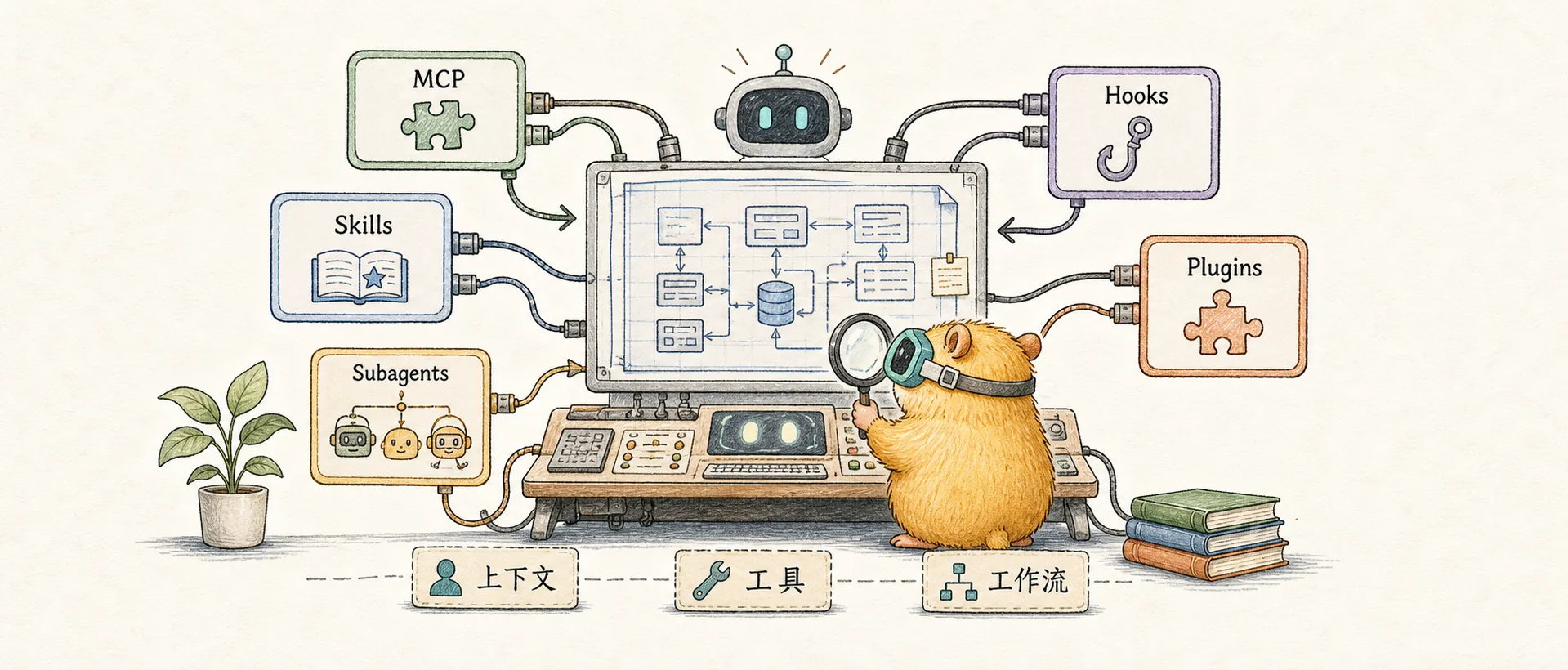
A Complete Guide to Claude's System Architecture
Deep dive into the roles, design intent, and synergies of MCP, Skills, Subagents, Hooks, Plugins, and other components in the Claude system
Introduction
In September 2025, Anthropic closed a $13B funding round at a $183B valuation, making it the fourth-largest private company in the world. Its flagship product, Claude Code, has attracted 115,000 active developers since its February launch, processing 195 million lines of code per week, with user growth of 300%.
Even more fascinating, Anthropic CEO Dario Amodei revealed: 90% of Claude Code's code is written by itself.
How is that possible?
How can an AI coding assistant "write itself"? What is unique about its architecture that enables it to assist — and even replace — human developers so effectively?
The key design principle behind Claude Code is that Claude needs the same tools that programmers use every day. By giving Claude access to the user's computer (via the terminal), it had what it needed to write code like programmers do.
The answer lies in Claude's modular architecture: MCP provides tools, Skills teach how to use them, Subagents execute tasks in parallel, and Hooks ensure deterministic control — these components work together to give Claude the ability to "work like a programmer."
This article gives you a bird's-eye view of the entire architecture — the role of each component, how they work together, and quick-start configuration examples. Follow-up articles will dive deep into the details of each component.
Architecture Overview
The Claude system uses a modular architecture where components are categorized by function and work as complementary collaborators rather than hierarchical dependencies:
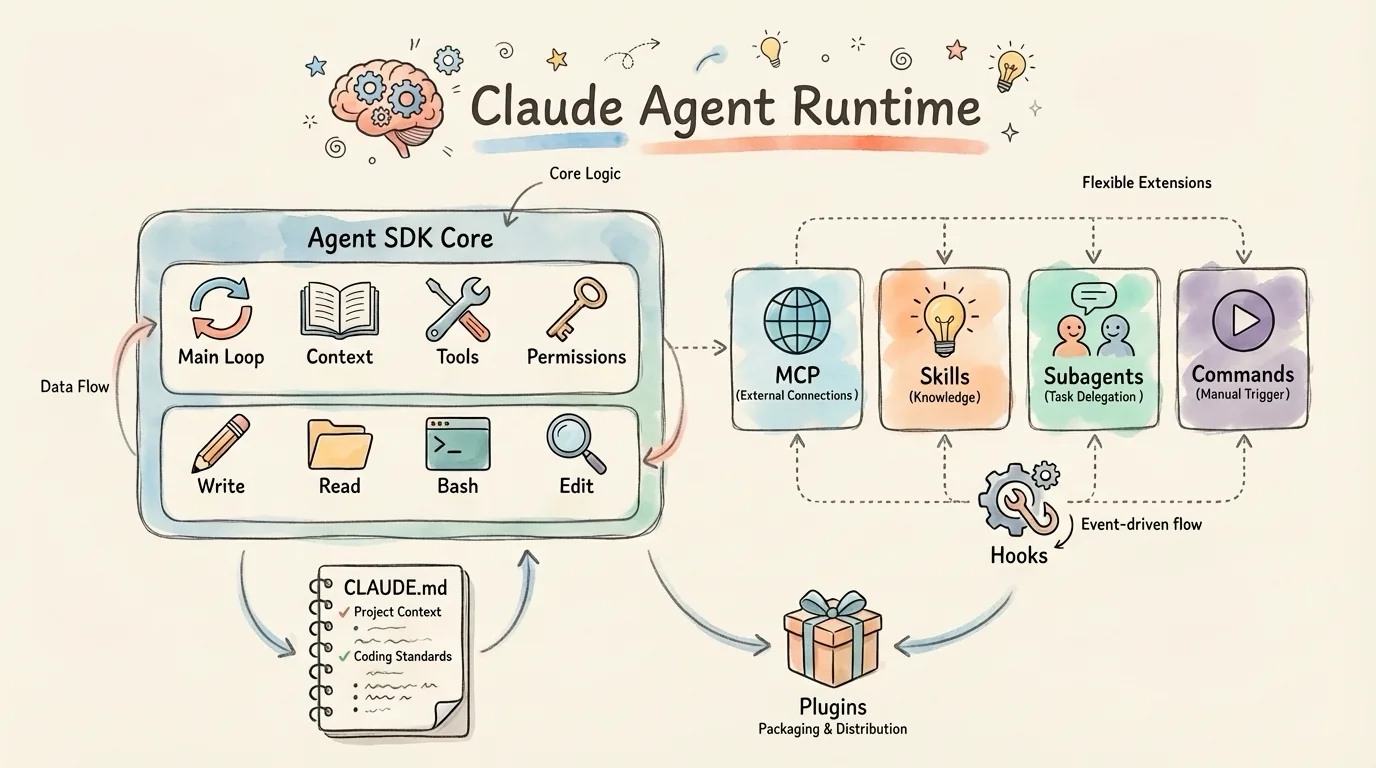
Key insight: These components are peer-level, complementary extensions — not hierarchical dependencies. You can freely combine them based on your needs:
| You want to... | Use... | One-line description |
|---|---|---|
| Connect to external data sources and services | MCP | Give Claude "hands and feet" to access databases, APIs, and file systems |
| Teach Claude specific workflows | Skills | Let Claude "know" how to do things in a particular domain |
| Process complex tasks in parallel | Subagents | Break large tasks into subtasks, with multiple Agents working simultaneously |
| Quickly trigger repetitive operations | Commands | One-click launch for common workflows, eliminating repetitive instructions |
| Ensure certain operations always execute | Hooks | Regardless of Claude's decisions, this step must run |
Core Runtime
Agent SDK — The Runtime Engine
Agent SDK is the core runtime engine of the entire Claude Agent system, providing:
- Main Loop: The Agent's core work loop
- Context Management: Token budgets, automatic compression (triggered at 92% usage)
- Tool Dispatch: Deciding which tool to use and how to execute it
- Permission System: Controlling tool access permissions
The Agent's core operating model is a simple feedback loop:
Gather context → Execute actions → Verify work → RepeatThe agent harness that powers Claude Code (the Claude Code SDK) can power many other types of agents too. To reflect this broader vision, we renamed the Claude Code SDK to the Claude Agent SDK.
Built-in Tools — Core Toolset
The Claude Agent ships with 20+ core tools in three categories:
| Category | Tools | Description |
|---|---|---|
| Read | Read, Glob, Grep | File reading, pattern matching, content search |
| Operate | Write, Edit, Bash | File writing, editing, command execution |
| Network | WebSearch, WebFetch | Web search, webpage fetching |
These tools are available by default with no additional configuration. Claude interacts with the computer through these tools, just like a programmer uses an IDE.
Configuration & Context
CLAUDE.md — Persistent Context
Every new conversation used to require repeating the project background, coding standards, and architectural conventions... CLAUDE.md lets you configure once, load automatically.
CLAUDE.md is like a README for AI — it tells Claude about the project's background knowledge, workflow, and conventions.
Hierarchical Override
Claude loads CLAUDE.md files in the following order, with more specific files taking higher priority:
Enterprise (lowest)
    ↓
User (~/.claude/CLAUDE.md)
    ↓
Project (./CLAUDE.md)
    ↓
Module (./src/module/CLAUDE.md) (highest)
Content Recommendations
CLAUDE.md should include the following core information:
| Category | Example Content |
|---|---|
| Tech Stack | Next.js 14 + TypeScript, Tailwind CSS |
| Build Commands | npm run dev, npm run build, npm run test |
| Code Standards | Naming conventions, Lint tool configuration |
| Project Structure | Purpose of key directories |
Key principle: Keep it concise. CLAUDE.md is loaded with every conversation — making it too long wastes precious tokens.
Packaging & Distribution
Plugins — Installable Units
Team configurations are scattered, hard to share, and difficult to standardize. Everyone has their own set of Skills, Commands, Hooks... How do you unify management?
Plugins bundle Skills + Commands + Subagents + Hooks + MCP into installable units, enabling one-click distribution and team standardization.
Directory Structure
my-plugin/
├── .claude-plugin/
│   └── plugin.json     # Plugin manifest (required)
├── commands/           # Slash Commands
├── agents/             # Subagents
├── skills/             # Skills
├── hooks/              # Hooks configuration
├── .mcp.json           # MCP Server configuration
└── README.md           # Documentation
Configuration Example
// plugin.json
{
  "name": "frontend-toolkit",
  "version": "1.0.0",
  "description": "Frontend development toolkit",
  "author": "Your Team"
}
# Installation methods
claude plugin install github:your-org/your-plugin # From GitHub
claude plugin install /path/to/plugin # From localRelated Resources
| Resource | Description |
|---|---|
| claude-plugins-official | Anthropic's official plugin repository |
| wshobson/agents | 24.3k stars, high-quality Agent template collection |
| Claude Plugin Hub | Community plugin marketplace for discovering plugins |
| awesome-claude-code | 19.3k stars, curated list of Claude Code resources |
Extension Capabilities (Complementary Modules)
The Claude system's extension capabilities consist of multiple complementary modules, each with a distinct role, working in synergy:
| Module | Functional Role | Activation Method |
|---|---|---|
| MCP | Connect to external data and services (WHAT) | Available after configuration |
| Skills | Procedural knowledge — teach Claude how to do things (HOW) | Auto-matched |
| Subagents | Independent context, parallel task delegation | Explicit invocation |
| Commands | Repetitive workflows | Manual /cmd |
| Hooks | Deterministic control, event-driven | Auto-triggered |
MCP — External Connectivity
Design Philosophy
Even the most sophisticated models are constrained by their isolation from data—trapped behind information silos and legacy systems.
In the traditional approach, each external data source requires custom integration, leading to an N-times-M integration nightmare. MCP provides a standardized protocol for integrate once, use everywhere.
MCP (Model Context Protocol) is designed as the USB-C port for AI applications:
| Feature | Description |
|---|---|
| Open Standard | Released November 2024, donated to Linux Foundation December 2025 |
| Industry Adoption | Adopted by OpenAI, Microsoft, Google, AWS, and others |
| Ecosystem Scale | 97M+ monthly SDK downloads, thousands of community servers |
Architecture Pattern
┌─────────────────┐
│   MCP Host      │  (Claude Desktop, IDE, AI Tools)
│   (Main Agent)  │
└────────┬────────┘
         │ 1:N
    ┌────┴────┬────────┬────────┐
    │ Client  │ Client │ Client │  (Protocol Clients)
    └────┬────┴────┬───┴────┬───┘
         │         │        │
    ┌────┴────┐ ┌──┴───┐ ┌─┴────┐
    │ Server  │ │Server│ │Server│  (Expose Specific Capabilities)
    │ GitHub  │ │  DB  │ │ Slack│
    └─────────┘ └──────┘ └──────┘
Use cases: Connecting to databases, integrating third-party services (GitHub, Slack, Notion), accessing private APIs, real-time data stream processing.
Configuration Example
Create .mcp.json in the project root:
{
  "mcpServers": {
    "github": {
      "command": "npx",
      "args": ["-y", "@modelcontextprotocol/server-github"],
      "env": {
        "GITHUB_TOKEN": "${GITHUB_TOKEN}"
      }
    }
  }
}
Commands — Manual Workflows
Slash Commands provide manually triggered repetitive workflows.
| Feature | Description |
|---|---|
| Trigger Method | Manually type /command-name |
| Location | .claude/commands/ |
| Purpose | Repetitive workflows, standardized operations |
Example: Create .claude/commands/review.md
Please perform a code review on the current changes, focusing on:
1. Code style and consistency
2. Potential performance issues
3. Security vulnerabilities
4. Test coverage
Then type /review to trigger it.
Hooks — Deterministic Control
Hooks are the core of deterministic control — certain operations must execute and cannot rely on the LLM's judgment.
| Category | Event | Trigger Timing |
|---|---|---|
| Tool | PreToolUse | Before tool execution |
PostToolUse | After successful tool execution | |
PostToolUseFailure | After tool execution failure | |
PermissionRequest | When permission is requested | |
| Session | SessionStart | When a session starts |
SessionEnd | When a session ends | |
Stop | When Claude completes a response | |
| Subagent | SubagentStart | When a subagent starts |
SubagentStop | When a subagent stops | |
| Other | UserPromptSubmit | After user submits a prompt |
Notification | Notification events | |
PreCompact | Before context compression |
Configuration Example
Auto-format TypeScript files:
{
  "hooks": {
    "PostToolUse": [
      {
        "matcher": "Edit|Write",
        "hooks": [
          {
            "type": "command",
            "command": "jq -r '.tool_input.file_path' | { read f; [[ $f == *.ts ]] && npx prettier --write \"$f\"; }"
          }
        ]
      }
    ]
  }
}
In Practice: Autonomous Loop
Ralph Wiggum is an official Anthropic plugin that uses the Stop hook to implement an autonomous iteration loop:
/ralph-loop "Implement a TODO API with CRUD operations and tests" --max-iterations 20How it works: The Stop hook intercepts Claude's exit, re-injects the original prompt, and continues iterating until the task is complete or the maximum iteration count is reached.
Best suited for: Tasks requiring multiple iterations (passing tests, code refactoring), and tasks with automated verification.
Subagents — Task Delegation & Parallel Execution
Design Philosophy
A single Agent faces challenges: limited context window, inability to parallelize, and unclear responsibilities. Subagents adopt the Orchestrator-Worker architecture pattern to solve these problems:
Main Agent (Orchestrator)
    ├── Analyze user request
    ├── Formulate plan
    ├── Decompose tasks
    └── Spawn specialized subagents
         ↓
    ┌────────┬────────┬────────┐
    │ Sub 1  │ Sub 2  │ Sub 3  │  (Workers - parallel execution)
    │ Code   │ Tests  │ Docs   │
    └────────┴────────┴────────┘
         ↓
    Aggregate results → Main agent synthesizes output
Core Features
| Feature | Description |
|---|---|
| Context Isolation | Each Subagent has independent context, preventing pollution |
| Task Specialization | Custom system prompts define dedicated roles |
| Tool Permission Control | Subagents can be restricted to specific tools |
| Parallel Execution | Multiple Subagents work simultaneously |
Performance data: Multi-agent systems outperform single agents by 90.2%, and parallelization can cut research time by 90% (token consumption is ~15x, but worth it for complex tasks).
Configuration Example
Create a Markdown file in .claude/agents/:
---
name: Code Reviewer
description: A subagent specialized in code review
tools:
  - Read
  - Grep
  - Glob
---

You are a senior code review expert. Focus on:
1. Code quality and maintainability
2. Potential bugs and edge cases
3. Performance optimization opportunities
4. Security vulnerabilities
Skills — Procedural Knowledge
Design Philosophy
Claude is powerful, but real work requires procedural knowledge and organizational context.
Skills are reusable playbooks for AI — modular knowledge packages that Claude can dynamically load on demand. The core design principle is Progressive Disclosure:
📚 Skills Playbook
│
├─ 📋 Table of Contents ──── [Metadata Layer] Preloaded at startup (~30-50 tokens)
│   name: "weekly-report"
│   description: "Generate standardized weekly reports"
│
├─ 📖 Main Content ────────── [Core Document Layer] Loaded when relevant (~hundreds to thousands of tokens)
│   # Weekly Report Generator
│   ## Instructions
│   Generate weekly reports following this structure...
│
└─ 📎 Appendix ────────────── [Reference Resource Layer] Loaded when needed
    references/
    ├── template.xlsx
    └── examples/
MCP vs Skills: MCP gives Claude the ability to access tools (WHAT), while Skills teach Claude how to use those tools effectively (HOW).
Core Advantages
| Advantage | Description |
|---|---|
| Token Efficient | Metadata only takes 30-50 tokens; dozens of Skills can be active simultaneously |
| Auto-activated | Automatically matched based on task context, no manual trigger needed |
| Composable | Multiple Skills automatically work together |
| Portable | Consistent experience across Claude.ai, Claude Code, and the API |
Configuration Example
Create a directory in .claude/skills/:
my-skill/
├── SKILL.md          # Core instructions (required)
├── scripts/          # Executable scripts (optional)
└── references/       # Reference materials (optional)
SKILL.md core structure:
---
name: code-review                        # Skill name
description: Code review for quality and security    # Brief description (used for auto-matching)
---

# Code Review Skill

## Instructions
[Detailed step-by-step instructions...]

## Output Format
[Output format requirements...]
Key point: The description in the frontmatter is used for auto-matching — keep it concise and accurate.
Official References
Design Philosophy
| Resource | Description |
|---|---|
| Building Effective Agents | Foundational article on Agent architecture |
| Building agents with the Claude Agent SDK | Agent SDK engineering practices |
| Equipping Agents with Agent Skills | Skills design philosophy |
| Introducing the Model Context Protocol | MCP launch announcement |
Official Documentation
| Resource | Description |
|---|---|
| Skills explained | Skills compared with other components |
| Using CLAUDE.md Files | Guide to using CLAUDE.md |
| Claude Code Subagents | Subagents official documentation |
| Claude Code Hooks | Hooks official documentation |
| MCP Documentation | MCP official documentation |
| MCP Specification | MCP protocol specification |
In-Depth Analysis
| Resource | Description |
|---|---|
| Understanding Claude Code's Full Stack | Includes architecture diagrams |
| Claude Agent Skills: Deep Dive | In-depth analysis of Skills internals |
| How Claude Code is built | Inside the building of Claude Code |
| Claude Skills vs. MCP | Technical comparison of Skills and MCP |
Further Reading
If you want to dive deeper into Skills concepts and practices, check out:
- What Are Claude Skills — Detailed explanation of Skills core principles
- Claude Skills Hands-on Guide — Create your first Skill step by step
- The Complete Guide to Claude Subagents — Using and customizing subagents
- GSD Deep Dive — An AI programming system based on context engineering
- My Claude Code Best Practices — Tips for everyday Claude Code usage
Comments
Advanced Tips
Advanced Claude Code techniques: terminal notifications, Hooks deep dive, plugin ecosystem, Agent Teams, and prompt strategies
The Complete Guide to Claude Worktree
Master Claude Code's Worktree feature — run multiple parallel Agents without conflicts for true parallel development workflows