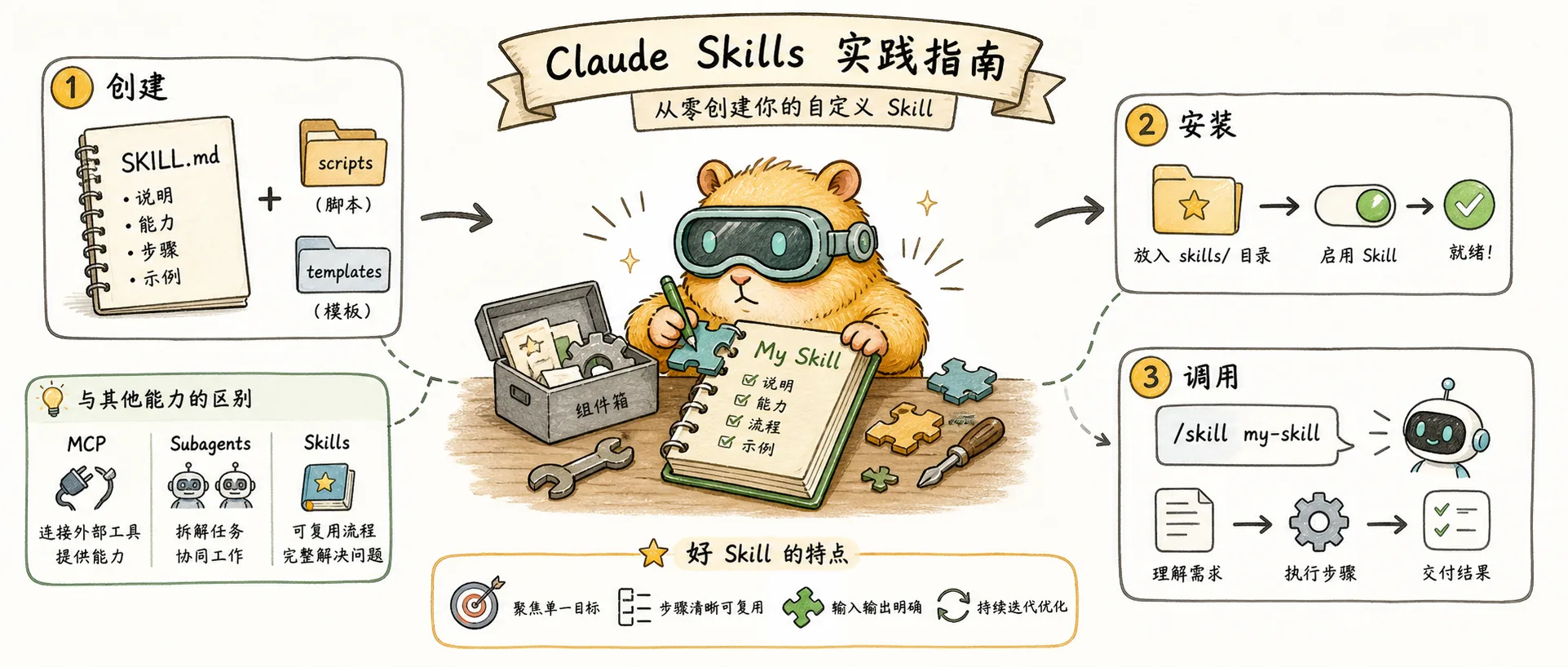
In the previous article, we covered the core concepts of Skills: reusable playbooks for AI assistants that achieve exceptional token efficiency through a progressive disclosure architecture, with three key strengths — efficiency, composability, and portability. This article takes a hands-on approach to help you understand how Skills differ from other features, learn to enable, install, and create Skills, and master best practices while avoiding common pitfalls.
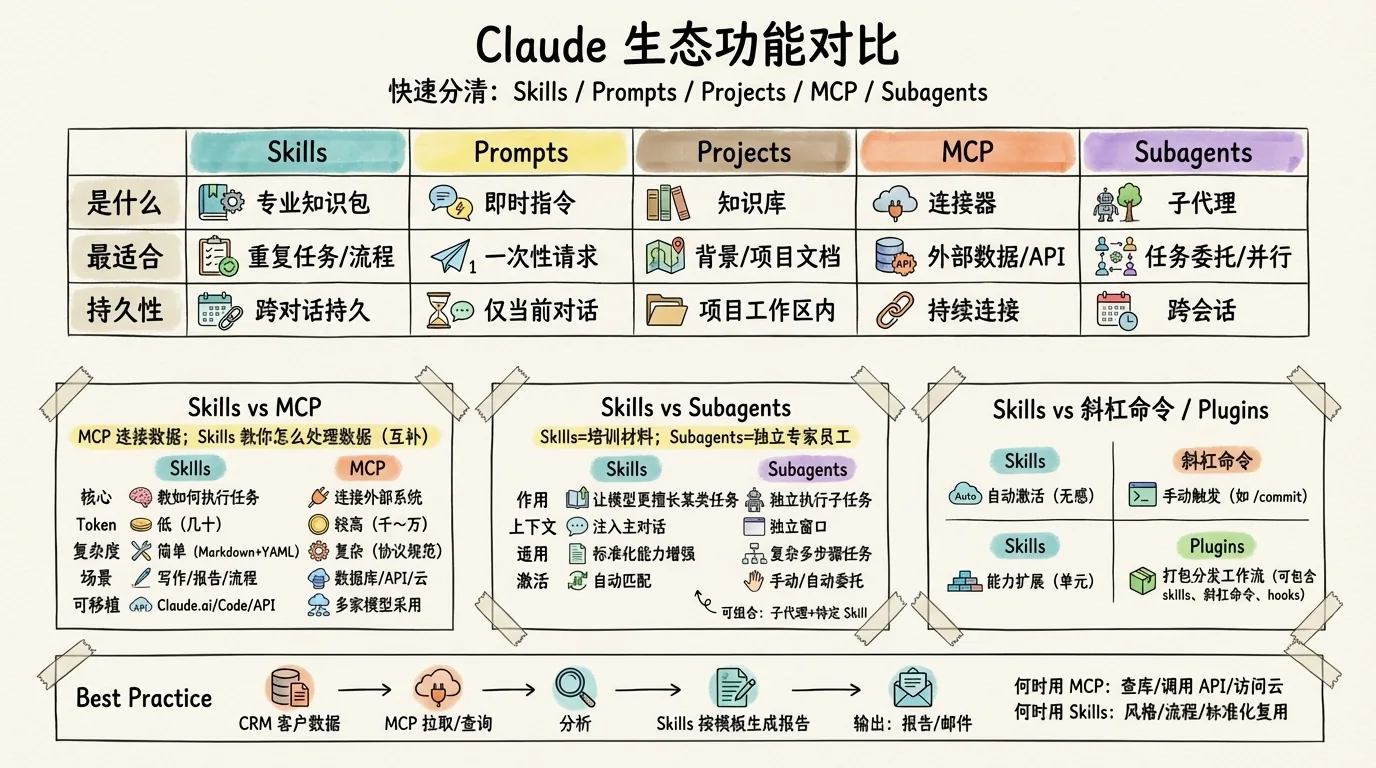
This is the most common source of confusion. The core distinction: MCP connects Claude to data; Skills teach Claude how to process data. They complement rather than replace each other.
Dimension
Skills
MCP
Core Function
Teaches Claude how to perform tasks
Connects Claude to external systems
Token Consumption
Very low (tens of tokens)
Higher (thousands to tens of thousands of tokens)
Technical Complexity
Simple (Markdown + YAML)
Complex (full protocol specification)
Typical Use Cases
Brand writing, report generation, workflows
Database queries, API calls, cloud services
Portability
Across Claude.ai/Code/API
Adopted by multiple model providers
Once you understand this distinction, you'll know when to use each one. Use MCP when you need to query databases, call APIs, or access cloud services. Use Skills when you need to follow a specific writing style, execute standardized workflows, or reuse domain expertise.
The best practice is to combine both: use MCP to connect to your CRM system and pull customer data, then use Skills to define how to analyze that data and generate reports.
The core distinction: Skills make Claude better at certain types of tasks; Subagents let Claude delegate tasks to independent "specialist workers."
Dimension
Skills
Subagents
Core Function
Provides expertise and instructions
Independent sub-agents that execute tasks
Context
Injected into the main conversation context
Has its own independent context window
Use Cases
Making Claude better at specific task types
Complex, multi-step independent tasks
Activation
Automatically matched based on description
Manually invoked or auto-delegated by Claude
Portability
Across Claude.ai/Code/API
Claude Code and Agent SDK only
Think of it this way: Skills are like training materials — they teach Claude how to do something. Subagents are like dedicated employees — they have their own workspace (context) and permissions (tools), complete tasks independently, and report back with results.
The two can be combined: for example, a code review sub-agent can load language-specific best practice Skills, achieving a "specialist + domain expertise" combination. According to Anthropic research, multi-agent systems (Claude Opus 4 as the orchestrator + Claude Sonnet 4 sub-agents) scored 90.2% higher than single-agent setups in internal evaluations.
If you've used Claude Code, you're familiar with slash commands like /commit and /review. The core distinction: Skills activate automatically based on context; slash commands require manual input to trigger.
Dimension
Skills
Slash Commands
Activation
Automatic (matched by context)
Manual input (e.g., /commit)
Trigger Condition
Claude decides relevance based on description
User explicitly enters the command
Use Cases
"Always-on" capability enhancement
Explicit, repeatable operations
User Awareness
Invisible, takes effect automatically
Requires remembering command names
Example: When you type /commit, Claude executes a predefined commit workflow — that's a slash command. When you say "help me write a weekly report," Claude automatically identifies and loads the weekly report generation Skill without any command input — that's Skills.
A simple way to remember: slash commands are keyboard shortcuts that you trigger manually; Skills are background knowledge that Claude uses at its own discretion.
Plugins are Claude Code's extension package mechanism. The core distinction: Skills are auto-activated capability extensions; Plugins are packaged and distributable complete workflow configurations.
Dimension
Skills
Plugins
Core Function
Capability extension
Packaged workflow distribution
Activation
Auto-activated based on context
Components merged after installation
Scope
Cross-platform (Claude.ai/Code/API)
Claude Code only
Contents
Instructions + scripts + resources
Slash commands + hooks + skills
Distribution
Standalone folder
Installed via marketplace
The key insight: Plugins can contain Skills (in their skills/ directory) and represent a larger packaging unit. When you install a Plugin, its Skills are automatically activated, slash commands appear in autocomplete, and hooks are merged with your existing configuration.
In short: use Skills to extend Claude's capabilities; use Plugins to distribute standardized workflow configurations across your team.
If you use Claude Code, you can install community-contributed Skills via commands.
Install from the plugin marketplace:
# Add the official Skills repository/plugin marketplace add anthropics/skills# Install the document skills package/plugin install document-skills@anthropic-agent-skills# Install the example skills package/plugin install example-skills@anthropic-agent-skills
Skills storage locations:
Location
Path
Description
Personal Skills
~/.claude/skills/
Available only to you
Project Skills
.claude/skills/
Version-controlled with git, shared across the team
Test in Claude: "Help me generate this week's report. This week I completed the user login feature, fixed 3 bugs, and attended two product review meetings."
At their core, Skills are a meta-tool system — they don't execute code directly but inject specialized instructions into the conversation context, altering how Claude reasons.
When you trigger a Skill, two things happen:
Metadata message: A visible status indicator showing which Skill is being loaded
Skill prompt: The complete SKILL.md instructions are sent to Claude, hidden from the user
How does Claude know which Skill to invoke? The answer: it relies entirely on language understanding.
The name and description of all enabled Skills are formatted into a dynamic list written into the system prompt. When you send a message, Claude uses its native language understanding to match your intent and decide whether to invoke a given Skill.
This is why the description field is so critical — it's the sole basis for Claude's decision. There's no complex algorithmic routing; the decision happens entirely within Claude's reasoning process.
Through extensive real-world usage, the community has distilled four golden rules for creating Skills:
1. Stay Focused
A Skill should do one thing well. Multiple focused Skills are far more useful than one catch-all Skill — they're easier to maintain and easier to compose.
2. Write Clear Descriptions
The description field determines when Claude invokes your Skill, so be specific about the applicable scenarios. "Generate quarterly analysis reports from sales data" is a good description; "process data" is too vague.
3. Provide Examples
Including input/output examples in your SKILL.md significantly improves output consistency, especially for tasks with specific formatting requirements.
4. Start Simple
Begin with plain Markdown instructions, validate the results, and only then consider adding scripts. Increase complexity gradually.
As an emerging feature, Skills currently has some limitations:
Limitation
Details
Anthropic ecosystem only
Resolved — see below
No review mechanism
No built-in review or audit workflow yet
Learning curve
Teams need to adapt workflows and establish version management processes
Early stage
The ecosystem is still evolving
Major Update (December 18, 2025): Anthropic officially released Agent Skills as an open standard. The specification and reference SDK are available at agentskills.io.
Companies/products that have adopted it:
Microsoft: Integrated into VS Code and GitHub
OpenAI: ChatGPT and Codex CLI use the same architecture
Additionally, Anthropic, OpenAI, and Block co-founded the Agentic AI Foundation (hosted by the Linux Foundation), with Google, Microsoft, and AWS also joining. This means Skills is evolving from a single-vendor feature into an industry standard — Skills written for Claude Code can interoperate with OpenAI Codex CLI.
The emergence of Skills represents an important direction in AI tooling — enabling AI not just to execute tasks, but to learn and remember specific ways of working. Simon Willison predicted that Skills would trigger a "Cambrian Explosion" in the AI tool space, and that prediction is no exaggeration.
As more developers and teams build and share Skills, we can expect to see:
Specialized Skills Marketplaces: Domain experts across industries packaging their knowledge into reusable Skills
Deep Skills + MCP Integration: Forming complete end-to-end workflows
Enterprise-Grade Skills Platforms: Team collaboration, version management, and access control
Now is a great time to get started. Here's what you can do right away: log in to Claude.ai and enable the document skills. This week, try installing a community Skill and creating your first simple Skill. In the long run, identifying repetitive work within your team and gradually building a dedicated skill library will be an effective way to boost productivity.