
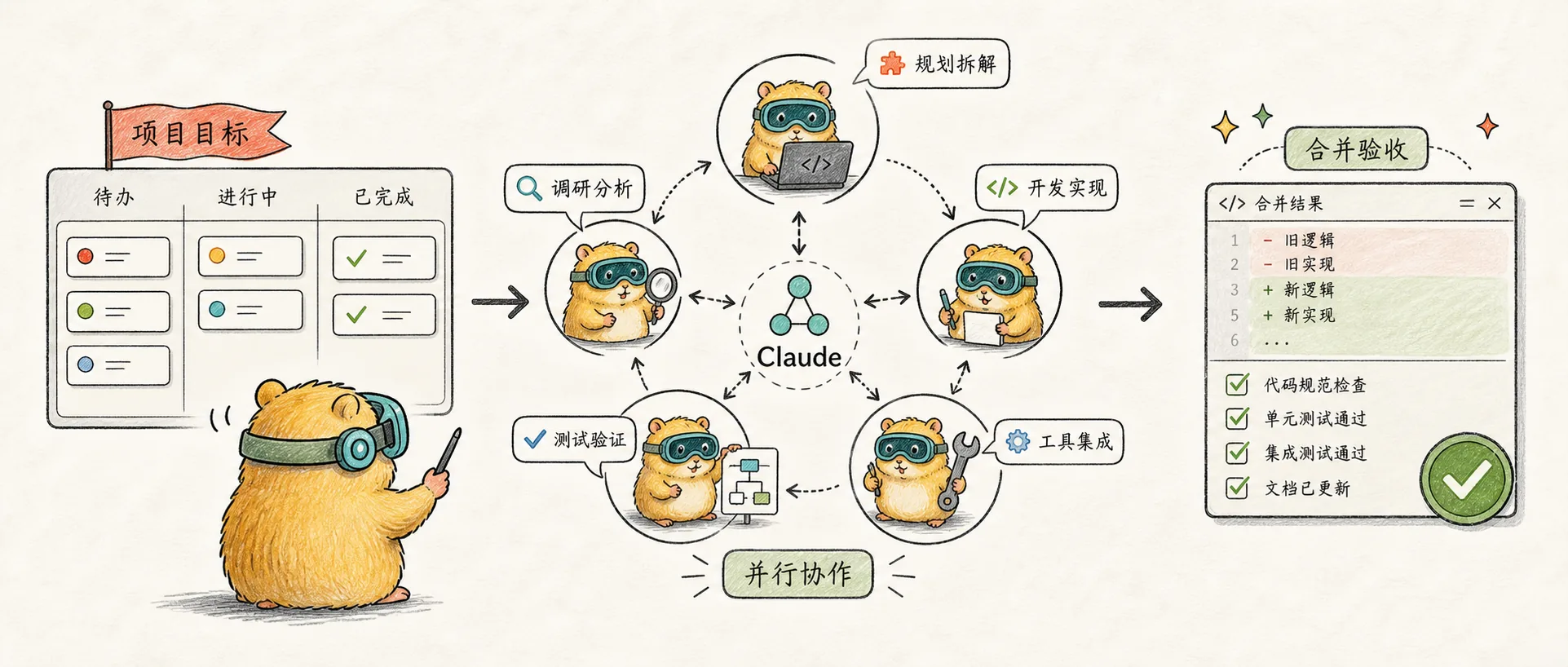
The Complete Guide to Claude Agent Teams
Master Claude Code's Agent Teams feature - coordinate multiple Claude instances into a team for true multi-agent collaborative development
Introduction
To stress test it, we tasked 16 agents with writing a Rust-based C compiler, from scratch, capable of compiling the Linux kernel.
If you've used Claude Code's Subagents, you might think parallel development is already powerful enough. But Subagents have a limitation: they can only report results back to the main Agent and cannot communicate with each other.
Agent Teams change this entirely. Imagine: one Agent handles security reviews, another focuses on performance optimization, and a third covers test coverage -- they can not only work in parallel but also talk directly to each other, challenge one another, and reach consensus. This is the core value of Agent Teams.
Understanding Agent Teams
An experimental feature in Claude Code that allows multiple Claude instances to form a collaborative team. One instance serves as the Team Lead responsible for coordination, while others work independently as Teammates, sharing a task list and communicating directly with each other.
The architecture of Agent Teams resembles a real development team:
┌─────────────────────────────────────────────────────────┐
│                      You (User)                          │
└─────────────────────────────────────────────────────────┘
                           │
                           ▼
┌─────────────────────────────────────────────────────────┐
│                    Team Lead                              │
│        (Main Claude instance, coordinates work)           │
└─────────────────────────────────────────────────────────┘
         │              │              │
         ▼              ▼              ▼
┌─────────────┐  ┌─────────────┐  ┌─────────────┐
│ Teammate 1  │  │ Teammate 2  │  │ Teammate 3  │
│Security Audit│◄─►│ Performance │◄─►│Test Coverage │
└─────────────┘  └─────────────┘  └─────────────┘
         │              │              │
         └───��──────────┼──────────────┘
                        ▼
              ┌─────────────────┐
              │ Shared Task List │
              └─────────────────┘
Differences from Subagents
| Feature | Subagent | Agent Teams |
|---|---|---|
| Context | Independent context, results returned to main Agent | Independent context, fully independent operation |
| Communication | Can only report to main Agent | Teammates can communicate directly |
| Task Coordination | Main Agent manages all work | Shared task list, self-coordinated |
| Use Cases | Focused tasks where only results are needed | Complex work requiring discussion and collaboration |
| Token Cost | Lower: result summaries returned to main context | Higher: each Teammate is an independent instance |
In short: Subagents are contractors you send out to execute tasks, while Agent Teams are a project team collaborating in the same room.
Why Agent Teams Work
LLMs perform worse as context expands. Adding unrelated information to a context window degrades performance. Swarms solve this by giving each agent narrow scope and clean context.
The core insight: specialization brings focus.
When a single Agent handles complex multi-step tasks, the context keeps expanding, often requiring /clear to reset. Agent Teams let each Teammate maintain a narrow area of focus, keeping the context clean and performance more stable.
Enabling Agent Teams
Agent Teams is currently an experimental feature, disabled by default. You need to enable it manually:
Method 1: Environment Variable
export CLAUDE_CODE_EXPERIMENTAL_AGENT_TEAMS=1Method 2: settings.json (Recommended, persistent)
{
  "env": {
    "CLAUDE_CODE_EXPERIMENTAL_AGENT_TEAMS": "1"
  }
}
Core Usage
Creating Your First Agent Team
Once enabled, simply tell Claude in natural language to create a team:
Create an agent team to review PR #142.
Spawn three reviewers:
- One focused on security issues
- One checking performance impact
- One verifying test coverage
Have them each review and report their findings.
Keyword tip: Use "create an agent team" or "spawn an agent team." If you just say "spawn agents," it may confuse Subagents with Agent Teams.
Display Modes
Agent Teams supports two display modes:
| Mode | Description | Requirements |
|---|---|---|
| In-process | All Teammates run in the main terminal | No special requirements |
| Split panes | Each Teammate gets its own pane | Requires tmux or iTerm2 |
The default is auto: uses split panes if running in tmux, otherwise in-process.
Configure display mode:
{
  "teammateMode": "in-process"
}
Per-session override:
claude --teammate-mode in-processCommon Shortcuts
| Action | Shortcut |
|---|---|
| Switch between Teammates | Shift+Down |
| Return to previous Teammate | Shift+Up |
| Toggle task list display | Ctrl+T |
| Interrupt current Teammate | Escape |
| Enable Delegate Mode | Shift+Tab |
| Enter Teammate session | Enter |
Delegate Mode (Important)
Enable delegate mode (Shift+Tab) as soon as you start a team. Without delegate mode, the lead often tries to do everything itself instead of delegating.
Delegate Mode is one of the most important features of Agent Teams:
| Mode | Lead Behavior |
|---|---|
| Normal Mode | Lead may implement tasks and write code itself |
| Delegate Mode | Lead can only coordinate -- no writing code or running tests |
Why you need Delegate Mode:
Without this restriction, the Lead often "grabs work" -- even with three Teammates waiting, the Lead starts writing code itself. With Delegate Mode enabled, the Lead is forced into a pure project manager role, limited to managing tasks, communicating with Teammates, and reviewing output.
# Press Shift+Tab immediately after starting the teamPractical Examples
Example 1: Parallel Code Review
A single reviewer tends to go deep on one type of issue. Splitting review dimensions into independent domains ensures security, performance, and test coverage all receive equal attention:
Create an agent team to review this PR. Spawn three reviewers:
- Security reviewer: check authentication, authorization, injection vulnerabilities
- Performance reviewer: analyze algorithm complexity, database queries, caching strategies
- Test reviewer: verify test coverage, edge cases, error handling

Have them review independently, then discuss their findings with each other.
Example 2: Competitive Hypothesis Debugging
When the root cause is unclear, a single Agent tends to stop at the first plausible explanation. Having Teammates challenge each other avoids this problem:
Users report the app exits after sending one message instead of staying connected.

Spawn 5 agent teammates to investigate different hypotheses. Have them discuss
with each other, actively trying to disprove each other's theories like a
scientific debate. Update the investigation report with consensus findings.
Key mechanism: The debate structure. Multiple independent investigators actively try to overturn each other's theories, and the hypothesis that survives is more likely to be the true root cause.
Example 3: Content Batch Production
This is a typical non-technical application -- transforming one input into multiple outputs:
Create an agent team to convert this video script into content for four platforms:
- LinkedIn article writer
- Twitter thread writer
- Newsletter writer
- Blog post writer

Script location: /content/scripts/video-20.md
Each Teammate creates independently while maintaining content consistency.
Example 4: QA Quality Check Cluster
A comprehensive quality check for a blog site, deploying 5 Agents to test different aspects in parallel:
Create an agent team for comprehensive blog quality checks:
- Agent 1: Core page testing (homepage, about page, contact page)
- Agent 2: Article page testing (rendering, navigation, SEO metadata)
- Agent 3: Link checking (internal links, external links, dead links)
- Agent 4: SEO validation (titles, descriptions, structured data)
- Agent 5: Accessibility testing (ARIA labels, contrast, keyboard navigation)

Generate a priority-sorted issue report.Result: Completes in minutes what would otherwise require sequential manual execution, with each Agent focused on its own domain, culminating in a priority-sorted issue list.
Example 5: Multi-Round Discussion Mode
A useful prompt pattern -- having Teammates discuss like a meeting:
Use Agent Teams to create 4 teammates to discuss [technical decision],
conducting 3 rounds of discussion. Have teammates exchange ideas in each round.
One teammate specifically takes the Red Team perspective, raising critiques.
This pattern is especially suitable for architecture decisions, technology selection, and other scenarios requiring multi-angle consideration.
Example 6: C Compiler Project
Anthropic used 16 Agents to build a C compiler from scratch capable of compiling the Linux kernel:
| Metric | Data |
|---|---|
| Number of Agents | 16 parallel instances |
| Sessions | ~2,000 Claude Code sessions |
| Cost | ~$20,000 |
| Lines of Code | 100,000 lines |
| Token Usage | 2 billion input + 140 million output |
Final output: A Rust compiler that can build a bootable Linux 6.9 on x86, ARM, and RISC-V.
Team Management
Specifying Teammates and Models
Claude automatically decides how many Teammates to spawn based on the task, but you can also specify explicitly:
Create 4 teammates to refactor these modules in parallel.
Have each teammate use the Sonnet model.
Requiring Plan Approval
For complex or high-risk tasks, you can require Teammates to create a plan before execution:
Spawn an architect teammate to refactor the authentication module.
Require plan approval before they make any changes.
After completing the plan, the Teammate sends an approval request to the Lead. The Lead can then approve or return it with revision feedback.
Talking Directly to Teammates
Each Teammate is a full Claude Code session. You can send messages directly to any Teammate:
- In-process mode: Switch with
Shift+Down, then type your message - Split-pane mode: Click directly on the corresponding pane
Closing Teammates
Please close the security review teammateThe Lead sends a shutdown request, and the Teammate can approve or decline (with an explanation).
Cleaning Up the Team
When finished, have the Lead clean up resources:
Clean up the teamImportant: Always clean up through the Lead. Don't have Teammates perform cleanup, as this may cause inconsistent resource states.
Best Practices
Team Size Control
Start with 3-5 teammates for most workflows. This balances parallel work with manageable coordination.
Size recommendations:
| Team Size | Use Case |
|---|---|
| 3 | Simple multi-perspective reviews |
| 4-5 | Standard feature development or refactoring |
| 6+ | Large-scale migrations or complex architecture tasks |
Rule of thumb: Assigning 5-6 tasks per Teammate works well. If you have 15 independent tasks, 3 Teammates is a good starting point.
Task Granularity
- Too small: Coordination overhead exceeds benefits
- Too large: Teammates work too long without checkpoints, increasing waste risk
- Just right: Independent, self-contained work units with clear output (a function, a test file, a review report)
Avoiding File Conflicts
Two Teammates editing the same file will cause overwrites. When splitting work, ensure each Teammate is responsible for a different set of files:
Teammate 1: responsible for src/auth/ directory
Teammate 2: responsible for src/api/ directory
Teammate 3: responsible for src/utils/ directory
Monitoring and Guidance
Check Teammates' progress regularly and correct misaligned directions promptly. Letting the team run unsupervised for too long increases waste risk.
If the Lead starts implementing tasks instead of waiting for Teammates:
Wait for your teammates to complete their tasks before continuingProviding Sufficient Context
Teammates automatically load project context (CLAUDE.md, MCP servers, skills) but do not inherit the Lead's conversation history. Provide enough task details when spawning:
Spawn a security review teammate with this prompt:
"Review the authentication module in src/auth/ for security vulnerabilities.
Focus on token handling, session management, and input validation.
The app uses JWT tokens stored in httpOnly cookies.
Include severity ratings with your findings."
Self-Reporting Verification Pattern
Include clear verification criteria in task descriptions to ensure Teammates self-check upon completion:
When the task is complete, report to the Lead:
1. Which files you checked
2. What issues you found
3. What changes you made
4. Whether verification criteria (tests pass, lint has no warnings, etc.) are met
This pattern reduces the Lead's verification workload while ensuring tasks are truly complete rather than just "appearing complete."
Advanced Techniques
Using Hooks to Enforce Quality Gates
Use Hooks to enforce rules when Teammates complete work:
{
  "hooks": {
    "TeammateIdle": [
      {
        "command": "your-validation-script.sh"
      }
    ],
    "TaskCompleted": [
      {
        "command": "your-quality-check.sh"
      }
    ]
  }
}TeammateIdle: Runs when a Teammate is about to become idle. Returning exit code 2 sends feedback and keeps the Teammate workingTaskCompleted: Runs when a task is marked complete. Returning exit code 2 blocks completion and sends feedback
Pre-Approving Permissions
Teammate permission requests bubble up to the Lead, which can cause frequent interruptions. Pre-approve common operations before spawning:
{
  "permissions": {
    "allow": [
      "Read(*)",
      "Write(src/**)",
      "Bash(npm test)"
    ]
  }
}
Combining with Worktrees
Agent Teams can work alongside Worktrees, with each Teammate operating in its own worktree:
Create an agent team where each teammate works in an independent worktree
to avoid file conflicts.
Third-Party Orchestration Tools
Beyond native Agent Teams, the community has developed some orchestration tools:
| Tool | Description |
|---|---|
| Gas Town | Tool for managing multiple parallel Claude sessions |
| Multiclaude | Run Claude instances in multiple terminal windows |
These tools provide alternatives beyond the experimental Agent Teams feature but require more manual configuration. If native Agent Teams meets your needs, official functionality is recommended.
Current Limitations
Agent Teams is still experimental, so understanding the limitations is important:
| Limitation | Description |
|---|---|
| Cannot recover in-process teammates | /resume and /rewind won't restore in-process teammates |
| Task status may lag | Teammates sometimes forget to mark tasks as complete |
| Shutdown may be slow | Teammates finish their current request before shutting down |
| One team per session | The Lead can only manage one team at a time |
| No nested teams | Teammates cannot spawn their own teams |
| Fixed Lead | The session that creates the team is the Lead and cannot be transferred |
| Split panes require tmux/iTerm2 | VS Code terminal, Windows Terminal, and Ghostty are not supported |
| Plan mode is session-level | A Teammate's Plan mode state is locked at spawn time and cannot be changed during the session |
Cost Considerations
Agent Teams consume significantly more tokens than single sessions:
| Scenario | Token Consumption | Cost Multiplier |
|---|---|---|
| Single Agent session | ~200k tokens | 1x |
| 3 Teammates | ~800k tokens | ~4x |
| 5 Teammates | ~1.2M tokens | ~6x |
| 16 Teammates (C compiler case) | 2 billion tokens | $20,000 / 2 weeks |
Cost analysis:
- Each Teammate is a fully independent Claude instance with its own context
- Communication between Teammates also consumes tokens
- The Lead needs to coordinate all Teammates, adding extra overhead
When it's worth it:
- Research tasks requiring parallel exploration
- Multi-perspective reviews (security, performance, testing)
- Decisions requiring discussion to reach consensus
- Not for routine tasks that can be done sequentially
- Not for parallel tasks that don't need inter-communication (Subagents are more cost-effective)
My Usage Insights
When to Use Agent Teams
My decision criteria:
- Tasks need multiple perspectives: Domain expertise across areas (security + performance + testing)
- Discussion and consensus are needed: Competitive hypotheses, architecture decisions
- Parallel exploration has value: Comparing multiple implementation approaches
If you only need parallel execution without inter-communication, Subagents or Worktrees are more suitable.
Start with Research and Reviews
If you're new to Agent Teams, start with tasks that don't require writing code: reviewing PRs, researching technical solutions, investigating bugs. These tasks have clear boundaries, demonstrate the value of parallel exploration, and avoid the coordination challenges of parallel implementation.
Combining with Other Features
| Combination | Effect |
|---|---|
| Agent Teams + Worktree | Each Teammate works in an isolated environment |
| Agent Teams + Hooks | Automated quality checks and feedback |
| Agent Teams + Skills | Each Teammate gains specialized capabilities |
Final Thoughts
Agent Teams represents a new paradigm in AI-assisted development: from "one AI assistant" to "an AI team."
Anthropic used 16 Agents over 2 weeks at a cost of $20,000 to produce a C compiler with 100,000 lines of code. The key lesson from this project: test quality matters more than anything. Agents will autonomously solve whatever problem you give them, so task validators must be near-perfect -- otherwise Agents will solve the wrong problem.
Remember three core takeaways:
| Takeaway | Description |
|---|---|
| Collaboration | Teammates can communicate directly, not just report results |
| Sharing | Work is coordinated through a shared task list |
| Supervision | Check progress regularly and correct course promptly |
Getting started is simple:
Create an agent team to [your task]Related reading:
- The Complete Guide to Claude Worktree -- Understanding how Worktrees work with Agent Teams
- The Complete Guide to Claude Subagent -- Comparing use cases for Subagents vs Agent Teams
- Tmux Quick Start Guide -- Using Tmux to manage multiple Agent sessions
References:
- Claude Code Official Documentation - Agent Teams
- Building a C compiler with a team of parallel Claudes
- Claude Code Agent Teams: The Complete Guide
- Multi-Agent Orchestration: Running 10+ Claude Instances in Parallel
Video tutorials:
- 7 Unexpected Use Cases for Claude Code Agent Teams -- 7 non-technical use case demos
- Claude Code Multi-Agent Workflows -- Multi-agent workflow deep dive
- Agent Teams Orchestration Deep Dive -- Team orchestration in depth
- Claude Code Agent Teams Setup Guide -- Complete setup tutorial
Comments
The Complete Guide to Claude Worktree
Master Claude Code's Worktree feature — run multiple parallel Agents without conflicts for true parallel development workflows
Concept Introduction
A deep dive into the core principles of Claude Skills: how reusable AI playbooks achieve token efficiency and composability through progressive disclosure