
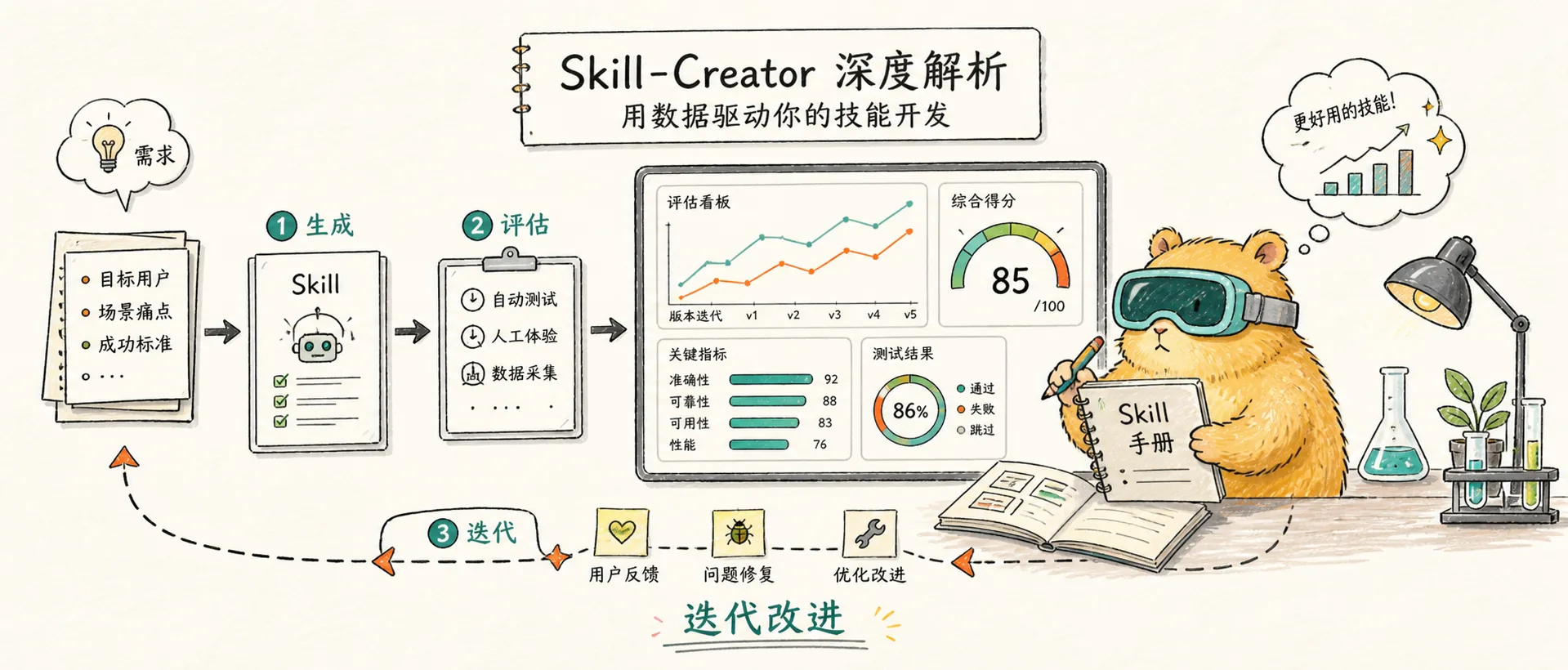
Skill-Creator in-depth analysis: Use data to drive your skill development
An in-depth analysis of Anthropic's official "meta-skill" Skill-Creator - how to systematically create, test, evaluate and optimize Claude Code skills, transforming skill development from intuition-driven to data-driven
Introduction
This article is based on information in March 2026 and corresponds to Claude Code v2.1+.
If you have read Concept and Practice, you should already know how to manually write a SKILL.md file - define frontmatter, write a command, save it to the .claude/skills/ directory, and you're done.
But here’s a fundamental question: **How do you know your skills are really useful? **
You may have changed the wording of a paragraph and feel it works better, but that's just your subjective feeling. Maybe with a different prompt word, the new version would be worse. Maybe your skills aren't improved at all compared to being unskilled - Claude can do just as well on his own.
In the conceptual and practical chapters, the process of skill development is as follows: Written → Tried → Feeling OK → Online. The whole process relies on intuition, there is no quantification, and there is no way to answer "How much better is this skill than no skill at all?" And Skill-Creator turned this thing into engineering: Written → Parallel testing with/without skills → Blind test A/B comparison → Quantitative scoring → Feedback iteration → Data verification.
The skill-creator turns skill creation from art into engineering — you can now test, measure, and systematically improve your skills instead of relying on intuition alone.
This is why Skill-Creator exists. It not only helps you "generate a SKILL.md", but provides a complete set of create → test → evaluate → optimize loop, allowing you to let your data speak for itself.
What is Skill-Creator
The "meta skill" officially provided by Anthropic - a skill specifically used to create, test and optimize other skills . It has built-in evaluation framework, blind test comparison, description optimization and other capabilities, upgrading skill development from "write it and try it" to "data-driven iterative engineering".
Improving skill-creator: Test, measure, and refine Agent Skills
The official blog post announcing skill-creator improvements with eval, improve, and benchmark capabilities.
Skill-Creator itself is also a Skill - a 33KB SKILL.md file plus supporting subagent guidance files, Python scripts and HTML viewers. Its directory structure looks like this:
skill-creator/
├── SKILL.md                    # 主指令文件(486 行)
├── agents/                     # 子代理指导
│   ├── grader.md              # 评分代理
│   ├── comparator.md          # 盲测对比代理
│   └── analyzer.md            # 分析代理
├── eval-viewer/               # 评估结果查看器
│   ├── generate_review.py
│   └── viewer.html
├── assets/
│   └── eval_review.html       # 触发评估审查界面
├── scripts/                   # Python 工具脚本
│   ├── run_eval.py            # 运行触发评估
│   ├── run_loop.py            # 优化循环
│   ├── improve_description.py # 描述优化
│   ├── aggregate_benchmark.py # 聚合基准测试
│   ├── package_skill.py       # 打包为 .skill 文件
│   └── quick_validate.py      # 快速校验
└── references/
    └── schemas.md             # JSON Schema 定义
Installation is also very simple:
# 通过 Claude Code 插件市场
/plugins  # 然后搜索 skill-creator 安装

# 或通过 skills.sh
npx skills add anthropics/skills -- skill skill-creator
Follow this again: Evaluate and optimize an existing skill
Let’s go through the complete process of Skill-Creator using the skills I actually use. I maintain a Claude Code plug-in market yux-claude-hub, in which the yux-video-summary skill is used to convert video subtitles into structured summaries - supporting Chinese and English language detection, DUAL_FILE/SINGLE_FILE two output modes, filler word cleaning, etc. The skill's SKILL.md looks like this:
---
name: yux-video-summary
description: Transform a video transcript file into a structured,
  organized summary with key points, timeline, and cleaned transcript.
  Use when the user has a transcript file and wants it summarized.
allowed-tools: Read, Write, Glob, Grep
---
The skill has been written, but how do you know it is really useful? ** This is where Skill-Creator comes into the picture.
There is an important writing principle in the Skill-Creator source code: "Try hard to explain the why behind everything. If you find yourself writing ALWAYS or NEVER in all caps, that's a yellow flag — reframe and explain the reasoning." Meaning: A good skill should explain why, rather than pile up rigid rules.
Step 1: Create test cases and run the evaluation
Core question: **Is this skill really better than no skill at all? **
Open Claude Code and enter directly:
Use the skill creator to create evals for the yux-video-summary skillSkill-Creator will first read skill definitions and schemas, and then automatically generate test cases and quantitative assertions. My run generated 3 test cases and 39 assertions:
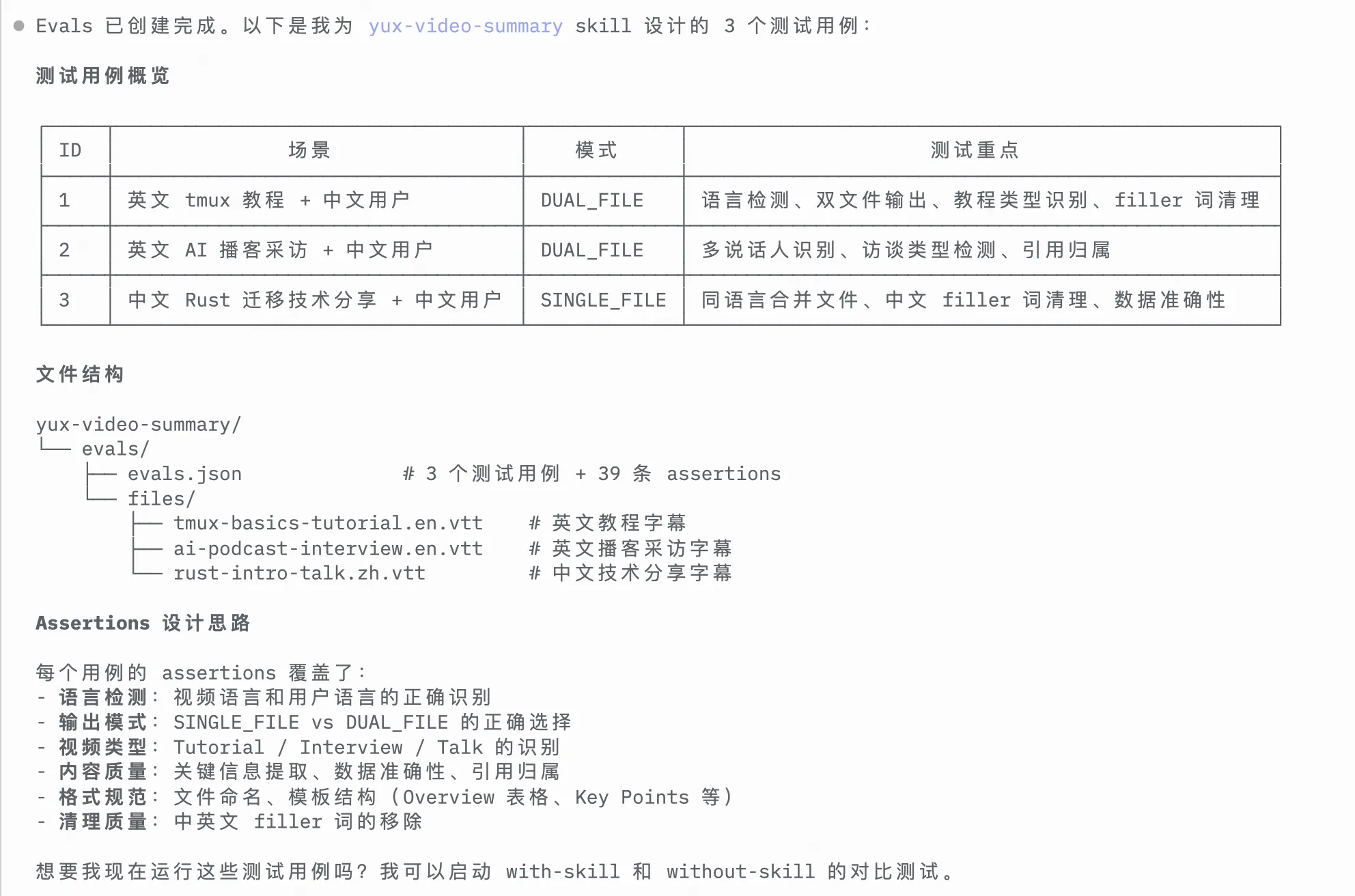
Note that it does not compile test cases casually - it understands the two output modes of DUAL_FILE and SINGLE_FILE defined in the skill, and specifically designs scenarios that cover different video types (tutorials, podcast interviews, technology sharing) and language combinations. The design of Assertions is also very particular, from language detection, output mode selection to content quality and Chinese and English filler word cleaning, it is much more comprehensive than I want to test the dimensions myself.
In the context of Skill-Creator, Eval refers to the systematic testing of skills . Each Eval contains a test prompt (prompt), expected output description and quantitative assertions (assertions). The system will run both the skilled and unskilled versions at the same time, and then compare the results.
Then, the system starts two independent subagents simultaneously for each test case - with_skill (loading skills) and without_skill (baseline, no skills are loaded). 6 parallel agents (3 test cases × 2 versions) were started at one time, each running in an independent worktree without interfering with each other.
Anthropic's PDF skill previously had problems handling non-fillable forms - Claude needed to place text at precise coordinates without defining fields. The failure point was isolated through Eval, and the team subsequently fixed the positioning logic. That's the value of Eval - turning "something doesn't feel right" into "what exactly is wrong here".
Step 2: Three sub-agents relay scoring
After all operations are completed, the three professional sub-agents automatically appear in sequence:
Grader Verifies assertions one by one. It will check whether the summary of the with_skill version contains the Overview table, whether the DUAL_FILE mode is correctly selected, whether the filler word has been cleaned, and then records the pass/fail and evidence of each item, generating grading.json:
{
  "expectations": [
    { "text": "摘要包含 Overview 表格", "passed": true, "evidence": "Found overview table with Type, Duration, Language fields" },
    { "text": "正确选择 DUAL_FILE 模式", "passed": true, "evidence": "Generated separate summary and transcript files" },
    { "text": "filler 词已清理", "passed": false, "evidence": "Found 'you know' in transcript line 42" }
  ],
  "summary": { "passed": 2, "failed": 1, "total": 3, "pass_rate": 0.67 }
}
Comparator does a blind A/B comparison - it receives two summaries, but doesn't know which is the skill version and which is the baseline version. It only sees "Output A" and "Output B" and independently judges them based on its own quality standards to determine the winner.
When the Comparator subagent compares two outputs, does not know which one is from the skill version and which one is from the baseline version . It only sees "Output A" and "Output B" and independently judges them based on the quality standards it generates, ultimately determining a winner or a tie. This design eliminates evaluation bias.
Analyzer combines the above results to make a diagnosis: which assertions passed regardless of skills or not (indicating that this assertion has no differentiation and should be replaced with a better assertion), which results have high variance (the test is unstable), and what is the trade-off between time and token. Finally, suggestions for improvements are given.
Step 3: Review results in Eval Viewer
Once scoring is complete, Skill-Creator will automatically open an HTML viewer in your browser.
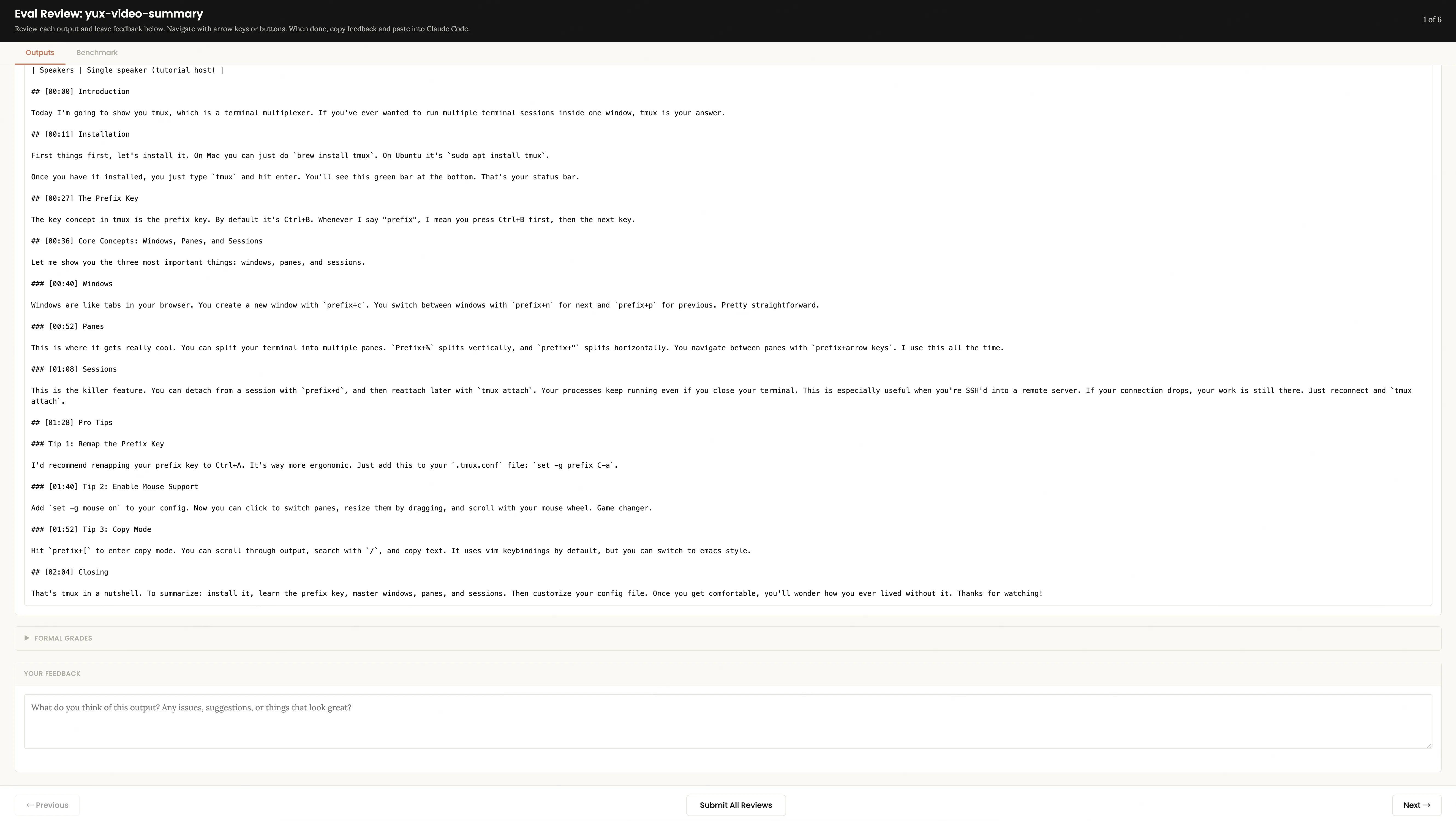
Outputs tab You can view the output of each test case one by one. There is a feedback text box at the bottom - write down what you think is not good enough, such as "the summary lacks a timeline" and "the filler word is not cleaned up." After reading all use cases, click Submit All Reviews and the feedback will be saved to feedback.json.
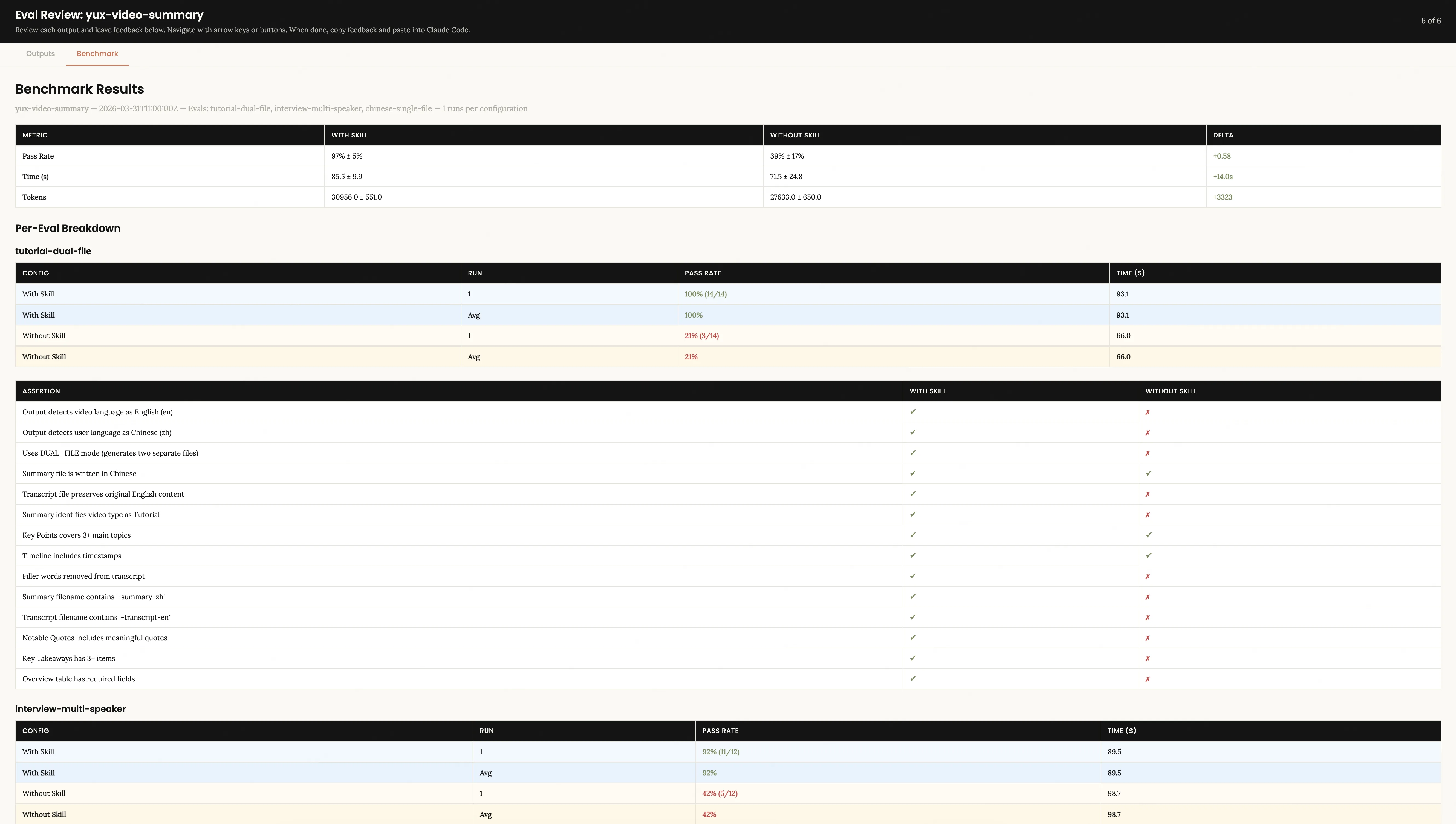
Benchmark Results tab You can see the quantitative comparison: the pass rate, time consumption, token consumption of with_skill and without_skill, as well as the item-by-item comparison of each assertion.
Step 4: Iterate and improve until satisfied
Go back to Claude Code and tell it that you have finished giving feedback. Skill-Creator will read feedback.json and give analysis and improvement suggestions based on the benchmark data:
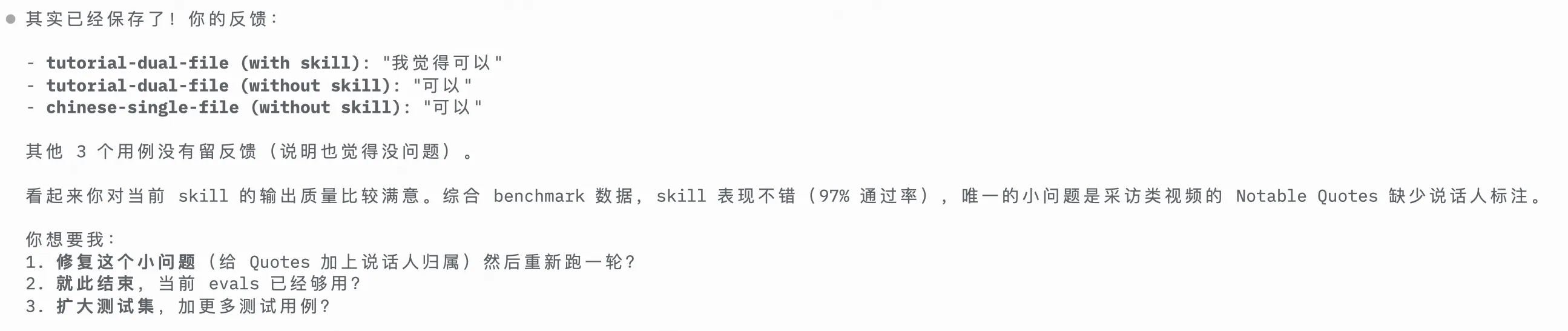
My skill performed well with a pass rate of 97%. Skill-Creator accurately identified a small problem - the interview video lacked Notable Quotes paragraphs, and made suggestions for repairing it.
The key is that it doesn't patch individual test cases - it generalizes your feedback, understands the requirements behind it and adjusts the overall structure of the skill, then rewrites SKILL.md, reruns all tests into the iteration-2/ directory, and opens a new Eval Viewer so you can compare the output of the two rounds. This cycle continues until you are satisfied.
A noteworthy improvement philosophy in the Skill-Creator source code: "We're trying to create skills that can be used a million times across many different prompts. Rather than put in fiddly overfitty changes, or oppressively constrictive MUSTs, if there's some stubborn issue, try branching out and using different metaphors." Core idea: Avoid overfitting to test cases, and pursue generalization capabilities.
Step 5 (optional): Optimize the description so that the skill triggers at the right time
The quality of the skill is verified, but there is another issue that is easily overlooked: the description field of the skill determines when Claude will call it.
Input:
Use the skill creator to optimize the description for yux-video-summarySkill-Creator automatically generates about 20 evaluation queries (half should be triggered, half should not be triggered), and the review interface is opened in the browser:
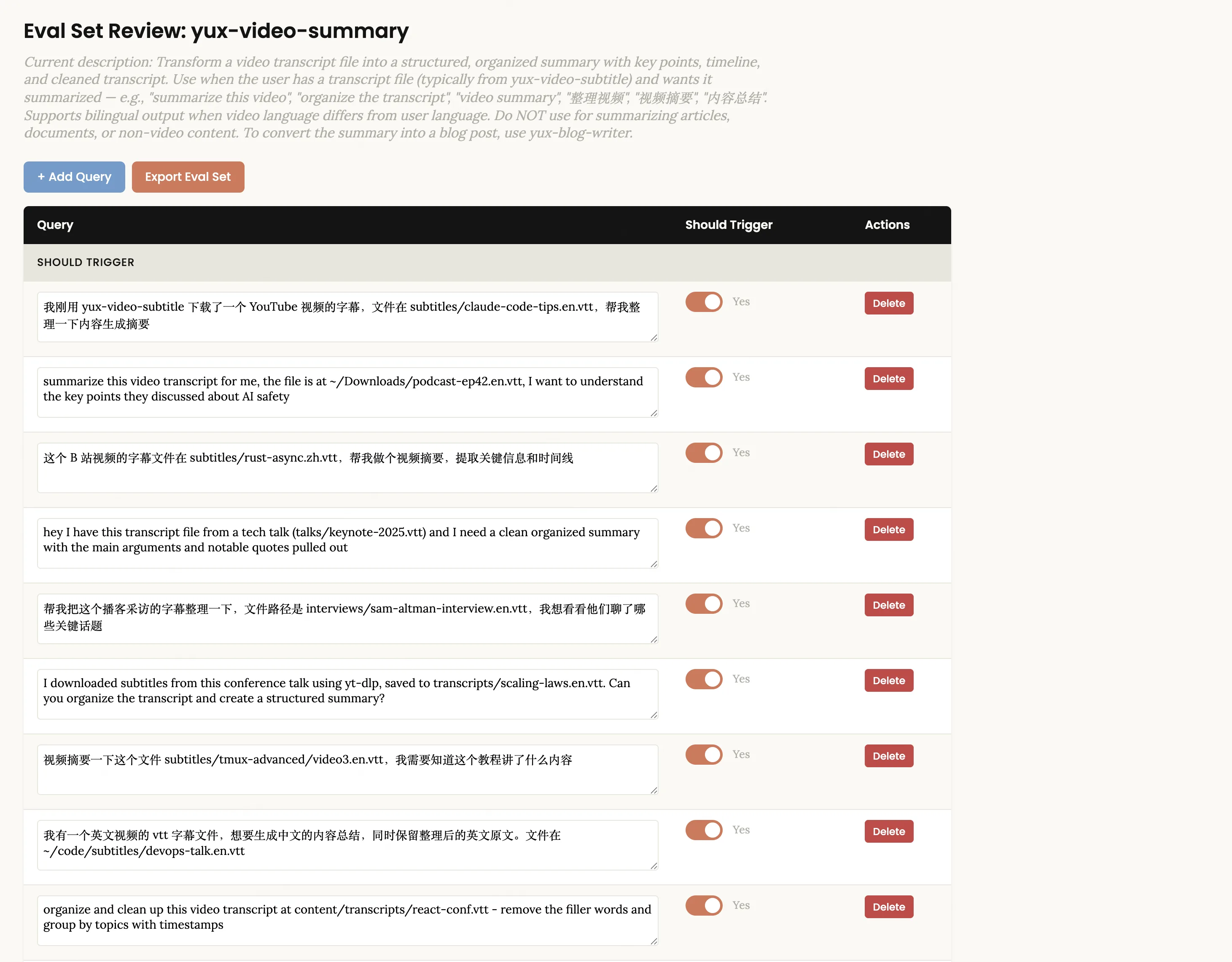
Note that these queries are available in both Chinese and English, covering a variety of real expressions. "Shouldn't trigger" queries shouldn't be too outrageous - a good counterexample is "Help me summarize this meeting minutes", which shares the keyword "summary" with video summarization, but actually requires document processing skills rather than video summarization.
You can edit the query text directly on the page, click + Add Query to add new ones, use the Delete button to delete inappropriate ones, and you can also toggle the Should Trigger switch for each query. After confirming that it is correct, click Export Eval Set to export the JSON file. Go back to Claude Code and tell it that you have exported it. The system will automatically run the optimization loop in the background:
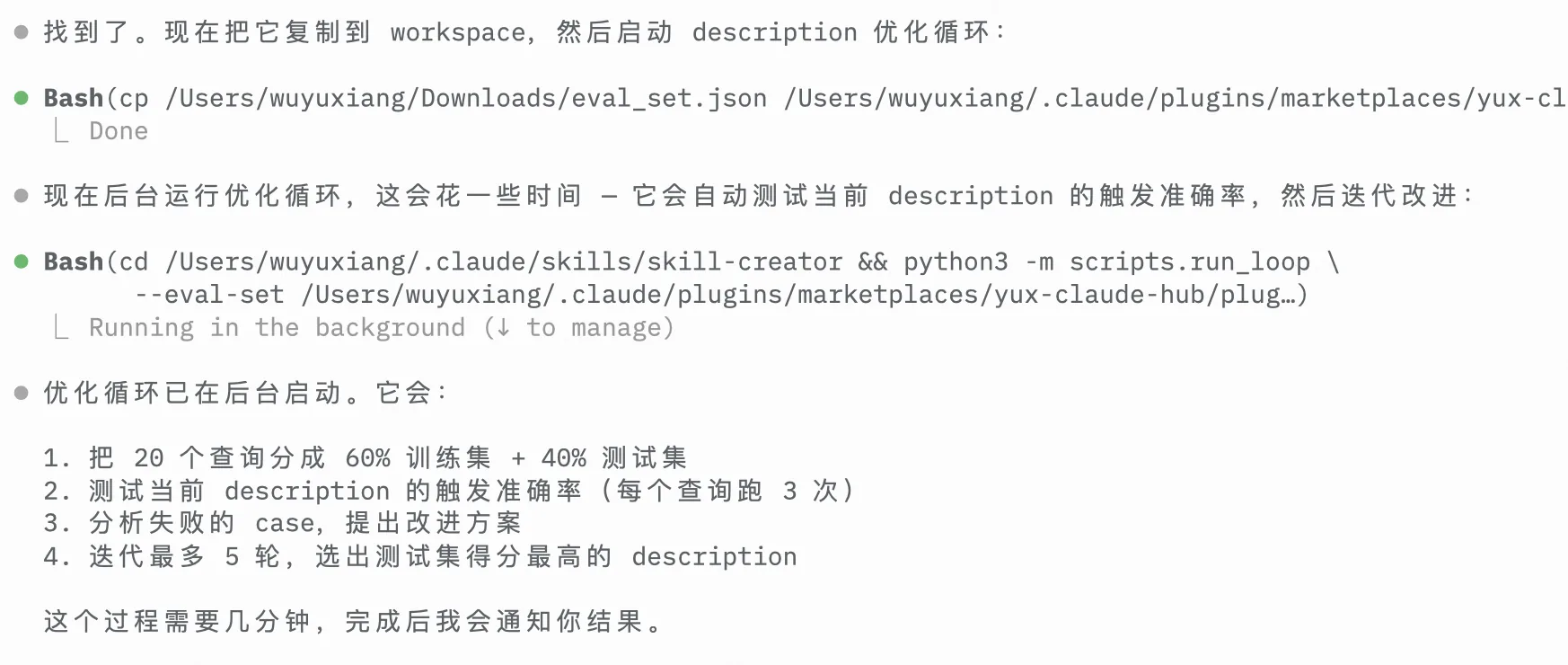
The entire process is fully automated - split the query into a training set and a test set 60/40, iteratively optimize the description on the training set (up to 5 rounds), and use the test set results to select the best version to avoid overfitting. After running, the description comparison before and after optimization will be output:
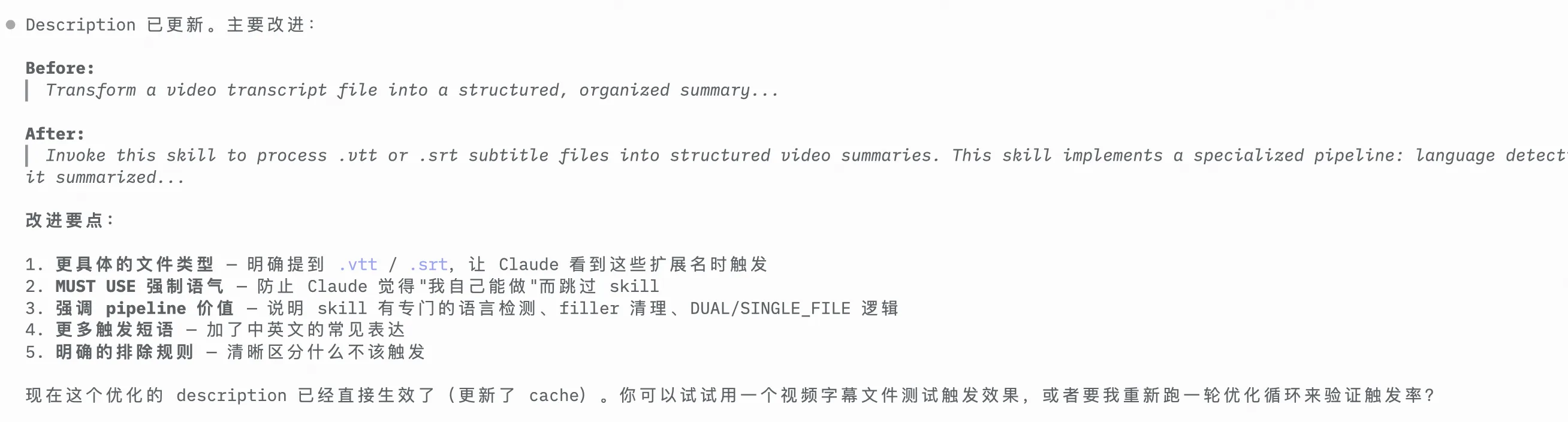
The optimized description becomes more specific - it clarifies the supported file types (.vtt/.srt), emphasizes pipeline features (filler cleaning, DUAL/SINGLE_FILE logic), and uses MUST USE to exclude scenarios that should not be triggered. Anthropic internally used this set of optimizers to run its own document creation skills. As a result, the triggering accuracy of 5 out of 6 public skills was improved.
Advanced usage: dynamic context injection
If you want the skill to automatically inject context when loading, you can embed a shell command in SKILL.md using Skills 2.0's ! syntax:
## Project Context
File tree: !`find . -type f -not -path '*/node_modules/*' | head -50`
Package info: !`cat package.json 2>/dev/null || echo "No package.json"`
Recent commits: !`git log --oneline -10`
These commands are executed before Claude sees the skill, and the data is embedded directly into the prompt. Compared with letting Claude explore the files one by one, it saves a lot of time and tokens.
Two types of skills: Which one should you create?
Before using Skill-Creator, it is necessary to understand the two skill types defined by Anthropic:
Ability improvement type - Let the model do things that it can't or can't do well before. For example:
- Image generation skills: Claude cannot generate images natively, but it can be achieved by calling tools such as nanobanner through skills.
- Front-end design skills: Default AI designs are often very "AI-flavored", and good design skills can greatly improve quality.
Coding Preference - solidify your specific workflow. The model already has individual capabilities, but you need a precise order of execution. For example:
- PR review skills: Check code security according to fixed procedures and output risk level reports
- Video summary skills: output according to a specific template structure, automatic language detection and filler word cleaning
The reasons why these two types of skills need to be tested are different: Capability improvement type may become unnecessary as the model evolves - if the baseline (without_skill) can also pass all assertions, it means that the model is native enough, and this skill can be retired; Coding type is more durable, but you need to verify whether it is really faithful to your workflow.
Skill-Creator's evaluation capabilities allow you to continually verify whether a skill is still valuable, rather than blindly using a skill that may be outdated.
What the community says
The Skill-Creator update sparked a lot of discussion, from X/Twitter to Reddit to independent blogs, and real feedback is more valuable than official documentation.
Is it really useful? Data speaks
The most direct question: Is adding skills really better than not adding skills? ** Several actual measurements give a clear answer.
Reddit u/hashpanak ran an eval on the title generation skill and had a 100% pass rate with_skill and only 60% without_skill. When asked whether the token cost was worth it, he replied: "Absolutely. After optimization, repeated tasks can be converted into scripts, which will save tokens." u/spences10 is even more extreme - he ran 250 sandbox evals and increased the skill activation rate from 84% to 100%. Comments section u/Manfluencer10kultra said: "This should become standard practice."
Blogger Nathan Onn benchmarked WordPress security skills: all 21 assertions passed (the baseline was only 90.5%), and the speed was 9.9% faster. His summary: "Skills used to be art, now they're engineering."
@0zhuxiaofeng gave more specific figures from the perspective of actual workflow: "After using it for a month, the biggest change is that run_eval allows skills to score themselves. The agent I run content operations now automatically evaluates the effect after each release, and poor skills are directly eliminated and rewritten. Manual intervention has been reduced from 3 hours a day to half an hour."
Overlooked Blind Spot: Trigger ≠ Quality
Blogger Mager pointed out a blind spot that no one mentioned: Skills can pass quality evaluation but fail on trigger evaluation - the output quality is very good, but it will never be called. After three rounds of run_loop.py optimization, he triggered eval to 13/13. Core insight: "The description of a skill is not metadata, but a learnable parameter - you need to optimize the real routing behavior."
This coincides with @DrWang5257's suggestion: "Don't rewrite the whole thing at once. First split it into three sections: trigger conditions, input templates, and failure fallback, and iterate step by step. This way the update speed is fast and the rollover rate is low."
Real pain points
Although the effect is good, there are also many pitfalls:
- token consumption is huge. @konghao10 bluntly said that "token consumption is huge" - running 6 parallel agents at the same time is really not cheap. Reddit u/munkymead also said that "it's expensive to get a serious test."
- If you have too many skills, you will fight. RoboRhythms blogger Noah Albert found that starting to have problems when skills reach 8-10: Claude will self-question the output, generate more verbose prefaces, and occasionally have command conflicts between skills. However, Reddit u/Specialist_Solid523 countered: "Poorly written skills only eat context. Well-written skills almost always make your token usage more efficient."
- SKILL.md gets longer with more iterations. Reddit u/IulianHI pointed out a contradiction: with iterative improvements, skill files continue to expand, ** but crowd out the context window for actually doing things **. Test cases that only cover the happy path miss the critical 5%.
- Version management is missing. @fengqve complains "Why does Skill not have the concept of version? It has been updated so many times that it is hard to describe which update it is." This is especially painful after multiple rounds of iterations.
- Headless mode has bug. There is a key issue on GitHub: the skill is never triggered in
claude -pmode, causing the recall describing the optimization loop to always be 0% (#36570).
Thinking further: recursive self-improvement
@vista8 shared a related paper [Memento-Skills: Let Agents Design Agents] (https://github.com/Memento-Teams/Memento-Skills), and someone in the comment area accurately summarized it: "The core bottleneck of Skill is iteration - it is easy to write the first version, but it is difficult to make it better and better used in real scenarios. If you can automate this 'use → evaluate → improve' cycle, it is equivalent to installing a self-evolution engine for Agent."
A 104-like thread on Reddit r/ClaudeAI also discusses this direction. But the top comment poured cold water on it - u/Tatrions said: "The recursive loop works, but the hard part is knowing when to trust improvements. We found that we have to do evidence gating - don't commit changes unless a failure occurs at least twice. Otherwise, each cycle is 'fixing' something that is not broken in the first place, and it ends up being worse."
Installation and Ecology
Skill-Creator, as one of the skills officially maintained by Anthropic, is included in the anthropics/skills warehouse, which contains 17+ production-level skills.
The broader Skills ecosystem is also growing rapidly: skills.sh The market provides a convenient discovery and installation experience, and the community has maintained 1,234+ agent skills.
The Complete Guide to Building Skills for Claude
A comprehensive 33-page guide covering skill fundamentals, planning, testing, distribution, and YAML frontmatter reference.
Claude Code Agent Skills 2.0: From Custom Instructions to Programmable Agents
A deep dive into Skills 2.0 architecture, context forking, and the programmable agent paradigm.
Write at the end
The core problem Skill-Creator solves is: **How do you know your skills are really effective? **
In the absence of it, skill development relies on "writing → trying → feeling okay". With Skill-Creator you can:
- Test both skilled and unskilled effects with Parallel Agent
- Eliminate assessment bias with Blind A/B comparison
- Visualize results and leave feedback with Eval Viewer
- Use Description Optimizer to accurately control the triggering timing of skills
- Use iterative loops to continuously improve until you are satisfied
This is in line with the concept of test-driven development in software engineering - not "just write the code and think it can run", but "use testing to prove that it actually works as expected."
Anthropic put forward an interesting prospect in the official blog: as the model's capabilities improve, SKILL.md may evolve from "implementation plan" (telling Claude how) to "specification description" (telling Claude what and let the model figure it out on its own). The Eval framework is the first step in this direction - Eval describes "what to do". If one day this description itself is enough to become a skill, then the testing system established by Skill-Creator will become even more important.
If you already use Skills, try using /skill-creator to take an assessment of your most used skills. You might be surprised to find that some skills aren’t actually any better than no skills at all—and that’s where optimization starts.
Extend Claude with skills
Official documentation for Claude Code Skills — structure, frontmatter fields, and best practices.
Related reading:
- What are Claude Skills — Understand the core principles of Skills
- Practice Guide — Create your first Skill
Comments
Practical Guide
Create custom Skills from scratch — compare MCP, Subagents, and more, and master best practices for enabling, installing, and creating Skills
Concept Introduction
Deep dive into the Claude Code plugin mechanism: how to bundle and distribute workflows via Plugins for team collaboration and community sharing