
Concept Introduction
Deep dive into the Claude Code plugin mechanism: how to bundle and distribute workflows via Plugins for team collaboration and community sharing
Introduction
They let you bundle all your customisations into shareable packages that install with a single command.
When you've set up a perfect workflow in Claude Code — custom commands, code review hooks, dedicated Skills — you might wonder: can I package all of this up and share it with my team or the community?
That's exactly the problem Plugin solves.
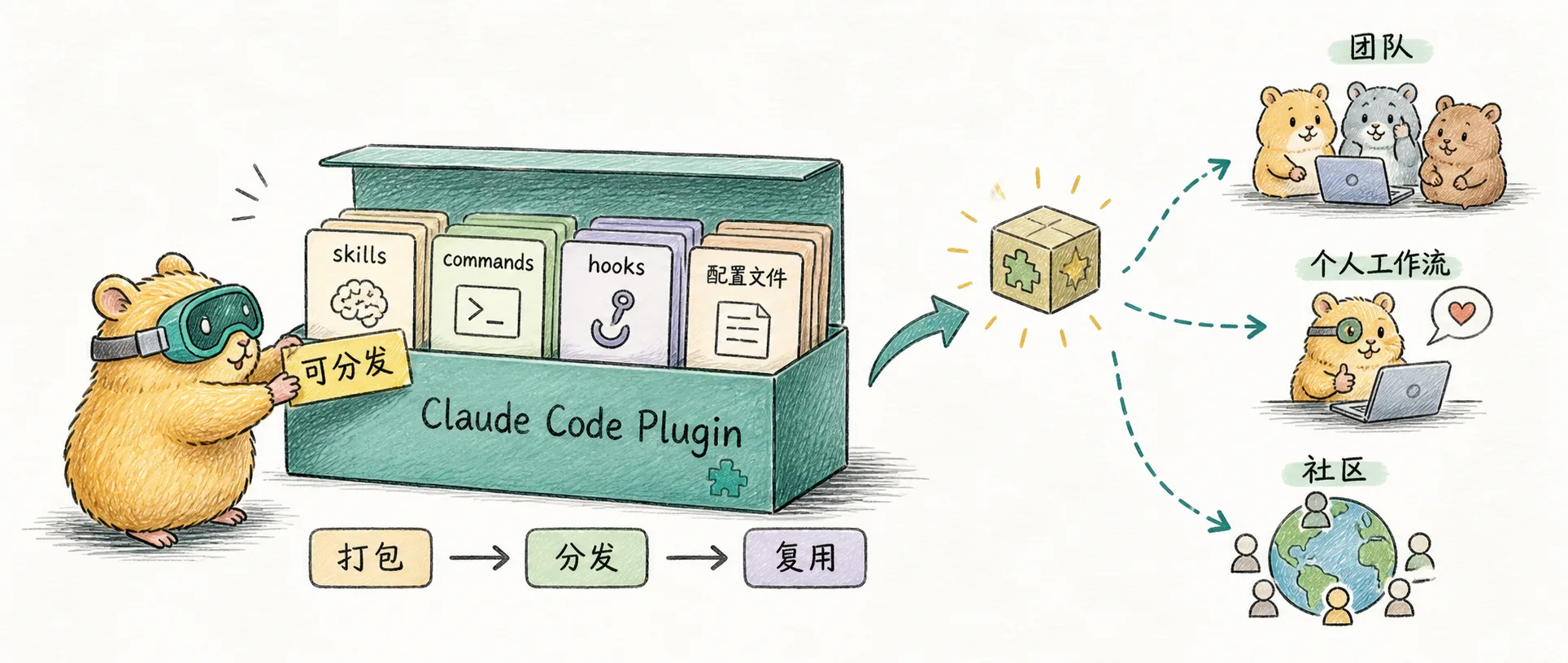
If Skills are "instruction manuals" for AI, then a Plugin is a "toolbox" — it bundles Skills, Commands, Hooks, MCP servers, and all other configurations together so you can install and distribute them with a single command.
Understanding Plugin
Imagine you're an experienced craftsperson who has accumulated a trusted set of tools over the years: hammers, saws, rulers, various screwdrivers. Every time you switch workbenches, you have to carry each tool one by one and reorganize everything. A Plugin is like a well-designed toolbox — it not only holds all your tools but also keeps them neatly organized by category, ready to go wherever you take it.
From a technical perspective, Plugin is the extension packaging mechanism for Claude Code. A Plugin can contain:
| Component | Purpose | File Location |
|---|---|---|
| Slash Commands | Quick action entry points | commands/ |
| Subagents | Specialized sub-agents | agents/ |
| Skills | AI knowledge packages | skills/ |
| Hooks | Event-triggered automation scripts | hooks/ |
| MCP Servers | External system connections | .mcp.json |
| LSP Servers | Language server configuration | .lsp.json |
These components work together to form a complete workflow solution.
Plugin vs Standalone Configuration
In Claude Code, you can place configurations in the project's .claude/ directory or package them as a Plugin. The core difference lies in distribution method and namespace:
| Aspect | Standalone Config (.claude/) | Plugin |
|---|---|---|
| Command Name | /hello | /plugin-name:hello |
| Use Case | Personal workflows, project-specific config | Team sharing, community distribution |
| Version Management | Managed with project code | Supports Semantic Versioning |
| Update Method | Manual sync | Supports auto-updates |
| Conflict Handling | May conflict with other configs | Namespace isolation |
When to choose Plugin:
- Need to share workflow configurations with team members
- Want to reuse the same toolset across multiple projects
- Planning to distribute configurations to the community
- Need version control and automatic updates
When to use standalone configuration:
- Quick personal experiments
- Project-specific configs that don't need reuse
- Simple one-off commands
Plugin Directory Structure
A standard Plugin structure looks like this:
my-plugin/
├── .claude-plugin/           # Metadata directory
│   └── plugin.json           # Required: plugin manifest
├── commands/                 # Slash commands
│   ├── review.md
│   └── deploy.md
├── agents/                   # Sub-agents
│   └── code-reviewer.md
├── skills/                   # Agent Skills
│   └── code-review/
│       └── SKILL.md
├── hooks/                    # Event hooks
│   └── hooks.json
├── scripts/                  # Helper scripts
│   └── format-code.sh
├── .mcp.json                 # MCP server configuration
└── .lsp.json                 # LSP server configuration
Key notes:
plugin.jsonmust be placed inside the.claude-plugin/directory- Other directories (commands, agents, skills, etc.) go in the plugin root
- Do not put feature directories inside
.claude-plugin/
Core Configuration File
The core of a Plugin is .claude-plugin/plugin.json, which defines the plugin's metadata and component paths:
{
  "name": "my-awesome-plugin",
  "version": "1.0.0",
  "description": "An example plugin",
  "author": {
    "name": "Your Name",
    "email": "you@example.com"
  },
  "keywords": ["example", "demo"],
  "commands": "./commands/",
  "agents": "./agents/",
  "skills": "./skills/",
  "hooks": "./hooks/hooks.json",
  "mcpServers": "./.mcp.json"
}| Field | Required | Description |
|---|---|---|
name | Yes | Unique plugin identifier, use lowercase letters and hyphens |
version | No | Semantic version number |
description | No | Short plugin description |
author | No | Author information |
keywords | No | Tags for discoverability |
commands | No | Command file or directory path |
agents | No | Agent file or directory path |
skills | No | Skills directory path |
hooks | No | Hook configuration path |
mcpServers | No | MCP configuration path |
Installation Scopes
Plugin supports four installation scopes to accommodate different use cases:
| Scope | Config File | Purpose |
|---|---|---|
user | ~/.claude/settings.json | Personal plugins, available across all projects |
project | .claude/settings.json | Team plugins, shared via version control |
local | .claude/settings.local.json | Project-specific, gitignored |
managed | managed-settings.json | Enterprise-managed (read-only) |
The default installation scope is user. If you want to commit plugin configurations to Git for team use, choose the project scope.
Core Advantages
Namespace Isolation
Plugin commands carry a namespace prefix (e.g., /my-plugin:review), avoiding naming conflicts with other plugins or project configurations. This is especially important in team collaboration — plugins developed by different teams can coexist peacefully.
Version Management
Plugin supports Semantic Versioning, allowing you to:
- Track the plugin's change history
- Roll back to older versions when needed
- Automatically receive compatible updates
Easy Distribution
Through the Plugin Marketplace, you can:
- Host plugins on GitHub
- Let users install with a simple command
- Automatically handle dependencies and updates
Team Collaboration
Plugin is particularly well-suited for team scenarios:
- Unify the team's development toolchain
- New members get all tools with one command
- Centralized configuration management reduces duplicate work
Plugin Ecosystem
The Claude Code Plugin ecosystem is growing rapidly. As of early 2025, the ecosystem has reached a considerable scale:
- 229+ plugins are active in the ecosystem
- 239 Agent Skills distributed across the marketplace
- 200+ MCP servers pre-built in the Docker toolkit
Official resources:
| Resource | Link | Description |
|---|---|---|
| anthropics/skills | GitHub | Official Skills repository |
| anthropics/claude-plugins-official | GitHub | Official plugin directory |
| Docker MCP Toolkit | Website | 200+ pre-built MCP servers |
Community picks:
| Resource | Link | Description |
|---|---|---|
| awesome-claude-plugins | GitHub | 243 plugins auto-collected |
| awesome-claude-code | GitHub | Best practices compilation |
| claude-plugins.dev | Website | Community registry and CLI |
| wshobson/agents | GitHub | 99 agents + 15 orchestrators |
| Compound Engineering | GitHub | 17 specialized agents |
Relationship with Other Features
Plugin is a "container" concept that can include other features in the Claude Code ecosystem:
Plugin (Container)
├── Skills (Knowledge Packages)
├── Commands (Quick Commands)
├── Agents (Sub-agents)
├── Hooks (Event Hooks)
└── MCP/LSP (External Connections)
Understanding this hierarchy is important:
- Skills teach Claude how to do something
- Commands provide quick trigger entry points
- Agents handle independent, specialized tasks
- Hooks enable event-driven automation
- Plugin bundles all of these together for easy distribution and management
Skills vs Plugins
The difference between Skills and Plugins can be confusing at first. According to Young Leaders Tech's analysis:
| Feature | Skills | Plugins |
|---|---|---|
| Scope | All Claude products (Web, API, Code) | Claude Code only |
| Contents | Markdown guides + optional scripts | Commands, Agents, Hooks, MCP, Skills |
| Activation | Automatic (model decides when to use) | Variable (depends on component type) |
| Best For | Teaching Claude domain expertise | Extending the Claude Code environment |
| Distribution | GitHub repos, file system | Decentralized Marketplace |
Key insight: Skills are automatically triggered by the model without manual invocation; Plugins are a packaging mechanism that solves the challenge of distributed sharing. The two can be used together — a Plugin can contain Skills.
Summary
Claude Code Plugin is essentially a workflow packaging and distribution mechanism. It solves the pain points of configuration reuse and team collaboration, letting you share your carefully crafted toolchain with more people.
Remember three keywords:
| Keyword | Meaning |
|---|---|
| Packaging | Integrates multiple configuration components into a single unit |
| Isolation | Namespaces prevent conflicts |
| Distribution | Easy sharing through the Marketplace |
Now that you understand the concepts, the next article, Claude Code Plugin Practical Guide, will walk you through hands-on practice: creating a Plugin from scratch, publishing to the Marketplace, and best practices for team collaboration.
If you're not yet familiar with the components a Plugin can contain, consider reading What Are Claude Skills to understand the core concepts of Skills first.
Comments
Skill-Creator Analysis
An in-depth analysis of Anthropic's official "meta-skill" Skill-Creator - how to systematically create, test, evaluate and optimize Claude Code skills, transforming skill development from intuition-driven to data-driven
Practical Guide
Create Claude Code plugins from scratch: complete development workflow, Marketplace publishing, team collaboration setup, and troubleshooting guide