
Concept Introduction
Understanding the core principles of GSD — a context engineering system that enables Claude Code to reliably deliver complex projects
Introduction
In the Ralph Wiggum Deep Dive, we explored a core problem: Context Rot — as conversations grow longer, Claude's context window fills up with failed code, outdated discussions, and irrelevant information, causing output quality to steadily degrade.
Ralph's solution was to "restart everything": use an infinite bash loop to spin up a fresh Claude instance each time, passing state through the file system. Simple, effective, but with clear limitations — it's just a methodology with no project understanding, no phase planning, and no quality verification. You need to write specs yourself, orchestrate tasks yourself, and judge "is it done?" yourself.
As Chase AI precisely summarized in his video: The Ralph Loop is an incredibly powerful weapon, but most people don't need a weapon — they need an entire arsenal. The Ralph loop depends entirely on upfront preparation: Is your PRD good enough? Are your feature definitions tight enough? Do you know what "done" looks like? If the answers to these questions aren't precise, no matter how many times the loop runs, it's just garbage in, garbage out.
What if you want a system that doesn't just loop Claude, but truly understands your project and reliably delivers code?
The complexity is in the system, not in your workflow. Behind the scenes: context engineering, XML prompt formatting, subagent orchestration, state management. What you see: a few commands that just work.
That's what GSD (Get Shit Done) is built to do.
What is GSD
A lightweight meta-prompting, context engineering, and spec-driven development system designed for Claude Code, OpenCode, and Gemini CLI. It solves the core problem of context rot through structured workflows, subagent orchestration, and file-system state management, enabling AI coding tools to reliably deliver complex projects.
GSD was created by TÂCHES (GitHub: glittercowboy), an independent developer. His motivation was straightforward:
"I'm not a 50-person software company. I don't want to play enterprise theater. I'm just a creative person who wants to make cool things."
In his livestream, TÂCHES demonstrated a stunning fact: he never writes code by hand. Using GSD, he built a complete macOS-native AI music generation app (Sample Digger) from scratch in 4 hours — zero hand-written code. He positions himself not as a programmer, but as a "high-level project manager" — describing the vision, making key decisions, and validating results. GSD makes this way of working possible.
"This has like 100x'd my ability to make cool shit with Claude Code because it's just created this systematization."
—— TÂCHES
Other spec-driven development tools — BMAD, SpecKit — each have their own value, but they tend to introduce complex enterprise workflows: sprint ceremonies, story points, stakeholder syncs. For solo developers or small teams, these processes are burdens in themselves. As Chase AI put it: "It's not enterprise theater. We understand that you're just one person, you just want some sort of scaffolding around Claude Code to make sure it executes the tasks it says it's going to execute in an effective way."
GSD's design philosophy is to hide complexity inside the system. Users only need a few simple commands while the system handles all the context management, task orchestration, and quality verification behind the scenes. Within one month of release, the project had earned nearly 3,000 GitHub stars and 14,000 npm installs, with TÂCHES pushing updates 15–20 times almost every day.
Where GSD Fits in the Tool Ecosystem
| Dimension | Ralph Wiggum | SpecKit | BMAD | GSD |
|---|---|---|---|---|
| Core Positioning | Execution technique (bash loop) | Spec generation toolkit | Enterprise-grade framework | Context engineering + spec-driven |
| Planning Capability | None (bring your own spec) | Strong (spec→plan→tasks) | Strong (full agile process) | Strong (research→discuss→plan) |
| Execution Autonomy | Highest (AFK mode) | Manual trigger per step | Manual trigger per step | Manual trigger per step |
| Human Involvement Model | Human on the Loop | Human in the Loop | Human in the Loop | Human in the Loop |
| Context Rot Handling | New session restart | No built-in solution | No built-in solution | Subagent fresh context |
| Quality Verification | Relies on external tests | Build checks | Built-in QA process | Auto verification + UAT |
| User Complexity | Lowest | Medium | Higher | Low |
| System Complexity | Lowest | Medium | Higher | High |
This table reveals a key tradeoff: Ralph trades minimal system complexity for maximum execution autonomy — start it and go to sleep; while GSD trades high system complexity for planning quality and human oversight — you have the opportunity to intervene at every stage. SpecKit and BMAD fall in the middle ground, offering planning capabilities but lacking GSD's context engineering and Ralph's autonomous execution.
GSD and Ralph are not contradictory. GSD inherits Ralph's core principles — fresh context, files as source of truth — but builds a complete project understanding and execution framework on top. If Ralph is "give the AI a task and let it keep trying," GSD is "understand what you want, research how to do it, plan the steps, execute, and verify."
Chase AI's summary captures it perfectly: The Ralph loop assumes you come with a complete blueprint — GSD helps you build that blueprint. GSD takes your half-formed idea, asks deep questions, conducts research on your behalf, generates a complete PRD, breaks it down into atomic tasks, and delivers the project end-to-end. And when executing code, it uses the very same foundational principles that make the Ralph loop powerful: fresh context for subagents, and tasks as small and precise as possible.
GSD - Get Shit Done
A light-weight and powerful meta-prompting, context engineering and spec-driven development system for Claude Code, OpenCode, and Gemini CLI.
Core Workflow
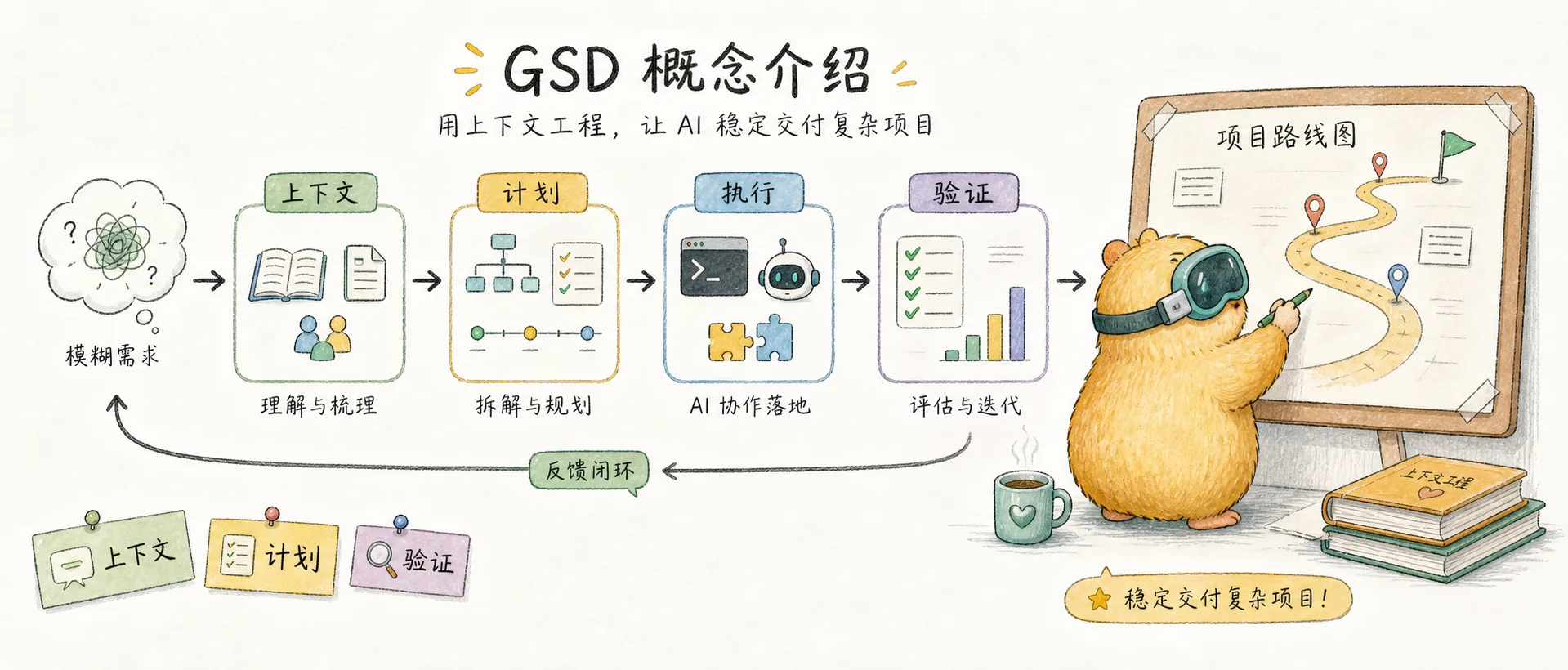
GSD's workflow is a discuss → plan → execute → verify loop, with each stage having clear inputs and outputs.
1. Initialize the Project
/gsd:new-projectOne command kicks off the entire process. The system will:
- Ask questions — Keep probing until it fully understands your idea (goals, constraints, tech preferences, edge cases)
- Research — Dispatch parallel agents to investigate relevant domains (optional but recommended)
- Extract requirements — Distinguish between v1, v2, and out-of-scope items
- Roadmap — Create a phased plan aligned with the requirements
You approve the roadmap, then start building. TÂCHES's experience is: the more detailed the initial description you provide, the fewer follow-up questions the system asks; the vaguer it is, the more it asks. He recommends preparing a rough vision document before starting — you don't need to know the tech stack or implementation details, just describe what you want.
Output files: PROJECT.md, REQUIREMENTS.md, ROADMAP.md, STATE.md
Already have a codebase? Run
/gsd:map-codebasefirst — the system will dispatch parallel agents to analyze your tech stack, architecture, conventions, and potential issues. Then/gsd:new-projectcan plan based on your existing codebase.
2. Discuss Phase
/gsd:discuss-phase 1Each phase in the roadmap has only a sentence or two of description — that's not enough to build what you want. The discuss phase exists to capture your implementation preferences before research and planning.
The system analyzes the current phase and identifies "gray areas" — decision points where multiple reasonable implementation approaches exist:
- Visual features → layout, interactions, empty state handling
- API/CLI → response format, error handling, verbosity
- Content systems → structure, tone, depth, flow
Every decision you make here directly affects the quality of subsequent research and planning. Skipping this step is fine (the system will use sensible defaults), but deeper discussion lets the system build something closer to your expectations.
Output files: {phase}-CONTEXT.md
3. Plan Phase
/gsd:plan-phase 1The system will:
- Research — Investigate how to implement the current phase, guided by the discuss phase decisions
- Plan — Create 2–3 atomic task plans using XML-structured format
- Verify — Check if the plan satisfies requirements, iterating until it passes
A key design principle is Goal-Backward Planning. Instead of starting from "what should we build?", it asks "what conditions must be true for the goal to be achieved?" — then works backward to derive the plan and tasks. TÂCHES says this approach "massively improved output quality" because each task understands its relationship to other tasks, rather than being just an item on a to-do list.
Each plan is small enough to execute within a single fresh context window. This is critical — there will be no quality degradation.
Output files: {phase}-RESEARCH.md, {phase}-{N}-PLAN.md
4. Execute Phase
/gsd:execute-phase 1The system will:
- Wave execution — Independent tasks run in parallel; dependent tasks run sequentially
- Fresh context — Each plan executes in a brand-new 200k token context, zero accumulated garbage
- Atomic commits — Each task gets an independent git commit
- Goal verification — Check whether the codebase delivers the functionality promised by the phase
In TÂCHES's livestream demo, he completed 3 full phases of development with his main context window staying at just 24%. The GSD Executor subagent needs to load fewer than 1,000 lines of context to complete an entire phase — you can execute 10 plans in a row and the context still stays below 50%. This is a completely different experience from working directly in Claude Code: no more "playing Russian roulette, betting on when you'll hit the context window wall."
Output files: {phase}-{N}-SUMMARY.md, {phase}-VERIFICATION.md
5. Verify Phase
/gsd:verify-work 1Automated verification can check whether code exists and tests pass. But does the feature work the way you expect? That requires your confirmation.
The system will:
- Extract testable deliverables — List things you should now be able to do
- Guide verification one by one — "Can you log in with email?" Yes/no, or describe the issue
- Auto-diagnose failures — Dispatch a debug agent to find the root cause
- Create a fix plan — A directly executable fix
If everything passes, continue to the next phase. If there are issues, run /gsd:execute-phase again to execute the fix plan.
This is the biggest philosophical difference between GSD and the Ralph loop: Ralph is hands-off — start it and let it run; GSD has a human verification step after every phase. Chase AI points out that the Ralph loop is "go conquer" style — it runs on its own without looking back; GSD ensures you can course-correct at every critical checkpoint, preventing errors from compounding under zero supervision.
Additionally, GSD provides a dedicated debugging workflow. When verification finds issues, /gsd:debug launches an isolated debug subagent with its own hypothesis-evidence-resolution workflow, creating independent debug documentation to track the entire investigation process without polluting the main context.
Output files: {phase}-UAT.md
Rinse and Repeat
/gsd:discuss-phase 2 → /gsd:plan-phase 2 → /gsd:execute-phase 2 → /gsd:verify-work 2
...
/gsd:complete-milestone → /gsd:new-milestone
Every phase goes through the complete discuss → plan → execute → verify cycle. Context stays fresh, quality stays consistent.
When all phases are complete, /gsd:complete-milestone archives the milestone and tags the version. Then /gsd:new-milestone kicks off the next version's build.
Why It Works: Technical Principles
GSD's reliability isn't accidental — four key technical pillars support it.
Context Engineering
Claude Code is extremely powerful when given the right context. Most people don't know how to give it the right context. GSD handles this for you.
| File | Purpose |
|---|---|
PROJECT.md | Project vision, always loaded |
research/ | Ecosystem knowledge (tech stack, features, architecture, pitfalls) |
REQUIREMENTS.md | Versioned requirements with phase traceability |
ROADMAP.md | Direction and progress |
STATE.md | Decisions, blockers, position — memory across sessions |
PLAN.md | Atomic tasks + XML structure + verification steps |
SUMMARY.md | Execution records, committed to history |
Every file has size limits based on Claude's quality degradation thresholds. Stay within the limits, and you get consistently high-quality output. The main context window stays at 30–40%, while actual work happens in subagents' fresh 200k contexts.
Chase AI has an intuitive explanation for context rot: No matter how large the context window — Sonnet, Opus, even million-token windows — tokens in the first half are more effective than those in the second half. This isn't a bug; it's an inherent property of LLMs. Claude Code's built-in autocompact can only partially mitigate this. GSD's approach is more thorough: every atomic task executes in a fresh subagent, ensuring each task gets Claude's best performance.
TÂCHES's own data confirms this: on the $200/month Max plan, he consumes roughly $30,000 worth of Opus tokens per month. That sounds like a lot, but because every task executes in fresh context, rework is minimal — the actual efficiency is far higher than repeatedly patching things in a degraded context.
XML Prompt Formatting
Every plan is structured XML optimized for Claude:
<task type="auto">
  <name>Create login endpoint</name>
  <files>src/app/api/auth/login/route.ts</files>
  <action>
    Use jose for JWT (not jsonwebtoken - CommonJS issues).
    Validate credentials against users table.
    Return httpOnly cookie on success.
  </action>
  <verify>curl -X POST localhost:3000/api/auth/login returns 200 + Set-Cookie</verify>
  <done>Valid credentials return cookie, invalid return 401</done>
</task>
Precise instructions, no guesswork, verification built into every task.
Multi-Agent Orchestration
Every stage uses the same pattern: a thin orchestrator dispatches specialized agents, collects results, and routes to the next step.
| Stage | What the Orchestrator Does | What Agents Do |
|---|---|---|
| Research | Coordinates, surfaces findings | 4 parallel researchers investigate tech stack, features, architecture, pitfalls |
| Planning | Validates, manages iterations | Planner creates plans, checker validates, loops until passing |
| Execution | Groups into waves, tracks progress | Executors implement in parallel, each with a fresh 200k context |
| Verification | Surfaces results, routes next step | Verifier checks codebase, debugger diagnoses failures |
The orchestrator never does the heavy lifting. It dispatches agents, waits, and integrates results. The result: you can run an entire phase — deep research, multiple plan creation and validation, thousands of lines of code written in parallel, automated verification — while your main context window stays at 30–40%.
Atomic Git Commits
Each task is independently committed immediately upon completion:
abc123f docs(08-02): complete user registration plan
def456g feat(08-02): add email confirmation flow
hij789k feat(08-02): implement password hashing
lmn012o feat(08-02): create registration endpoint
Benefits: git bisect can pinpoint the exact failing task, each task can be independently rolled back, and clean history helps Claude understand code evolution in future sessions.
GSD's Limitations
GSD is powerful, but understanding what it cannot do is equally important.
GSD is a Human-Guided Workflow, Not an Autonomous Agent
GSD cannot run persistently. Every stage boundary — from discuss to plan to execute to verify — requires you to manually enter a command. You can't say "build me an app" and go to sleep.
This stands in stark contrast to Ralph's AFK mode. Ralph is designed for "start it and go to sleep" — the infinite bash loop keeps running until the task completes or fails. GSD requires you to be present at every critical checkpoint: approving the roadmap, answering discussion questions, triggering planning, launching execution, confirming verification results.
During his 4-hour livestream, TÂCHES was continuously typing commands: new-project, discuss-phase 1, plan-phase 1, execute-phase 1, verify-work 1, discuss-phase 2... Every transition required him to press Enter. This is not accidental — it's a deliberate design choice.
We are not in the game of just trying to one-shot things as quick as possible. We are methodical.
A Deliberate Design Tradeoff
Ralph sacrificed planning capability for execution autonomy; GSD sacrificed execution autonomy for planning quality and human oversight. This is a design tradeoff, not a deficiency.
- Ralph's advantage: You can let it run through an entire feature while you sleep. But if the spec isn't good enough, it'll charge full speed in the wrong direction.
- GSD's advantage: You can course-correct after every phase. But you must be present throughout — you can't walk away.
What would the ideal look like? If GSD's discuss, plan, execute, and verify could be chained into an automated loop — like Ralph's bash loop but with GSD's structured planning and quality verification — that would be the best of both worlds. But no such tool exists yet. Perhaps that's the next direction worth exploring.
Video Resources
The following videos can help you gain a more intuitive understanding of how GSD is used and what it can achieve.
Final Thoughts
GSD represents a direction in the evolution of AI coding tools: from "let AI write code" to "let AI reliably deliver projects."
Ralph Wiggum proved a key insight — fresh context is more valuable than accumulated context. GSD builds on this foundation by adding project understanding (new-project), decision capture (discuss), structured planning (plan), parallel execution (execute), and quality verification (verify), forming a complete closed loop.
For solo developers and small teams, GSD's value lies in packaging complex engineering practices into a few simple commands. You don't need to understand subagent orchestration or XML prompt engineering — you just need to describe what you want, and let the system get it done.
Chase AI put it well: GSD is for people who "don't come from a technical background but still want to build projects end-to-end in Claude Code in a sustainable, repeatable way." And TÂCHES's livestream proved the point — someone who describes himself as "probably only able to write a Hello World HTML page on my own" used GSD to build a complete native desktop application.
This isn't magic. It's putting the right complexity in the right place — the system handles the complexity of orchestration while humans focus on creativity and decisions. And its limitations are equally worth respecting: GSD's choice to keep humans present at all times is both its constraint and the source of its reliability.
Ready to get hands-on? Continue to the GSD Practice Guide — covering complete command reference, configuration details, workflow walkthroughs, and FAQ.
Related Reading:
- Ralph Wiggum Deep Dive — Complete analysis of the Context Rot problem and the Ralph methodology
- What is Spec-Driven Development — The paradigm shift from Vibe Coding to spec-driven development
- Claude Subagent Complete Guide — Another approach to keeping context clean
- Claude System Architecture Overview — The overall architecture of Hooks, Subagents, and other components
- My Claude Code Best Practices — Day-to-day tips for using Claude Code
Comments
Ralph Practical Guide
Complete operational manual for snarktank/ralph — from installation to real-world use, covering PRD writing, loop execution, quality gates, and lessons learned
Practical Guide
Complete GSD command reference, configuration details, workflow walkthroughs, and FAQ — a hands-on manual from installation to project delivery