

snarktank/ralph Practical Guide
Minimal outer loop implementation: PRD authoring, loop execution, quality gates, and lessons learned
Introduction
In the previous article, we explored Ralph's core principles — infinite loop + fresh context every time + files as the source of truth. The three pillars sound simple, but there are quite a few details between understanding the concept and actually getting it running.
In this article, we'll get hands-on. snarktank/ralph is the outer loop implementation of the Ralph methodology — each iteration launches a brand-new Claude process, completely solving the Context Rot problem. It's one of the most mature Ralph implementations in the community (10k+ stars), supporting both Claude Code and Amp platforms, and providing a full toolchain for PRD generation, JSON conversion, and automated execution.
Another implementation path is frankbria/ralph-claude-code, which offers a complete engineering toolchain (monitoring dashboard, circuit breakers, rate limiting), focusing on controllability and safety mechanisms. See that article for a comparison of the two.
Prerequisites
Before getting started, make sure your environment meets the following requirements:
| Dependency | Description |
|---|---|
| AI Coding Tool | Claude Code (npm install -g @anthropic-ai/claude-code) or Amp CLI |
| jq | JSON processing tool (macOS: brew install jq) |
| Git | Project must be a Git repository |
# Check dependencies
claude --version   # Claude Code CLI
jq --version       # JSON processing
git --version      # Git
Installation & Configuration
The simplest approach — paste the GitHub link directly in a Claude Code conversation:
Help me install this skill: https://github.com/snarktank/ralphClaude Code will automatically clone the repository and copy the skill files to the correct location. Once installed, you can use the /prd and /ralph commands.
snarktank/ralph also supports Marketplace installation, manual skill file copying, project-level installation, and more. See the GitHub repository for details.
Core File Structure
Ralph's memory relies entirely on the file system. Understanding each file's role is essential to using Ralph effectively.
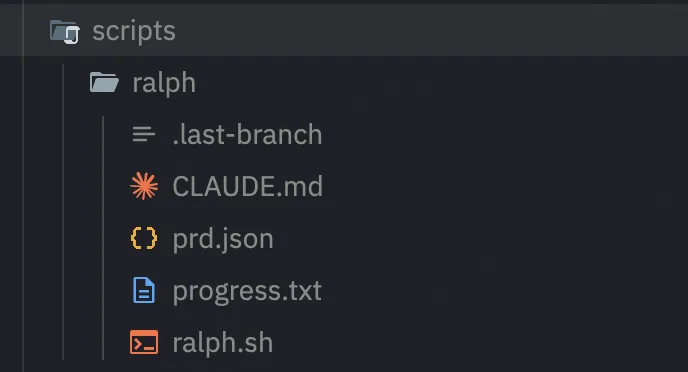
ralph.sh — The Loop Engine
This is Ralph's core: a bash script that repeatedly launches new AI instances.
# Basic usage
./scripts/ralph/ralph.sh [max_iterations]        # Uses Amp by default
./scripts/ralph/ralph.sh --tool claude [iterations]  # Uses Claude Code
Each iteration, ralph.sh does the following:
- Creates a feature branch (based on
branchNamein prd.json) - Selects the highest-priority incomplete story (
passes: false) - Launches a brand-new AI instance to implement the story
- Runs quality checks (type checking, tests)
- Checks pass → git commit; fail → leave for the next iteration
- Updates prd.json, marking the story as
passes: true - Appends lessons learned to progress.txt
- Repeats until all stories are complete or the iteration limit is reached
The default iteration limit is 10. Adjust based on project complexity:
# Simple projects
./scripts/ralph/ralph.sh --tool claude 10

# Complex projects
./scripts/ralph/ralph.sh --tool claude 50
prd.json — Task Definition
This is Ralph's "brain" — all tasks are defined here. The format is a flat JSON file:
{
  "projectName": "Blog i18n Translation",
  "branchName": "ralph/i18n-translation",
  "userStories": [
    {
      "id": "US-001",
      "title": "Translate homepage metadata",
      "description": "Create content/docs/meta.en.json with English translations for all navigation items",
      "acceptanceCriteria": [
        "meta.en.json file exists and has valid JSON format",
        "All navigation titles are translated to English",
        "pnpm types:check passes"
      ],
      "priority": 1,
      "passes": false,
      "dependsOn": [],
      "notes": "Reference the existing meta.json structure"
    },
    {
      "id": "US-002",
      "title": "Translate blog post hello-world",
      "description": "Create content/blog/hello-world.en.mdx, translated from Chinese to English",
      "acceptanceCriteria": [
        "hello-world.en.mdx file exists",
        "All QuoteCard components have defaultLang='en'",
        "Internal links use /en/ prefix",
        "Code blocks remain untranslated",
        "pnpm types:check passes"
      ],
      "priority": 2,
      "passes": false,
      "dependsOn": ["US-001"],
      "notes": "Preserve the MDX component props format"
    }
  ]
}
Field descriptions:
| Field | Description |
|---|---|
projectName | Project name, used for logging and branch naming |
branchName | Git branch name, Ralph creates it automatically |
id | Unique story identifier, US-001 format recommended |
title | Short title |
description | Detailed description — the more specific, the better |
acceptanceCriteria | List of acceptance criteria — this is the most critical field |
priority | Priority number, lower values are executed first |
passes | Whether completed, automatically updated by Ralph |
dependsOn | List of dependent story IDs |
notes | Additional notes and hints |
progress.txt — Experience Log
This is Ralph's "long-term memory." After each iteration, the AI appends what it learned:
=== Iteration 1 (US-001) ===
- Discovered: typecheck command is `pnpm types:check`, not `pnpm typecheck`
- Discovered: meta.en.json needs to mirror exact structure of meta.json
- Pattern: fumadocs i18n uses `.en.` suffix convention

=== Iteration 2 (US-002) ===
- Discovered: QuoteCard requires both `quote` and `quoteZh` props
- Gotcha: internal links must use /en/ prefix for English pages
- Pattern: code blocks should never be translated
The next iteration's new Claude instance reads this file and immediately gains all previous experience. This is why Ralph gets smoother over time — knowledge accumulates across iterations while the context stays clean.
AGENTS.md — Persistent Knowledge Base
In addition to progress.txt, Ralph also updates the project's AGENTS.md file (or CLAUDE.md). Both Claude Code and Amp automatically read these files on startup.
Unlike progress.txt, AGENTS.md records stable, cross-project knowledge:
# AGENTS.md

## Codebase Conventions
- Use fumadocs for documentation framework
- MDX files use custom components: QuoteCard, BlogImage, GlossaryCard
- i18n files use `.en.mdx` suffix

## Gotchas
- Always run `pnpm types:check` after modifying MDX files
- QuoteCard: set `defaultLang='en'` in English translations
Writing the PRD
The quality of the PRD (Product Requirements Document) directly determines Ralph's execution effectiveness. Write it well, and Ralph runs smoothly; write it poorly, and Ralph will repeatedly fail on the same story.
Using the Skill to Generate a PRD
If you installed the snarktank/ralph skill, you can generate a PRD interactively:
# In Claude Code or Amp
/prd I want to add i18n support to the blog system, translating all Chinese content to English
The AI will ask you a series of clarifying questions (which files are involved, tech stack constraints, quality standards, etc.), then generate a structured PRD document.
After generation, use the /ralph command to convert the PRD to prd.json format:
/ralph # Convert PRD to prd.jsonWriting the PRD Manually
You can also write prd.json directly. Here are the key design principles.
Principle 1: Get the Story Granularity Right
Each story should be small enough to complete in a single iteration, yet large enough to deliver independent value.
// ❌ Too large: can't finish in one iteration
{
  "id": "US-001",
  "title": "Build complete user authentication system",
  "description": "Implement registration, login, password reset, OAuth, permission management..."
}

// ❌ Too small: no independent value
{
  "id": "US-001",
  "title": "Create email field for User table",
  "description": "Add email field to the User model"
}

// ✅ Just right: completable in one iteration, delivers independent value
{
  "id": "US-001",
  "title": "Implement email-password login",
  "description": "Create login API and login page with email-password authentication",
  "acceptanceCriteria": [
    "POST /api/auth/login accepts email + password",
    "Returns JWT token",
    "Login page form can be submitted",
    "All tests pass"
  ]
}
Rule of thumb: A story involves 1-3 file modifications and has 3-5 acceptance criteria.
Principle 2: Acceptance Criteria Must Be Automatically Verifiable
Ralph needs to determine whether a story is complete, so acceptance criteria must be objectively verifiable:
// ❌ Vague criteria
"acceptanceCriteria": [
  "Code quality is good",
  "Performance is decent",
  "User experience is smooth"
]

// ✅ Verifiable criteria
"acceptanceCriteria": [
  "pnpm types:check passes",
  "pnpm test passes",
  "API response time < 200ms",
  "File src/auth/login.ts exists and exports loginHandler function"
]
Principle 3: Use dependsOn to Control Execution Order
Some stories have dependencies. The dependsOn field ensures Ralph executes them in the correct order:
{
  "userStories": [
    {
      "id": "US-001",
      "title": "Create database schema",
      "dependsOn": []
    },
    {
      "id": "US-002",
      "title": "Implement user registration API",
      "dependsOn": ["US-001"]
    },
    {
      "id": "US-003",
      "title": "Implement login page",
      "dependsOn": ["US-002"]
    }
  ]
}
Principle 4: Provide Context in notes
The notes field gives additional hints to the AI. Write things you know but the AI might not:
{
  "notes": "The project uses the fumadocs framework. i18n file naming convention is the .en.mdx suffix. Reference the translation style of content/docs/notes/speckit/concept.en.mdx."
}
Running the Ralph Loop
With the PRD ready, it's time to start the loop.
Starting Execution
# Using Claude Code, default 10 iterations
./scripts/ralph/ralph.sh --tool claude

# Specify iteration count
./scripts/ralph/ralph.sh --tool claude 30

# Using Amp (default)
./scripts/ralph/ralph.sh 20
Execution Process
After launching, you'll see output similar to this:
Starting Ralph - Tool: claude - Max iterations: 35

===============================================================
  Ralph Iteration 1 of 35 (claude)
===============================================================
## US-001 Complete

**Summary of what was done:**
1. Created meta.en.json with all navigation items translated
2. Ran pnpm types:check — PASSED
3. Committed: feat: [US-001] - Translate homepage metadata

There are still **15 user stories with `passes: false`** remaining.
The next story is **US-002: Translate blog post hello-world**.
Iteration 1 complete. Continuing...

===============================================================
  Ralph Iteration 2 of 35 (claude)
===============================================================
Each iteration is a brand-new Claude instance. It knows what to do by reading prd.json, and it knows what was learned previously by reading progress.txt.
Completion Signal
When all stories are marked as passes: true, Ralph outputs the completion signal and exits:
All stories completed!
<promise>COMPLETE</promise>
Monitoring & Debugging
While Ralph is running, you can use these commands to check progress:
# View completion status of each story (with icons for clarity)
cat tasks/prd.json | python3 -c "
import json,sys
for s in json.load(sys.stdin)['userStories']:
    print(f'{\"✅\" if s[\"passes\"] else \"⬜\"} {s[\"id\"]}: {s[\"title\"]}')"

# Or use jq
cat tasks/prd.json | jq '.userStories[] | {id, title, passes}'

# View the experience log
cat progress.txt

# View recent git commits
git log --oneline -10

# Watch Ralph's output in real time
tail -f progress.txt

# After completion, view all changes compared to main branch
git diff main...ralph/your-branch-name --stat
Interrupting & Resuming
Ralph may run for a long time, and interrupting midway is completely safe:
- Interrupt: Just press
Ctrl+C. Completed stories (passes: true) won't be lost — they're already committed and written to prd.json - Resume: Run the same command again. Ralph will automatically continue from the first story with
passes: false
# Resume after interruption — just rerun the same command
./scripts/ralph/ralph.sh --tool claude 35
If a story repeatedly fails and blocks progress, you can skip it manually — edit prd.json, set that story's passes field to true, then rerun. Ralph will skip it and continue with subsequent stories.
Auto-archiving
When you start a different feature with a new branchName, Ralph automatically archives the previous run's files to the archive/YYYY-MM-DD-feature-name/ directory, keeping the working directory clean.
Feedback Loops & Quality Gates
Ralph's "self-correction" ability depends entirely on the quality of the feedback loop. Without a feedback loop, Ralph is just a blindly looping script — it will keep producing code but can't tell if the code is correct.
Configuring Quality Checks
Define your quality check commands in CLAUDE.md (or prompt.md):
## Quality Commands

After implementing each story, run these checks IN ORDER:

1. `pnpm types:check` — TypeScript type checking
2. `pnpm test` — Unit tests
3. `pnpm build` — Full build verification

If any check fails:
- DO NOT commit
- Fix the issue
- Re-run all checks
- Only commit when all checks pass
Quality Gate Layers
| Layer | Tool | Issues Caught |
|---|---|---|
| Instant Feedback | TypeScript compiler | Type errors, syntax errors |
| Functional Verification | Unit tests | Logic errors, edge cases |
| Integration Verification | Build command | Dependency issues, configuration errors |
| Runtime Verification | dev-browser skill | UI rendering issues (frontend projects) |
For frontend stories, Ralph recommends adding to the acceptance criteria: "Verify in browser using dev-browser skill" — letting the AI actually open a browser to confirm the page renders correctly.
When Quality Checks Fail
If a story's quality checks fail repeatedly, Ralph won't infinitely retry the same story. After reaching the iteration limit, it stops and preserves the current state. You can:
- Check progress.txt to see where the AI got stuck
- Manually fix the issue and rerun
- Adjust the story granularity (it might be too large)
- Add more context in notes
Prompt Customization
Ralph's prompt template (CLAUDE.md or prompt.md) is your primary means of controlling AI behavior. After installation, you should customize it for your project. Key customization areas:
Code Style Constraints
## Code Conventions
- Use TypeScript strict mode
- Prefer named exports over default exports
- Use fumadocs components for MDX content
- Follow existing file naming patterns (kebab-case)
Common Pitfalls
## Known Gotchas
- MDX files: always import components at the top
- i18n: English files use `.en.mdx` suffix
- Links: English pages must use `/en/` prefix
- QuoteCard: set `defaultLang` to match the file language
Handling Stuck Situations
## When Stuck
If you cannot complete a story after 3 attempts within the same iteration:
1. Document what's blocking in progress.txt
2. Move to the next story if possible
3. Do NOT modify files unrelated to the current story
Real-World Case Study: Using Ralph for Blog i18n Translation
To demonstrate how Ralph works in a real project, here's an actual case study: using a Ralph-style autonomous agent to translate an entire blog from Chinese to English.
Project Setup
The project needed to translate 22+ content files (blog posts, documentation, navigation metadata) from Chinese to English, targeting i18n support for a fumadocs-based Next.js blog. Tasks were defined in a prd.json file containing 16 user stories, each with clear acceptance criteria:
scripts/ralph/
├── prd.json          # 16 user stories with acceptance criteria
└── progress.txt      # Experience log, updated after each story
Each user story followed a consistent pattern:
- Clear deliverables: "Create content/blog/xxx.en.mdx"
- Verifiable criteria: "Typecheck passes", "Internal links use /en/ prefix"
- Technical constraints: "Keep code blocks untranslated", "Set defaultLang='en' on QuoteCard"
Execution Model
The agent followed the core principles of the Ralph methodology:
-
Files as the source of truth:
prd.jsontracks each story's status (passes: true/false).progress.txtaccumulates experience across iterations — such as "Typecheck command ispnpm types:check, notpnpm typecheck" -
Automated quality gates: After each translation,
pnpm types:checkverifies the MDX file compiles correctly. If typecheck fails, fix the issue before committing. -
Incremental progress: Each story is committed independently with descriptive commit messages (
feat: [US-003] - Translate blog/claude-code-quality-control.mdx), making rollbacks easy when needed. -
Parallel execution: For longer articles, multiple subagents translate simultaneously — for example, US-010 (claude-skills concept + practice), US-011 (speckit concept + practice), and US-012 (claude-architecture + claude-subagent) all ran in parallel.
Key Takeaways
| Takeaway | Details |
|---|---|
| Knowledge accumulation matters | Patterns discovered in early stories (QuoteCard's defaultLang, link prefix rules) made later stories faster to complete |
| Typecheck as a feedback loop | Catches missing imports or malformed MDX before issues compound |
| Parallelization scales | 6 translation agents running simultaneously finished in about the same time as 1 |
| PRD granularity is critical | Each story scoped to 1-2 files — small enough to reliably complete, large enough to be meaningful |
| Progress logs prevent repeated mistakes | The "Codebase Patterns" section of progress.txt became a knowledge base, avoiding stepping on the same pitfalls |
Results
All 16 user stories were completed in a single session: 8 meta.en.json navigation files created, 3 blog posts translated, 12 documentation pages translated, and full site build verification passed. Each translation maintained consistent quality because the acceptance criteria were explicit and the feedback loop (typecheck) caught issues immediately.
This project demonstrated Ralph's Full Implementation Mode — clearly defined tasks, explicit success criteria, automated verification, and incremental delivery through the file system.
Best Practices & FAQ
Cost Control
Ralph's automated execution means API costs are ongoing. Several control measures:
- Always set
max_iterations: This is the most basic safety net - Keep story granularity reasonable: Stories that are too large consume multiple iterations; stories that are too granular increase startup overhead
- Test small first: For new projects, try 3-5 iterations first to confirm the prompt and quality gates work properly before scaling up
Common Pitfalls
Pitfall 1: Story Too Large
Symptom: A story fails repeatedly, quickly exhausting the iteration count.
Solution: Split it into 2-3 smaller stories. "Build complete authentication system" becomes "Implement login API" + "Create login page" + "Add JWT middleware."
Pitfall 2: No Feedback Loop
Symptom: Ralph claims the story is complete, but the code actually has issues.
Solution: Add executable check commands to your acceptance criteria. "Code is written" is not an acceptance criterion — "pnpm test all pass" is.
Pitfall 3: progress.txt Not Being Utilized
Symptom: The same error keeps appearing across different iterations.
Solution: Confirm your prompt template explicitly instructs "read progress.txt and follow the lessons within." If the AI isn't automatically appending learnings, add "After each story, append learnings to progress.txt" to the prompt.
Pitfall 4: Incorrect Dependency Order
Symptom: A story depends on code that doesn't exist yet, causing implementation failure.
Solution: Set the dependsOn field correctly, ensuring infrastructure stories come first.
FAQ
Q: Can I manually modify prd.json mid-run?
Yes. Ralph re-reads prd.json at the start of each iteration. You can modify story descriptions, add new stories, or manually mark a story as passes: true (to skip it) between iterations.
Q: What if Ralph gets stuck on one story and keeps failing?
- Check progress.txt for the failure reason
- Add more context in notes
- Split the story (the granularity might be too coarse)
- Manually fix the blocking issue and rerun
Q: Can I do other things while Ralph is running?
Yes. Ralph is designed for "Human on the Loop" — you don't need to watch it. In AFK mode, start it before leaving work and check the results the next day. Just don't modify files that Ralph is currently working on.
Q: How do I control costs?
Three ways: set a reasonable max_iterations, keep story granularity appropriate (reducing wasted iterations), and run a small-scale test first to confirm the process works. Generally, a project with 10-20 stories falls within the $50-100 API cost range.
Summary
Ralph's workflow can be summarized in five steps:
Install → Write PRD → Configure Quality Gates → Run Loop → Review ResultsThe core philosophy never changes: Let files be the source of truth, let every iteration start fresh, and let quality gates do the gatekeeping for you.
Now, go back to your project, prepare your prd.json, run ./scripts/ralph/ralph.sh --tool claude, and go grab a cup of coffee.
Further Reading
- Ralph Wiggum Deep Dive — Review Ralph's core principles
- frankbria/ralph-claude-code Practical Guide — Engineering-grade Ralph implementation: monitoring, circuit breakers, and safety mechanisms
- GSD Deep Dive — A complete context engineering system built on top of Ralph
- What Are Claude Skills — Ralph's PRD skill is a Claude Skill
- Speckit Practical Guide — Another structured AI coding workflow