
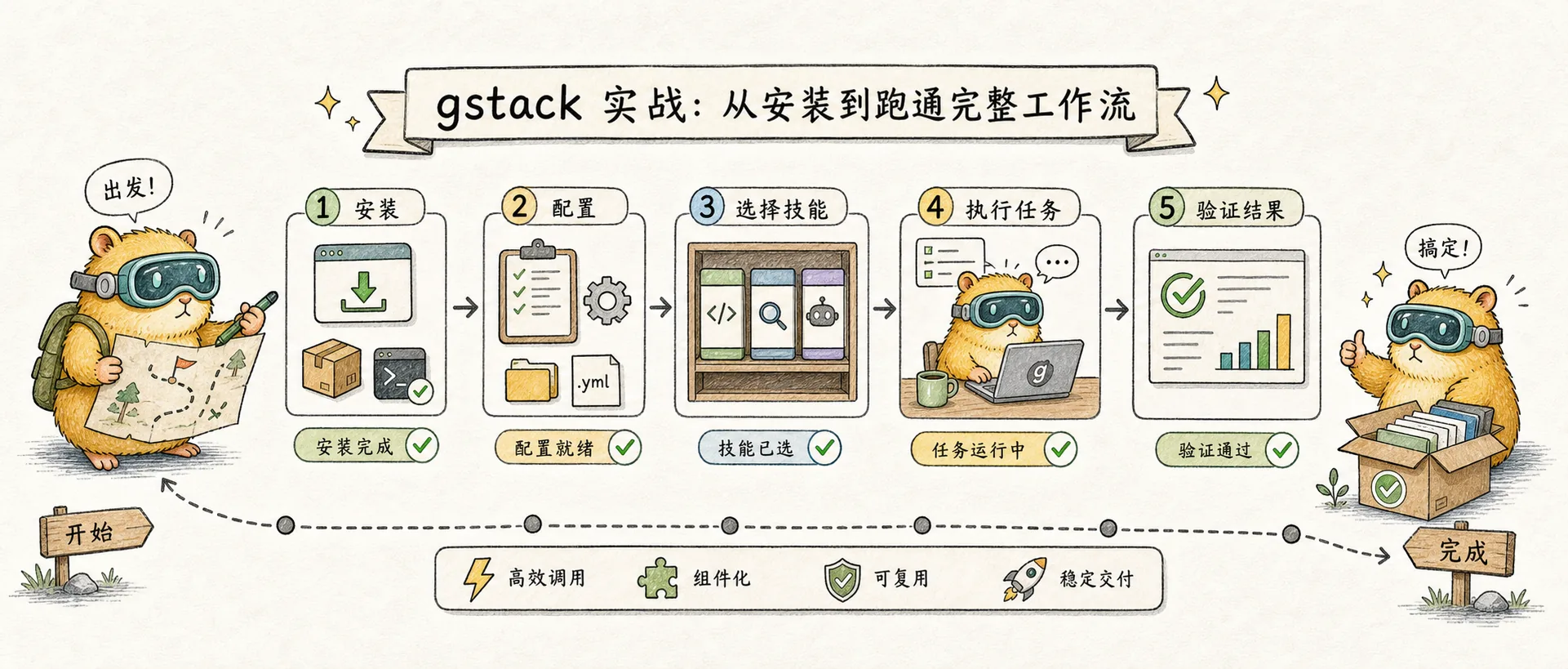
gstack practice: complete workflow from installation to runthrough
gstack installation configuration, complete command reference, workflow demonstration and community best practices
Introduction
In Concept, we learned about the core positioning of gstack - a role-based skill set that turns Claude Code into a virtual engineering team, and its differentiated positioning in the AI programming tool ecosystem compared to GSD, Superpowers, Ralph and other solutions.
This practical article focuses on how to use: from installation and configuration to running through the complete workflow, helping you get started with gstack in 30 minutes.
Installation and configuration
Preconditions
- Claude Code is installed and available
- Git installed
- Bun v1.0+ installed (gstack is built on Bun)
- Windows users also need Node.js
Global installation (recommended, completed in 30 seconds)
git clone --single-branch --depth 1 https://github.com/garrytan/gstack.git ~/.claude/skills/gstack
cd ~/.claude/skills/gstack && ./setup
The installation script does three things:
- Add gstack’s skill information to your
CLAUDE.mdfile - Put all skill files into the skills directory
- Install Playwright and the corresponding Chromium browser (for
/browseand/qa)
Project-level installation (team sharing)
If you want team members to automatically obtain gstack after cloning the repository:
cp -Rf ~/.claude/skills/gstack .claude/skills/gstack
rm -rf .claude/skills/gstack/.git
cd .claude/skills/gstack && ./setup
###Multi-Agent support
gstack is not limited to Claude Code, and currently supports 10 AI programming Agents. ./setup automatically detects installed hosts by default:
./setup --host codex      # OpenAI Codex CLI
./setup --host opencode   # OpenCode
./setup --host cursor     # Cursor
./setup --host factory    # Factory Droid
./setup --host slate      # Slate
./setup --host kiro       # Kiro
./setup --host hermes     # Hermes
./setup --host gbrain     # GBrain(修改版)
./setup --host openclaw   # OpenClaw(通过 ACP 派发 Claude Code 会话)
The skill installation path of each host is in the shape of ~/.<agent>/skills/gstack-*/ and does not interfere with each other.
💡 Extra options for OpenClaw users: In addition to calling through ACP, OpenClaw can also directly install 4 native methodology skills (
gstack-openclaw-office-hours,gstack-openclaw-ceo-review,gstack-openclaw-investigate,gstack-openclaw-retro) through ClawHub, which can be used conversationally without a Claude Code session.
Team Mode (Team Sharing + Automatic Updates, Recommended)
v1.x introduces Team Mode: each developer installs gstack globally, and the warehouse only records "we use gstack", and updates occur automatically:
(cd ~/.claude/skills/gstack && ./setup --team) && \
~/.claude/skills/gstack/bin/gstack-team-init required && \
git add .claude/ CLAUDE.md && git commit -m "require gstack for AI-assisted work"
Replacing required with optional is a "gentle reminder" rather than mandatory. Every time you start Claude Code, it will automatically run an update check (throttling once per hour, safe and silent if the network fails). There are no vendored files in the warehouse, and there is no version drift.
Update
cd ~/.claude/skills/gstack && git pull && ./setupOr use /gstack-upgrade directly in Claude Code.
Complete command reference
Sprint Process
| Command | Role | Description |
|---|---|---|
/office-hours | YC Office Hours | 6 forcing questions to reconstruct product direction and generate design documents |
/plan-ceo-review | CEO / Founder | Looking for 10-star products, available in four range models |
/plan-eng-review | Engineering Manager | Lockdown Architecture, Data Flow, Edge Cases, Test Matrix |
/plan-design-review | Senior designer | Design dimension 0-10 score, explain how to achieve 10 points |
/plan-devex-review | Developer Experience Leader | Explore developer portraits, benchmark TTHW, and design magic moments; three modes (DX EXPANSION / POLISH / TRIAGE), 20-45 forcing questions |
/autoplan | Review pipeline | Automatically run CEO → Design → Engineering → DX review in sequence, automatically decide according to coding decision-making principles, and only throw "taste decisions" to you |
Design
| Command | Description |
|---|---|
/design-consultation | Build a complete design system from scratch and generate DESIGN.md |
/design-shotgun | Generate multiple AI design variants and compare selections in the browser |
/design-html | Generate production-grade HTML/CSS, support React/Svelte/Vue framework detection |
Review and Security
| Command | Role | Description |
|---|---|---|
/review | Staff Engineer | Find bugs that can pass CI but will explode in production, automatically fix obvious problems, and mark integrity gaps |
/investigate | Debugging expert | Systematic root cause debugging. Iron rule: Don’t fix the bug until you find the root cause; stop after 3 failed fixes |
/design-review | Designer who can write code | Visual audit + automatic repair, atomic submission, before and after comparison screenshots |
/devex-review | DX tester | Really run onboarding: browse documents, run entry process, timing TTHW, screenshot errors, compare with /plan-devex-review score |
/cso | Security Officer | OWASP Top 10 + STRIDE threat modeling, 17 false positive exclusion rules, 8/10 confidence threshold, each finding is accompanied by specific utilization scenarios |
Testing and QA
| Command | Description |
|---|---|
/qa | Open the real browser test and find the bug → Atomic commit fix → Generate regression test → Re-verify |
/qa-only | Same as above but only reporting, no code modifications |
/benchmark | Baseline performance test: page loading, Core Web Vitals, resource size, support before and after comparison |
/browse | ~100ms level browser commands, real Chromium, screenshots, form filling, element clicks |
/open-gstack-browser | Start GStack Browser: visible AI control Chromium, comes with sidebar extension, anti-crawling stealth, automatic model routing (Sonnet operation/Opus analysis), supports one-click cookie import |
/setup-browser-cookies | Import cookies from real browsers (Chrome/Arc/Brave/Edge) to headless sessions to test login-required pages |
/pair-agent | Cross-AI Agent browser pairing: share the same GStack Browser to OpenClaw / Hermes / Codex / Cursor, etc., each Agent has an independent tab, comes with ngrok tunnel to support remote Agents, scope token + tab isolation + rate limit + behavior attribution |
Release and operation and maintenance
| Command | Description |
|---|---|
/ship | Synchronize the main branch → Run tests → Audit coverage → Update version → Submit push → Create PR; Automatic bootstrap when the project does not have a test framework |
/land-and-deploy | Merge PR → Wait for CI → Deploy → Verify production environment health |
/canary | Post-deployment canary monitoring: console errors, performance regressions, page failures |
/setup-deploy | /land-and-deploy One-time configuration: auto-detection platform (Fly.io/Render/Vercel/Netlify/Heroku/GitHub Actions/custom) + production URL + deployment command |
/setup-gbrain | Get started with GBrain database in one click (within 5 minutes): PGLite local, Supabase existing URL, or automatically create a new Supabase project through Management API; MCP registration + warehouse-level read-write/read-only/deny permissions |
Review and learn
| Command | Description |
|---|---|
/retro | Team perception weekly report: per capita teardown, winning streak statistics, test health trends, growth opportunities; /retro global across all projects + AI tools (Claude Code / Codex / Gemini) |
/document-release | Automatically update project documentation to match published code (README / ARCHITECTURE / CONTRIBUTING / CLAUDE.md / TODOS); /ship is now automatically called |
/learn | Manage cross-session learning memories: view, search, prune, export, accumulate by project |
/context-save /context-restore | Continuous checkpoint mode package: automatic WIP commit to save context, use /context-restore to rebuild the session after crash/switch |
Security Protection
| Command | Description |
|---|---|
/careful | Dangerous operation warning: rm -rf, DROP TABLE, force-push, etc. |
/freeze / /unfreeze | Lock/unlock editing scope to specific directory |
/guard | /careful + /freeze combination, highest security mode |
/checkpoint | Save/restore working status snapshot |
Tool integration
| Command | Description |
|---|---|
/codex | OpenAI Codex CLI integration: independent code review (pass/fail gate), confrontation mode, consultation mode; cross-model overlap analysis will be given after running with /review |
/health | Code quality dashboard: tsc + biome + knip + shellcheck + tests → 0-10 overall score |
/skillify | Consolidate the current workflow into a reusable skill |
/scrape | Web scraping workflow |
/landing-report | Landing page performance and experience report |
/make-pdf | Generate PDF document |
/benchmark-models /model-overlays /plan-tune | Cross-model comparison, coverage overlay, plan optimization |
Standalone CLI(v0.19+)
In addition to the slash command, gstack also comes with a set of standalone CLIs (not run within the Claude Code session):
| Command | Description |
|---|---|
gstack-model-benchmark | Cross-model evaluation: run Claude / GPT (via Codex CLI) / Gemini at the same prompt, compare delay, token, cost and (optional) LLM-judge quality score; unavailable provider automatically skips |
gstack-taste-update | Design taste learning: write /design-shotgun's approval/disapproval into the project-level taste file, decay by 5% every week, and feed back to subsequent variant generation |
Configuration details
CLAUDE.md Add content
After installation, gstack will add a list and short description of all available skills to your CLAUDE.md. This lets Claude Code know which commands are available.
Skill directory structure
The main entrance is the top-level ~/.claude/skills/gstack/SKILL.md, each subcommand exists in the form of a flat directory, and the core is the SKILL.md file:
~/.claude/skills/gstack/
├── SKILL.md            # 主入口 skill
├── browse/             # 浏览器 daemon
├── qa/                 # QA 测试
├── review/             # 代码审查
├── ship/               # 发布流程
├── plan-ceo-review/    # CEO 审查
├── office-hours/       # 产品门诊
├── pair-agent/         # 跨 Agent 浏览器配对
├── open-gstack-browser/ # GStack Browser 启动器
├── setup-gbrain/       # GBrain 数据库一键上手
├── hosts/              # 10 个 host 配置(claude/codex/cursor/...)
├── bin/                # standalone CLI(gstack-model-benchmark 等)
└── ...                 # 当前 v1.x 共 50 个 skill 目录
You are free to modify any SKILL.md to customize the behavior - this is the advantage of "fork and customize".
Browse Daemon
Browse Daemon is a permanent Chromium instance. Key configuration:
- Port: Randomly selected 10000-60000, supports 10+ parallel workspaces
- Security: Only bind localhost, use bearer token authentication for each session
- Cookie: Use
/setup-browser-cookiesto import from Chrome/Arc/Brave/Edge
Practical workflow demonstration
The following demonstrates a typical gstack workflow. The commands and output are based on real cases in the documentation and videos.
💡 Note: The following output is a general example compiled based on research. Screenshots of specific projects will be added in the future based on actual practice.
Step 1: Product clinic
> /office-hours

[YC Office Hours] 6 forcing questions:
1. Who specifically needs this?
2. What do they do today without it?
3. Why is this urgent right now?
4. How will you know it works?
5. What happens if you do nothing?
6. What is the smallest version you can ship?

→ Design doc generated
Don’t rush to write code, first let AI torture your ideas from the perspective of YC Office Hours.
Step 2: Multi-role review plan
> /autoplan

[CEO Review] Finding the 10-star product...
[Design Review] Rating dimensions 0-10...
[Eng Review] Locking architecture + edge cases...

→ Fully reviewed plan ready
/autoplan automatically runs three rounds of CEO → Design → Engineering reviews to produce a complete post-review plan.
Step 3: Coding implementation
Code normally according to the approved plan. You can use the standard Claude Code conversation.
Step 4: Multi-expert code review
> /review

Dispatching 7 specialist reviewers...
- Testing coverage ✓
- Maintainability ✓
- Security: Found 1 issue (auto-fixing)
- Performance ✓
- Data migration ✓
- API contract ✓
- Red team: No vulnerabilities found

→ Review complete, 1 auto-fix applied
Step 5: Browser QA
> /qa

Opening headless browser...
Testing user flows:
- Login flow ✓
- Dashboard load ✓
- Form submission: Bug found → fixing → re-testing ✓
- Image upload ✓

→ 4 flows tested, 1 bug fixed, regression test generated
Step 6: Publish
> /ship

Syncing with main...
Running tests: 42 passed, 0 failed
Reviewing diff: 3 files changed
Updating VERSION: 1.2.0 → 1.3.0
Creating PR: "Add screenshot feature"

→ PR #47 created, ready for merge
Practical Tips and Community Experience
Garry Tan’s suggestion
ETHOS.md from gstack, three core principles:
- Boil the Lake: AI makes completeness almost free—always do complete things and don’t take shortcuts
- Search Before Building: Search first, understand first, and then start after three-layer knowledge verification
- User Sovereignty: AI recommendation, you decide. Even if both AI models agree, your judgment still takes precedence
The README of gstack begins with a quote from Karpathy - this is also the starting point for Garry Tan himself to explain why he wants to build gstack:
I don't think I've typed like a line of code probably since December, basically, which is an extremely large change.
Positive community experiences
/office-hoursfor YC applications: Multiple S26 applicants on Reddit r/ycombinator reported that using gstack’s office hours to stress test their application materials is very effective.- Security audit found real vulnerabilities: There was CTO feedback
/reviewdiscovered an XSS vulnerability that the team was not aware of. /browseReal browser testing: Recognized by the community (including critics) as a "truly technical contribution"
Common pitfalls
- Frequent permission prompts: Some users reported that "permission prompts have to be approved every 30 seconds, making it impossible to sleep." It is recommended to configure appropriate automatic approval rules in Claude Code settings
- High Token consumption: Characterized prompts will increase context consumption. If you are cost-sensitive, you can selectively use the skills you need most
- Agent Loop: There are cases on HN where users reported that the agent got stuck in a 70-minute loop. It is recommended to set reasonable timeouts and checkpoints
- Not for everyone: Experienced developers may feel that most skills are unnecessary wrappers. gstack is more suitable for independent founders and small teams rather than teams with mature engineering processes
Frequently Asked Questions and Best Practices
**Q: Can gstack and Superpowers be used at the same time? **
Yes. The two complement each other - Superpowers is good at process discipline and TDD assurance, and gstack is good at product thinking and multi-role reviews. Many teams use Superpowers for daily coding discipline and gstack for product planning and QA.
**Q: Is Token expensive? **
Higher than native Claude Code. Each skill's role prompt occupies the context window. But if your time is worth more than the token fee, this is usually a good deal.
**Q: What type of projects is it suitable for? **
Best suited for full-process product development – from idea to launch. If you just fix bugs or make small features, native Claude Code is enough. The value of gstack is maximized in the "complete process".
**Q: How to customize skill? **
Each skill is a SKILL.md file. Just edit it directly:
- Find the skill directory:
~/.claude/skills/gstack/<skill-name>/ - Edit
SKILL.md - Rerun
./setup
The community recommends forking the repository and customizing it instead of directly modifying the global installation.
Best Practices
- First
/office-hoursthen code: Make it a habit to do product clinics before writing any code - Make good use of
/browseverification: Don’t just look at the code, let AI really "see" your application - Periodic
/retro: Maintain visibility into code quality and work pace - Gradual Adoption: No need to use all skills at once. Starting from
/office-hours+/review+/ship - Fork customization: If you encounter an inappropriate prompt, change it directly. This is the advantage of open source
Summary
The core value of gstack does not lie in how powerful a specific skill is, but in that it provides a structured AI collaboration mode - through role switching, you can get different types of AI assistance at different stages. First review the product direction from the CEO's perspective, then review the architecture with the rigor of an engineering manager, and finally verify the results with QA's real browser.
Next, you can try installing it yourself and start your first gstack project from /office-hours.
Extended reading:
- gstack Concepts — Understand gstack’s core concepts and tool ecological positioning
- GSD Practical — A practical guide to another structured AI programming solution
- Claude Skills Practical Chapter — Understand the creation mechanism of Skills
gstack - Claude Code Skills
An opinionated stack of role-based skills that transforms Claude Code into a virtual engineering team. Now supports 10 AI coding agents.
Comments
gstack concepts
Garry Tan What is the open source gstack, what problems does it solve, core workflow and tool ecological positioning
gstack Skill architecture dismantling
Systematic dismantling of gstack's engineering design from the perspective of Skill developers: template generation, upgrade mechanism, learning system, preamble injection, status management, prompt engineering skills