
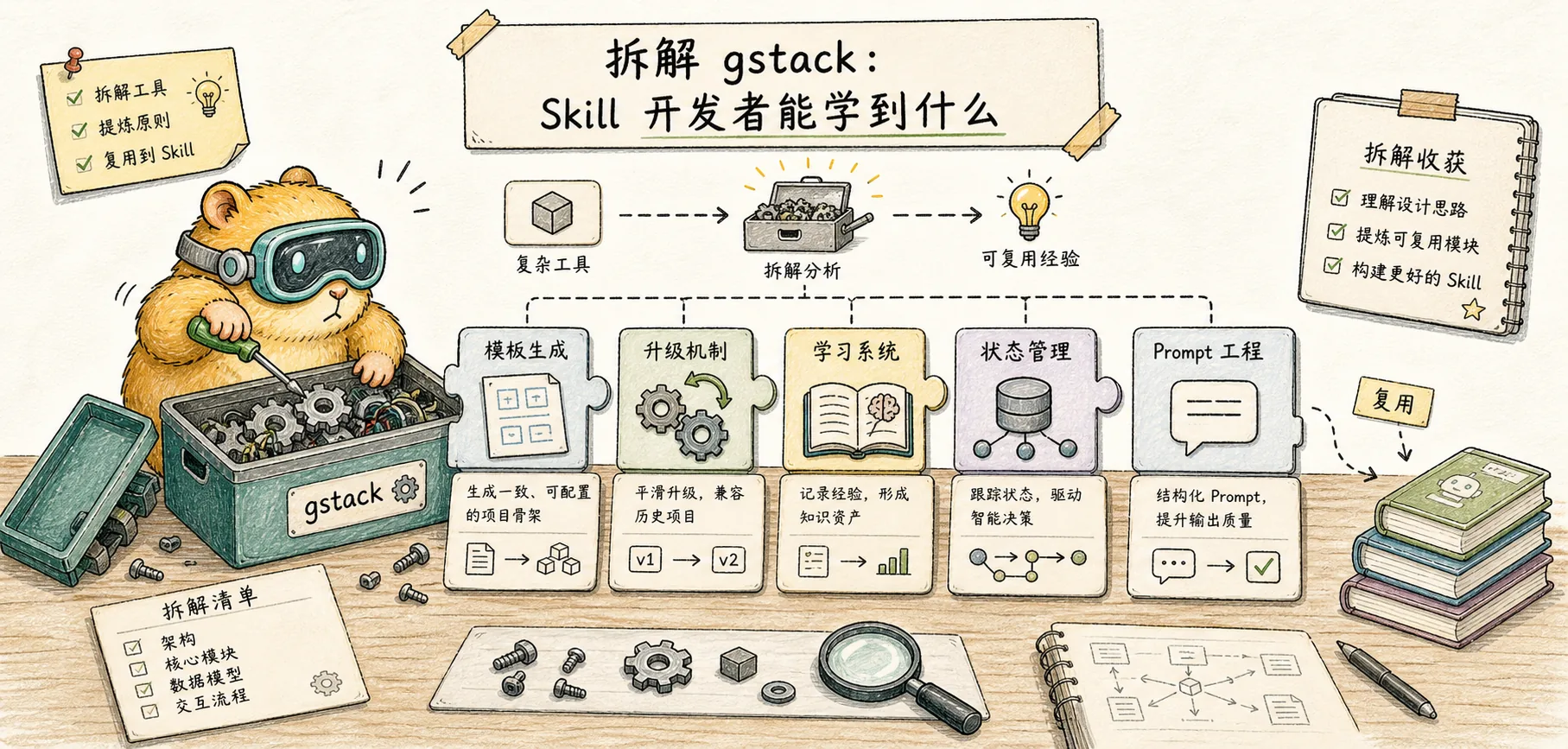
Teardown gstack: What Skill Developers Can Learn
Systematic dismantling of gstack's engineering design from the perspective of Skill developers: template generation, upgrade mechanism, learning system, preamble injection, status management, prompt engineering skills
Introduction
In Concept and Practical, we learned what gstack is and how to use it from a user perspective. This note is from a different perspective - As a Skill developer, after reading the gstack warehouse file by file, what engineering designs are worth learning and learning from.
gstack is more than just a collection of 23 prompt files. There is a complete engineering system behind it: template generation, automatic upgrade, learning and memory, progressive guidance, multi-platform adaptation, layered testing - these are the keys to turning a skill project from "usable" to "easy to use".
1. SKILL.md is not handwritten - template generation system
The most counter-intuitive design of gstack: **Each SKILL.md is automatically generated and cannot be edited directly. **
SKILL.md.tmpl (人写) → gen-skill-docs → SKILL.md (机生)The human-written .tmpl template contains workflow logic and best practices, plus {{PLACEHOLDER}} placeholders. The build script extracts the command reference, browser flag list, preamble startup code, etc. from the source code and fills them into the placeholders to generate the final SKILL.md.
{{PREAMBLE}}           ← 从 resolvers/preamble.ts 生成的启动代码
{{BROWSE_SETUP}}       ← 浏览器初始化指令
{{COMMAND_REFERENCE}}  ← 从 commands.ts 提取的命令文档
{{SNAPSHOT_FLAGS}}     ← 从源代码常量提取的快照选项
**Why do this? **
- Documentation and code will never be out of sync - the command reference is generated from the source code, and the documentation is automatically updated when the source code changes
- 23 skills share the same preamble (about 220 lines), and all skills are updated simultaneously
- CI can
--dry-runcheck whether the generated file is expired to prevent forgetting to regenerate
Takeaway: If you maintain multiple skills, any content shared across skills should be extracted into templates and used in build steps to generate the final files. Manually syncing multiple copies of the same content will cause problems sooner or later.
2. Upgrade mechanism - complete link from detection to execution
The upgrade system of gstack is very exquisitely designed and divided into three layers:
First layer: version detection
bin/gstack-update-check is a standalone bash script that does the following:
- Read the local
VERSIONfile - Check cache
~/.gstack/last-update-check(UP_TO_DATE caches for 60 minutes, UPGRADE_AVAILABLE caches for 720 minutes) - If the cache expires, HTTP request GitHub’s
raw.githubusercontent.com/.../VERSION - Compare the version number and output
UPGRADE_AVAILABLE <旧> <新>
Second layer: Preamble integration
The first line of each skill's SKILL.md startup code is version detection:
_UPD=$(~/.claude/skills/gstack/bin/gstack-update-check 2>/dev/null || true)
[ -n "$_UPD" ] && echo "$_UPD" || true
This means that updates will be automatically detected when users call any skill - no need to run an upgrade command specifically, zero presence but 100% coverage.
The third level: progressive reminder + automatic upgrade
After detecting a new version, it will not immediately disturb the user, but use the snooze mechanism (Snooze) for progressive backoff:
- 1st Reminder: Please mention again after 24 hours
- 2nd Reminder: Please mention again after 48 hours
- 3rd time and later: please mention again after 7 days
- New version release resets snooze counter
Users can gstack-config set auto_upgrade true enable automatic upgrade and skip confirmation to execute it directly.
When performing the upgrade, 5 installation types (global git, local git, vendored, etc.) will be distinguished. git installation uses git fetch + reset, vendored installation first backs up and then replaces, and restores from .bak in case of failure. After the upgrade, the local vendored copy of the project will also be automatically synchronized.
Points worth learning from:
- The "detect on each call" mode has extremely high coverage and is imperceptible to users
- Gradual backoff avoids frequent interruptions
- Differentiate installation types and implement different upgrade strategies instead of one size fits all
- Backup and restore ensure that upgrade failure will not cause the entire skill to hang up.
3. Learning system - Make Skills smarter the more you use them
gstack implements a lightweight but effective cross-session memory system.
Storage
Each project has an independent learning log: ~/.gstack/projects/$SLUG/learnings.jsonl, which is written additionally.
{
  "skill": "review",
  "type": "pitfall",
  "key": "n-plus-one",
  "insight": "这个项目的 User model 有 N+1 查询问题,findAll 要加 include",
  "confidence": 8,
  "source": "observed",
  "files": ["src/models/user.ts"],
  "ts": "2026-04-01T14:30:00Z"
}
Automatic collection
Before each skill is completed, there is an "operational self-improvement" link - reflecting on whether there were unexpected failures, detours, or project quirks discovered during the execution, and any will be automatically recorded in learnings.jsonl. No manual triggering is required by the user.
Automatic loading
Each time a new session starts, the preamble will load the first 3 high-confidence learning entries to inject context, allowing the new session to inherit historical knowledge.
Confidence decay
Entries from observed and inferred sources decay by 1 point every 30 days. There is no need to manually clean up the knowledge base—outdated knowledge fades naturally and new observations naturally take its place.
Management interface
/learn            # 显示最近 20 条
/learn search     # 搜索
/learn prune      # 检测过期条目(引用的文件已删除)
/learn export     # 导出为 markdown 可加入 CLAUDE.md
Points worth learning from:
- Additional write-only design is simple and reliable, and concurrency is safe
- Confidence decay is a low-maintenance knowledge aging management - much more efficient than manual cleaning
- Use git remote URL instead of path to identify the project (via
gstack-slug), which can be cloned to different locations and reused. - Support cross-project query, but isolated by default
4. Preamble injection - Skill's "middleware layer"
This is one of the smartest architectural designs of gstack. Each SKILL.md shares a preamble code of about 220 lines, which functions like the middleware of a web framework:
┌─ 更新检测 ──────────────────────────────────┐
│ 会话追踪 (sessions/$PPID)                    │
│ 配置读取 (proactive, skill_prefix, telemetry)│
│ 学习历史加载 (前 3 条高置信度)                │
│ 上下文恢复 (最近的 checkpoint + timeline)     │
│ 路由规则检测                                 │
│ 首次使用引导流程                              │
└──────────────────────────────────────────────┘
         ↓
    Skill 特有逻辑
Preamble's bash script outputs key-value pairs (BRANCH: main, PROACTIVE: true), and then the template uses natural language conditions to let Claude adjust his behavior accordingly:
If PROACTIVE is false, do not invoke skills automatically.
Instead suggest: "I think /skillname might help here -- want me to run it?"
This is essentially treating bash output as Claude's "environment variables" - using bash for runtime detection and natural language for behavioral routing.
Points worth learning from: If you have multiple skills, the shared logic (configuration loading, state recovery, version detection) should be extracted into a unified preamble instead of writing a copy for each skill.
5. Progressive boot - Sentinel file mode
The first-time user experience of gstack is designed with great care. Make sure each boot step occurs only once via a touch file (sentinel file):
~/.gstack/.completeness-intro-seen    ← "Boil the Lake" 理念介绍
~/.gstack/.telemetry-prompted         ← 遥测选择(community/anonymous/off)
~/.gstack/.proactive-prompted         ← 主动触发开关
~/.gstack/.routing-prompted           ← CLAUDE.md 路由规则写入
~/.gstack/.welcome-seen               ← 安装欢迎消息
Check whether these files exist each time the skill is started. If not, display the corresponding boot and touch files. Steps that have already been viewed will never appear again.
Points worth learning from: Compared with maintaining the status of "onboarding_step": 3 in config, sentinel files are simpler and more reliable - they will not be affected by configuration file corruption, and each step is controlled independently.
6. SKILL.md structural design - three-tier architecture
Each SKILL.md follows a standard three-layer structure:
First layer: YAML Frontmatter
---
name: qa
preamble-tier: 3
version: 0.15.1.0
description: |
  Systematically QA test a web application...
  Use when asked to "qa", "test this site", "find bugs"...
benefits-from: [office-hours]
allowed-tools:
  - Bash
  - Read
  - Write
hooks:
  PreToolUse:
    - matcher: "Bash"
      hooks:
        - type: command
          command: "bash ${CLAUDE_SKILL_DIR}/bin/check-careful.sh"
---
Key fields:
allowed-tools: Tool-level permission whitelist, each skill declares only the tools it needsbenefits-from: Explicitly declare the pre-dependency skillhooks: PreToolUse hook, which can intercept before the tool is called (such as careful interceptionrm -rf)description: Contains all natural language trigger words
Layer 2: Shared Preamble + General Rules
preamble startup code + Voice definition + context recovery + integrity principle + search priority + completion status protocol + upgrade rules, etc. All skills are identical and generated from templates.
The third layer: Skill-specific logic
This is the "soul" of each skill - workflow definition, role setting, cognitive model injection, interaction gating, etc.
Points worth learning from: The three-layer separation allows each skill to only focus on its own unique logic, and the shared parts are ensured by the framework for consistency.
7. Prompt Engineering Tips Collection
After reading all SKILL.md, here are the prompt design techniques worth learning:
Anti-Flattery Rules
The Startup Mode of office-hours explicitly prohibits the common "and muddy" behavior of AI:
Never say:
- "That's an interesting approach" → take a position instead
- "There are many ways to think about this" → pick one
- "You might want to consider..." → say "This is wrong because..."
- "That could work" → say whether it WILL work
Prohibited word list
The Voice section has clear banned words and phrases:
- Banned words: delve, crucial, robust, comprehensive, nuanced, pivotal, landscape...
- Banned phrases: "here's the kicker", "plot twist", "let me break this down"...
- Disabled format: em dash (replace with comma/period)
These are common "AI-flavored" words in LLM, and the output is obviously more natural after being disabled.
Cognitive model injection
Each Review skill injects a different thinking framework:
- CEO Review: 18 cognitive models (Bezos’ one-way/two-way door decision-making, Munger’s reverse thinking, Jobs’ focus and subtraction...)
- Eng Review: 15 engineering management patterns ("boring by default", blast radius intuition, Conway's law...)
- Design Review: 12 Design Cognition Patterns (Hierarchy as a Service, Worship of Constraints, "Would I notice?" testing...)
These modes do not let AI perform mechanically, but provide it with a thinking framework - just like giving a smart newcomer a list of experiences of its predecessors.
Specification standards
Not "you should test this"
    but `bun test test/billing.test.ts`

Not "this might be slow"
    but "this queries N+1, ~200ms per page load with 50 items"

Not "there's an issue in the auth flow"
    but "auth.ts:47, the token check returns undefined"
Confidence Calibration
The review skill requires each discovery to be accompanied by a confidence score, and low-confidence findings are automatically downgraded or hidden:
| Score | Meaning | Processing |
|---|---|---|
| 9-10 | Read the specific code and verify | Normal display |
| 7-8 | High confidence pattern matching | Normal display |
| 5-6 | Moderate, possible false alarm | Display with instructions |
| 3-4 | Low confidence | Hide from reports |
| 1-2 | Pure guessing | Only shown at P0 level |
Interactive Gating
The ship skill precisely defines when to stop and wait for the user and when to continue automatically:
Only stop for:
- Tests failing with no obvious fix
- Merge conflicts requiring human judgment
- Unclear which changes to include

Never stop for:
- Normal git operations
- CHANGELOG/VERSION updates
- PR creation
Points worth learning from: A good skill is not "AI does everything", but a precise definition of the human-machine boundary.
8. State management - file system is database
All persistence of gstack is done through the file system, stored under ~/.gstack/:
| Path | Purpose | Format |
|---|---|---|
config.yaml | Global configuration | YAML |
sessions/$PPID | active session | touch file |
projects/$SLUG/learnings.jsonl | Learning record | JSONL |
projects/$SLUG/timeline.jsonl | Skill Timeline | JSONL |
projects/$SLUG/checkpoints/*.md | Checkpoint | Markdown |
projects/$SLUG/health-history.jsonl | Health check history | JSONL |
analytics/skill-usage.jsonl | Using telemetry | JSONL |
last-update-check | version cache | plain text |
Almost all time series data is written appendably using JSONL (one JSON object per row). This choice is smart:
- Added write natural concurrency safety
- No database dependencies required
- You can use
grep/jqto query directly - Corrupted up to missing last line
9. Cross-Skill Integration Mode
File transfer product
Transfer work products between skills through the file system:
/office-hours → design doc → /plan-ceo-review 读取
/plan-ceo-review → ceo-plans/*.md → /autoplan 读取
/review → reviews.jsonl → /ship 读取并展示 Dashboard
/qa → qa-reports/ → /retro 读取
Review Readiness Dashboard
The ship skill reads reviews.jsonl, showing cross-skill review status before publishing:
| Review          | Runs | Last Run    | Status | Required |
| Eng Review      |  1   | 2026-03-16  | CLEAR  | YES      |
| CEO Review      |  0   | —           | —      | no       |
| Design Review   |  0   | —           | —      | no       |
Pre-dependency suggestions
When plan-ceo-review detects that there is no design doc, it will actively recommend running /office-hours first:
"No design doc found. /office-hours produces a structured problem statement...
Takes about 10 minutes."
Options: A) Run /office-hours now  B) Skip
Use sequence prediction
Context Recovery will analyze the recent skill usage sequence and predict the next step:
If pattern repeats (e.g., review → ship → review),
suggest: "Based on your recent pattern, you probably want /ship."
10. Other noteworthy designs
Hook system
The three skills careful, freeze, and guard use PreToolUse hooks - this is the only mechanism that can intercept before the tool is called:
- careful: Intercept Bash, check
rm -rf,DROP TABLE,git push --force - freeze: intercept Edit/Write and check whether the path is within the allowed range
- guard: combine the above two
Multi-platform adaptation
The same set of templates generates skill files for different platforms through the --host parameter:
bun run gen:skill-docs --host claude   # Claude Code 格式
bun run gen:skill-docs --host codex    # OpenAI Codex 格式
bun run gen:skill-docs --host kiro     # AWS Kiro 格式
bun run gen:skill-docs --host factory  # Factory Droid 格式
The path and frontmatter are automatically adapted, and the skill logic remains unchanged.
Completion status protocol
A standardized completion status must be output at the end of each skill:
DONE                — 全部完成,提供证据
DONE_WITH_CONCERNS  — 完成但有顾虑
BLOCKED             — 无法继续
NEEDS_CONTEXT       — 需要更多信息
Three failed upgrade rules
If you have attempted a task 3 times without success, STOP and escalate.Prevent AI from getting stuck in an infinite retry loop.
Diff-based test selection
E2E tests cost about $4 each (requires starting Claude agent), so gstack declares the source files each test depends on through touchfiles.ts, and only runs the affected tests according to git diff:
// test/helpers/touchfiles.ts
{
  "qa-workflow": ["qa/SKILL.md.tmpl", "browse/src/server.ts"],
  "ship-flow": ["ship/SKILL.md.tmpl", "scripts/resolvers/preamble.ts"]
}
Summary: Design principles you can take away
From gstack’s engineering practice, I extracted the following design principles that are most valuable to Skill developers:
- Template generation > Manual synchronization: Content shared across skills is automatically generated using templates + build steps, do not copy and paste
- Passive detection > Active detection: Upgrade detection is embedded in every skill call, the user is unaware but the coverage rate is 100%
- Append log > Complex database: JSONL + file system can cover most persistence needs, simple and reliable
- Progressive Boot > One Configuration: Use sentinel files to control boot steps, each appearing only once
- Precise Gating > Fully Automatic: Clearly define the boundaries between "stop and wait for user" and "automatically continue"
- Confidence quantification > Fuzzy judgment: Each AI judgment comes with a confidence score, and low confidence is automatically downgraded.
- Time Decay > Manual Cleaning: The confidence of learning records decays with time, and outdated knowledge naturally fades
- BANNED WORDS LIST > STYLE GUIDE: A direct list of prohibited words is much more effective than "please use a natural tone"
gstack - Claude Code Skills
23+ opinionated skills that transform Claude Code from a single AI assistant into a virtual engineering team.
Related Reading:
- gstack Concepts — What is gstack and what problems does it solve?
- gstack Practical Chapter — Complete workflow from installation to runthrough
- gstack Front-end Skill — Front-end/UI design Skill panorama and recommended workflow
- Claude Skills Concept — Understand the underlying mechanism of Skills