
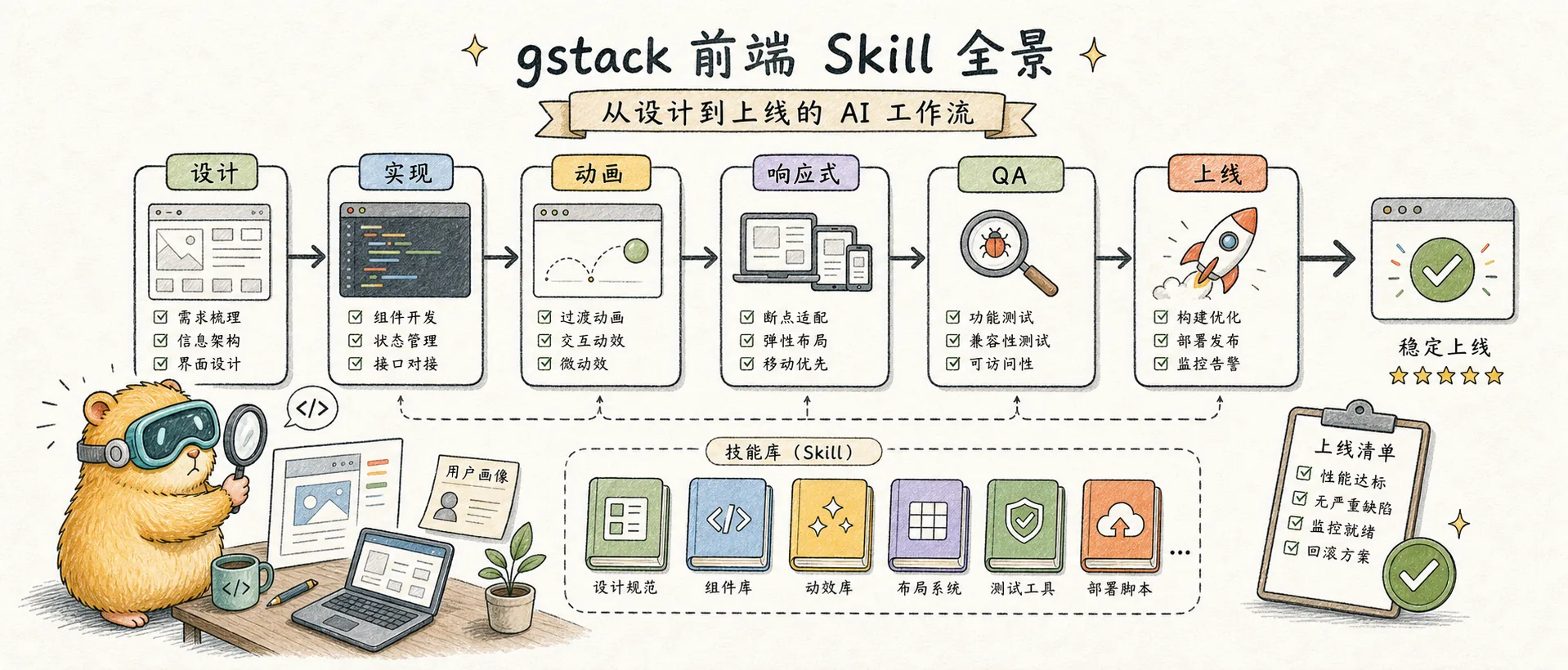
gstack front-end skill panorama: AI workflow from design to launch
System review of 25+ front-end/UI related skills in gstack, recommended development workflow, and real test propositions
Introduction
In previous notes, we talked about What is gstack, How to run through the workflow, and Skill’s engineering structure. But there is one question that has not been discussed - among the 60+ Skills brought after gstack installation, which ones are related to front-end/UI design? In what order? **
This note does two things: first, classify the ~27 skills related to the front end by function, and then use an interesting small project - the countdown anniversary page - to walk through the complete workflow from beginning to end, with screenshots at each stage, so that you can see the actual effect.
Front-end Skill Kit Panorama
gstack's front-end skills can be divided into 6 functional layers, from foundation to roof, with each layer solving problems at different stages.
Design Infrastructure
A one-time setting at the project level to determine the design language, and all subsequent Skills will refer to these benchmarks.
| Skill | What to do | When to use |
|---|---|---|
/design-consultation | Complete design system consultation, output color matching, fonts, spacing, texture direction | When starting a new project, or if you want to redefine the visual style |
/teach-impeccable | Collect design preferences at one time and write them into the AI configuration file | Run once after installing gstack to let AI remember your aesthetics |
/brand-guidelines | Apply existing brand color matching and font specifications | Apply directly when there is an existing brand manual |
If the project already has
DESIGN.md, this level can be skipped.
Design Exploration
When you are unsure about the direction, quickly compare multiple options.
| Skill | What to do | When to use |
|---|---|---|
/design-shotgun | Generate 3-5 visual solutions, open the comparison panel | Not sure what style you want, want to see the possibilities |
/frontend-design | Generate recognizable, production-level front-end interface code | Work directly after the direction is clear |
/canvas-design | Generate posters, visual art (PNG/PDF) | Requires static visual design rather than web components |
Design implementation
Turn the plan into truly runnable code and handle typesetting, layout, and responsiveness.
| Skill | What to do | When to use |
|---|---|---|
/design-html | Convert the confirmed design draft into production-grade HTML/CSS | I have mockups that I want to implement directly |
/mobile-responsiveness | Mobile-first responsive layout and touch interaction | Mobile adaptation from scratch |
/adapt | Breakpoint adaptation across devices and screen sizes | There is a desktop version and needs to be adapted to mobile phones/tablets |
/typeset | Font selection, level, size, thickness, and readability optimization | Text layout looks "almost meaningless" |
/arrange | Layout spacing, visual rhythm, alignment repair | Inconsistent spacing, layout feels crowded or scattered |
Design enhancements
On the basis of functional completion, inject dynamic effects, personality and emotional details.
| Skill | What to do | When to use |
|---|---|---|
/animate | Add purposeful micro-interactions and animations | Page functionality OK but feels "rigid" |
/delight | Add surprise details and personalized touches | Want users to remember this page |
/bolder | Amplify visual impact | Design is too plain and too safe |
/colorize | Add strategic color to the monotonous interface | The page is too gray, too plain, and lacks warmth |
/overdrive | Technical explosion-level effects - shader, spring physics, scroll drive animation | A certain area wants wow effect |
/onboard | New user guidance process, empty state design | First-time user experience |
These four enhancement skills are in a progressive relationship: animate is the basic dynamic effect, delight is emotional, bolder is amplification, and overdrive is explosion. Stack them step by step according to project needs, it is not necessary to use them all.
Design optimization
Convergence and refinement – removing excess, aligning deviations, and polishing rough edges.
| Skill | What to do | When to use |
|---|---|---|
/polish | Final quality polish: alignment, spacing, consistency | One final pass before release |
/quieter | Reduce the intensity of visual stimulation | The design is too fancy and noisy |
/distill | Minimalize and remove unnecessary complexity | There are too many elements on the page and I want to reduce them |
/normalize | Align design system standards (token, spacing, color) | Style deviates from DESIGN.md specifications |
/clarify | Improve UX copywriting, error messages, label wording | Copywriting is confusing, error messages are unfriendly |
Design Review and Verification
Systematic inspection before going online, finding problems, scoring, and fixing them.
| Skill | What to do | When to use |
|---|---|---|
/plan-design-review | Design plan review before implementation (0-10 score) | I want AI to review the plan from a designer's perspective |
/design-review | Visual QA after implementation, automatic screenshot comparison and repair | After the code is written, check the visual restoration degree |
/critique | UX Assessment: Visual Hierarchy, Cognitive Load, Emotional Resonance | Want a structured design review report |
/audit | Technical review: accessibility, performance, themes, responsiveness | Systematic checks before going live |
/benchmark | Performance baseline testing, before/after comparison | Want to quantify the impact of changes on performance |
The front-end related skills in gstack are divided into 6 layers by function - Infrastructure → Exploration → Implementation → Enhancement → Optimization → Review , forming a complete pipeline from design to launch. Instead of running them all every time, you can draw from them as needed.
Practical demonstration: Use the countdown anniversary page to go through the entire process
Just looking at the classification table is too abstract. We use a small project to string together the above skills - making a countdown/anniversary single page: choose a meaningful date and create a countdown display with digital animation and background effects.
This project is small but complete, just enough to cover most of the 6 levels of skills. The complete process is:
基建 → 探索 → 构建 → 增强 → 调优 → 审查 → 发布You don’t have to run all 7 steps every time. After you become proficient, the commonly used links are only
/frontend-design → /animate → /polish → /shipfour steps. In order to show the complete ability, every step is taken here.
Stage 1: Infrastructure - Determine the design language
Skill:/design-consultation + /teach-impeccable
It only needs to be done once at the beginning of the project. Outputs DESIGN.md, which lets the AI remember your design preferences. If the project already has DESIGN.md, skip it directly.
> /design-consultation
"我要做一个倒计时纪念日页面,风格偏好是深色背景、
数字大而醒目、整体氛围温暖但克制"
Stage 2: Exploration - Comparison of multiple options
Skill:/design-shotgun
When unsure of the direction, let AI generate 3-5 visual solutions and open the comparison panel to choose.
> /design-shotgun
"做一个倒计时/纪念日单页,展示距离某个日期的天/时/分/秒,
要有数字翻牌动画,背景有微妙的粒子或渐变效果,
整体氛围要温暖但不俗气。给我 3 个方向。"
Choose a direction from 3 options. If you know exactly what you want, skip this step and go directly to Stage 3.
Stage 3: Build - produce production-level code
Skill:/frontend-design + /adapt
core link. code while ensuring responsiveness is in place from the start.
> /frontend-design
"基于方案 2 实现倒计时页面。要求:
- 实时倒计时(天/时/分/秒)
- 响应式布局(桌面 + 手机)
- 日期可配置"
Stage 4: Enhance – Inject motion and personality
Skill: /animate → /delight (on demand /overdrive)
These three are in a progressive relationship: animate is the basic dynamic effect, delight is the emotional detail, and overdrive is the explosive effect. Add layers as needed.
> /animate
"给倒计时数字加翻牌动画效果,页面加载时有入场动画"

> /delight
"给页面加一些有趣的小细节,比如到达整点时的微庆祝效果"

> /overdrive  (可选,想要 wow effect 的话)
"给背景加粒子效果或流体动画,60fps"
Note the animation constraints referenced to DESIGN.md - if the design system only allows a 150ms hover transition, /overdrive will not apply. This is a good judgment exercise.
Stage 5: Tuning - Convergence and Polishing
Skill: /typeset + /polish (on demand /distill, /normalize)
Spacing alignment, font hierarchy, visual rhythm. If you find you've added too much, use /distill for subtraction.
> /typeset
"检查数字字体的大小、粗细层级是否合理"

> /polish
"最终打磨,检查对齐、间距、暗色模式支持"
Stage 6: Review – Systematic Check
Skill:/design-review + /audit
Visual QA + technical review. /design-review will automatically take screenshots to compare and fix issues, /audit will check accessibility and performance.
> /design-review
"视觉 QA,截图对比桌面和手机端"

> /audit
"检查可访问性和性能"
Stage 7: Release
Skill:/ship
Standard gstack release process - testing, diff review, creating PR.
> /shipExpected results: A visually exquisite countdown page, using 8-10 front-end skills in the process. What's more important is to establish the intuition of "what skill to use at what stage".
Daily cheat sheet
The above is the complete process. If you encounter specific problems in daily development, just check this table:
| My current question | What to use |
|---|---|
| Don’t know what style I want | /design-shotgun |
| The page function is good but it feels "almost useless" | /polish |
| I feel like something is wrong but I can’t explain | /design-review |
| The font/layout looks awkward | /typeset |
| Messy spacing and crowded layout | /arrange |
| Style deviates from the design system | /normalize |
| Want to extract public components | /extract |
| The page is too complex and I want to subtract | /distill |
| The design is too plain and too safe | /bolder or /colorize |
| The design is too fancy and noisy | /quieter |
| The error message text is not friendly | /clarify |
| There is a problem with the display on the mobile phone | /adapt |
| Want to add animation effects | /animate (basic) or /overdrive (explosion) |
| Systematic inspection before going online | /audit |
| debug | /investigate |
Summary
This note does two things:
- Panorama - gstack’s 27 front-end skills are classified into 6 layers (infrastructure→exploration→implementation→enhancement→optimization→review)
- Practical Demonstration - Use a countdown anniversary page to walk through the complete workflow, showing what Skills are used at each stage and why
Key takeaway: The most powerful usage of these Skills is not to call them individually, but to combine them in a pipeline - exploring directions, building implementations, enhancing polishing, and reviewing releases, with clear Skill selection at each stage.
But don’t be tied down by the process – once you’re proficient, /frontend-design → /animate → /polish → /ship four steps is enough most of the time.
gstack - Claude Code Skills
23+ opinionated skills that transform Claude Code from a single AI assistant into a virtual engineering team.
Related Reading:
- gstack Concepts — What is gstack and what problems does it solve?
- gstack Practical Chapter — Complete workflow from installation to runthrough
- gstack Skill Architecture Teardown — What can Skill developers learn?
- Claude Skills Concept — Understand the underlying mechanism of Skills
Comments
gstack Skill architecture dismantling
Systematic dismantling of gstack's engineering design from the perspective of Skill developers: template generation, upgrade mechanism, learning system, preamble injection, status management, prompt engineering skills
Overview
Dismantling mattpocock/skills - why this warehouse that reached 61k stars in 4 months is so popular, and what the 18-minute speech behind it is about. From 5 AI programming failure modes to 5 installable skills, give you a complete Matt Pocock workflow map