
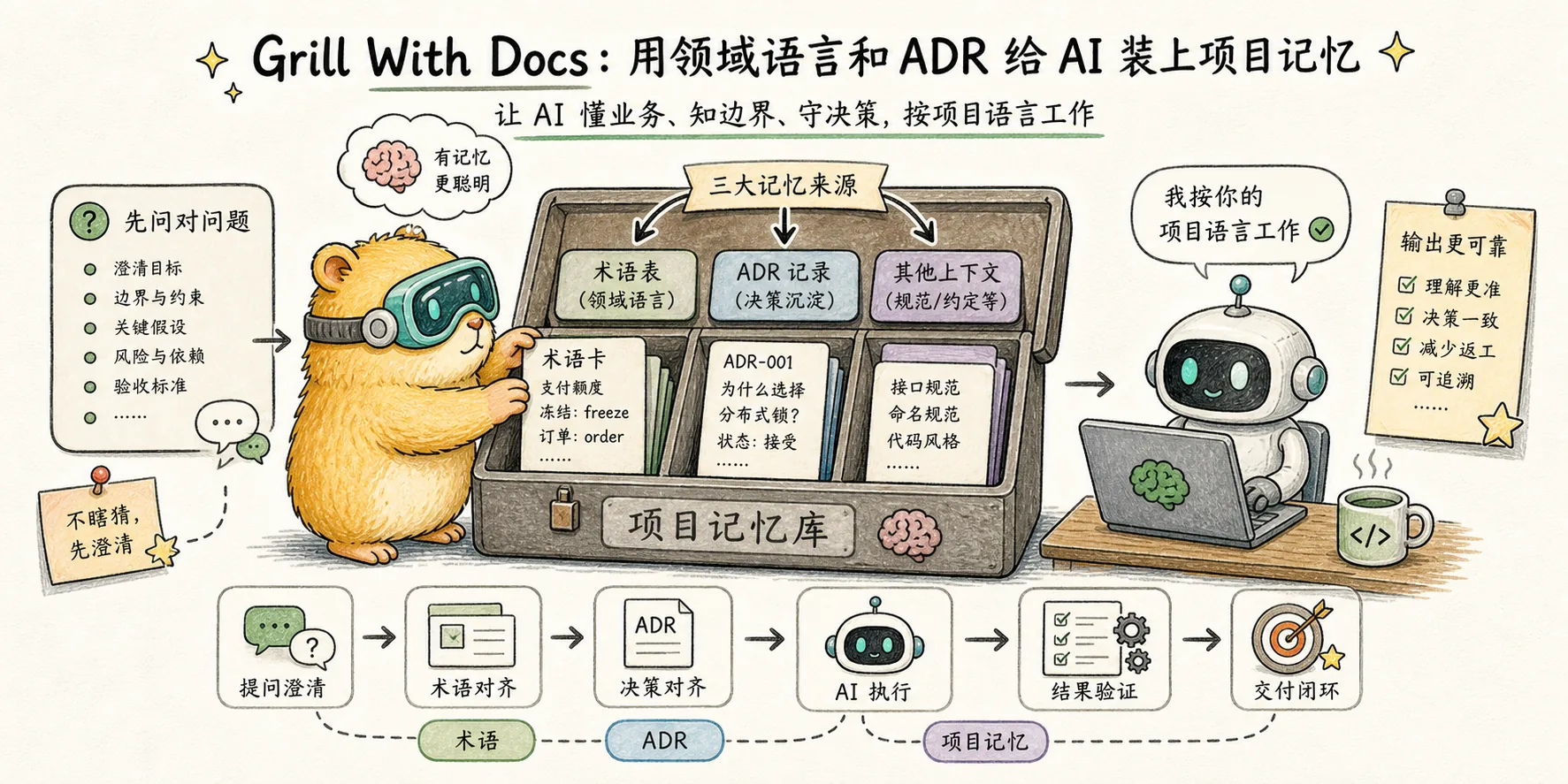
Grill With Docs: Equipping AI with project memory using domain language and ADR
The advanced version of grill-me - while interrogating requirements, it automatically maintains CONTEXT.md (project glossary) and ADR (architectural decision record), and translates DDD's ubiquitous language ideas into workflows that LLM can directly execute.
With a ubiquitous language, conversations among developers, expressions of the code, and conversations with domain experts are all derived from the same domain model.
Failure mode: "AI is too verbose"
The second failure mode in Matt’s speech:
The AI expresses a simple thing in a bunch of verbiage. It's like speaking two languages to you.
This has nothing to do with the amount of code, it's vocabulary misplacement. AI will use general terms ("item", "data", "handler") by default, and the real terms in the project in your mind may be "Course", "Draft Version", "Ghost Lesson". AI doesn't know that these words have specific meanings in your project, so it will create a bunch of synonymous new words around them. The result is:
- Long-winded thinking process (avoid your proprietary words)
- The implementation is misaligned with the design in your mind (because they are not in the same semantic space)
- Not reusable across sessions (the context must be re-established for each conversation)
Classic theory: DDD’s Ubiquitous Language
Matt cited "Domain-Driven Design" by Eric Evans. This book was published in 2003 and proposed the concept of ubiquitous language:
Use the same set of terms to connect domain experts, developers, and code. A word in product discussions, code comments, variable names, documentation - it must mean the same thing.
The goal of DDD is to make code look like the brain of a domain expert. In the AI era, there is a new role: LLM must also be in this language. The LLM is not in the standup meeting, cannot see the product requirements meeting, and cannot understand the slang of your group - it can only learn from the documents you give it.
Matt turned this into a skill: scan the code base to extract terms, generate a markdown file CONTEXT.md, and then align it with both humans and AI.
The Evolution of Skill: From Ubiquitous Language to Grill With Docs
The earliest skill was called ubiquitous-language - it only did one thing: scan the code base to generate a glossary. But Matt later discovered that simply generating a document was not enough:
- Documentation will be out of date: it is generated today, the code is changed tomorrow, and the glossary has not kept up.
- People won’t take the initiative to look at it: It would be dead if you put it there
He refactored it into grill-with-docs, which combined three things:
- Torture Requirements (all abilities inherited from grill-me)
- Challenge existing glossary: The word you said is inconsistent with what is written in CONTEXT.md? Point it out immediately
- Update documents simultaneously when making decisions: New conclusions reached during the torture process are written inline into CONTEXT.md or create a new ADR.
This is a paradigm shift from "generating static documents" to "dialogue is maintaining documents".
Skill full text
Core structure of engineering/grill-with-docs/SKILL.md:
---
name: grill-with-docs
description: Grilling session that challenges your plan against the
  existing domain model, sharpens terminology, and updates
  documentation (CONTEXT.md, ADRs) inline as decisions crystallise.
---

<what-to-do>
Interview me relentlessly about every aspect of this plan until we
reach a shared understanding. Walk down each branch of the design
tree, resolving dependencies between decisions one-by-one. For each
question, provide your recommended answer.

Ask the questions one at a time, waiting for feedback on each question
before continuing.

If a question can be answered by exploring the codebase, explore the
codebase instead.
</what-to-do>

<supporting-info>

## Domain awareness

During codebase exploration, also look for existing documentation:

### File structure

Most repos have a single context:

/
├── CONTEXT.md
├── docs/
│   └── adr/
│       ├── 0001-event-sourced-orders.md
│       └── 0002-postgres-for-write-model.md
└── src/

If a CONTEXT-MAP.md exists at the root, the repo has multiple contexts.

## During the session

### Challenge against the glossary
When the user uses a term that conflicts with the existing language in
CONTEXT.md, call it out immediately.
"Your glossary defines 'cancellation' as X, but you seem to mean Y —
which is it?"

### Sharpen fuzzy language
When the user uses vague or overloaded terms, propose a precise
canonical term.
"You're saying 'account' — do you mean the Customer or the User?
Those are different things."

### Discuss concrete scenarios
When domain relationships are being discussed, stress-test them with
specific scenarios.

### Cross-reference with code
When the user states how something works, check whether the code
agrees. If you find a contradiction, surface it.

### Update CONTEXT.md inline
When a term is resolved, update CONTEXT.md right there. Don't batch
these up — capture them as they happen.

### Offer ADRs sparingly
Only offer to create an ADR when all three are true:
1. Hard to reverse
2. Surprising without context
3. The result of a real trade-off

</supporting-info>
What does the real CONTEXT.md look like?
Matt's own course-video-manager repository gives a complete CONTEXT.md example. Let’s pick a few terms to get a feel for it:
| Terminology | Definition |
|---|---|
| Course | The primary domain entity: a structured collection of versions, sections, lessons, and videos |
| Draft Version | The single mutable CourseVersion that is currently being edited; always the latest by createdAt |
| Published Version | An immutable CourseVersion with a name and description, created by the Publish flow |
| Ghost Lesson | A lesson that exists in the database but not yet on the file system (fsStatus = "ghost") |
| Export Hash | A SHA256 hash derived from a video's clip filenames, timestamps, clip order |
| Unexported Video | A video whose current Export Hash does not match any file on disk; blocks publishing |
| Materialization Cascade | The chain reaction when materializing a lesson inside a ghost course |
| Clip | A timestamped segment of source footage within a video |
| Fractional Index | A string-based ordering value that allows inserting items between existing items |
| Purge | The deliberate deletion of an Exported Video's .mp4 file from disk |
Note a few things:
- Each term is a gerund or proper noun – not a descriptive phrase like “order status”
- Each definition refers to other terms (Course → Version → Lesson → Video) forming an ontology network
- The code field appears directly (
fsStatus = "ghost") - 1:1 mapping of documents and code - Include decision descriptions ("blocks publishing", "chain reaction") - not just nouns, but rules
When writing code, when AI sees this document, it will use "Ghost Lesson" instead of "lesson with no file". Code, conversations, and commit messages are all unified.
ADR: when created
There is an important restraint in Skill:
Only offer to create an ADR when all three are true:
- Hard to reverse — the cost of changing your mind later is meaningful
- Surprising without context — a future reader will wonder "why did they do it this way?"
- The result of a real trade-off — there were genuine alternatives
The culture of ADR (Architecture Decision Record) originated from Michael Nygard's blog in 2011, but many teams use it to write ADR for all decisions - 18 out of 20 ADRs are running accounts. Matt This triangulation is a great tool: ADR is only worthwhile if three conditions are met simultaneously. Otherwise, let it be digested in CONTEXT.md and digested in the code.
How to install and use
Preconditions: Run /setup-matt-pocock-skills first (it will ask you where to put CONTEXT.md and where to put the ADR directory).
Call: /grill-with-docs
Typical process:
- Describe what you want to do
/grill-with-docs- Claude scans CONTEXT.md and docs/adr/ first, loading existing terms and decisions into context
- Start the torture, during the process:
- The word you used conflicts with CONTEXT.md → Point it out on the spot
- You used vague words (for example, "Account" could be either Customer or User) → Let you choose one of the two and drop it into the document
- The behavior you mentioned is inconsistent with the existing code → point out the conflict
- Update CONTEXT.md synchronously when the decision is reached (no backlog, no batch processing)
- Key irreversible decisions → Ask whether to generate an ADR
If there is no CONTEXT.md and docs/adr/ in the project yet - it will be created lazily: the files will not be generated until the first term needs to be written and the first ADR needs to be built. We won’t give you a blank template right off the bat.
##Multiple context projects (CONTEXT-MAP.md)
If the project is too large to fit in one CONTEXT.md (for example, ordering and billing are two independent bounded contexts), you can put CONTEXT-MAP.md in the root directory as the general directory:
/
├── CONTEXT-MAP.md                    ← 总目录
├── docs/adr/                         ← 系统级决策
├── src/
│   ├── ordering/
│   │   ├── CONTEXT.md
│   │   └── docs/adr/                 ← 模块级决策
│   └── billing/
│       ├── CONTEXT.md
│       └── docs/adr/
/grill-with-docs will automatically recognize the existence of CONTEXT-MAP.md and jump to the corresponding subdirectory. This is a direct implementation of the concept of bounded context in DDD - "orders" in each context may have different meanings, and are maintained separately to avoid contamination.
The difference between ## and grill-me
| dimensions | /grill-me | /grill-with-docs |
|---|---|---|
| Questioning ability | ✅ | ✅ (inherit all) |
| Project terminology verification | ❌ | ✅ |
| Real-time updates CONTEXT.md | ❌ | ✅ |
| ADR trigger judgment | ❌ | ✅ |
| Applicable stage | Early ideas, personal projects | Real projects with domain complexity |
| Startup cost | 0 | Requires setup + Have/are willing to build CONTEXT.md in the project |
Simple and crude judgment:
- Personal scripts, writing articles, teaching courses →
/grill-me - Real projects that require long-term maintenance →
/grill-with-docs
A counter-intuitive benefit: Let the AI learn to "shut up"
CONTEXT.md isn't just for AI - it's for future AI sessions. Every time a new conversation starts, Claude can instantly enter the project context by reading CONTEXT.md, saving a long onboarding.
What’s even more subtle is: Matt said in his speech that after adding CONTEXT.md he could see in AI’s thinking trace——
"It allows the AI to think in a less verbose way."
Why? Because without CONTEXT.md, the AI has to constantly define its own terms when thinking - "the user, by which I mean the person who ordered the item, hereinafter referred to as...". With CONTEXT.md it directly says "Customer", the thinking chain is much shorter and the response is faster.
LLM’s token economics determines: shortening the thinking path = faster, more accurate, and cheaper output. CONTEXT.md is the hidden lever for this efficiency.
Notes
CONTEXT.md will be significantly changed for the first run. If there is already a handwritten CONTEXT.md in the project, git stash first or let it dry-run before running (you can add a sentence in the prompt "List the content to be changed first, do not write the file directly").
ADR Moderation is Real Moderation. Don’t get excited and make every decision generate an ADR, your docs/adr/ will be full of garbage in 6 months. Matt’s three criteria must be strictly followed.
CONTEXT.md Do not put implementation details. There is a saying in Skill: "Don't couple CONTEXT.md to implementation details. Only include terms that are meaningful to domain experts." Writing "PostgreSQL" into CONTEXT.md is wrong - domain experts don't care about database selection, that's a matter of ADR.
Reference resources
grill-with-docs/SKILL.md (源码)
The full SKILL.md including supporting-info on domain awareness, ADR discipline, and multi-context handling.
course-video-manager CONTEXT.md (真实例子)
A real-world CONTEXT.md from Matt's own video editor project. Use as a template for what good ubiquitous language docs look like.
Skills Changelog: ubiquitous-language → grill-with-docs
Matt's writeup on why he merged the standalone ubiquitous-language skill into a new conversational version.
Next article: to-PRD + to-Issues: From dialogue to executable ticket——After the torture, how to solidify the dialogue into an executable work unit.
Comments
Grill Me
Matt Pocock's most popular skill, 7-line markdown, allows Claude to align with your needs for 30 to 45 minutes before starting to do it - dismantling its working principle, the difference from the plan mode that comes with Claude Code, and how to extend it to non-programming scenarios
PRDs and Issues
The middle part of Matt Pocock's workflow - /to-prd turns the conversation into a PRD, and /to-issues cuts the PRD into vertically sliced issues that can be collected independently. In-depth interpretation of the new role of the two old concepts of "tracer bullet" and "vertical slice" in the AI era