
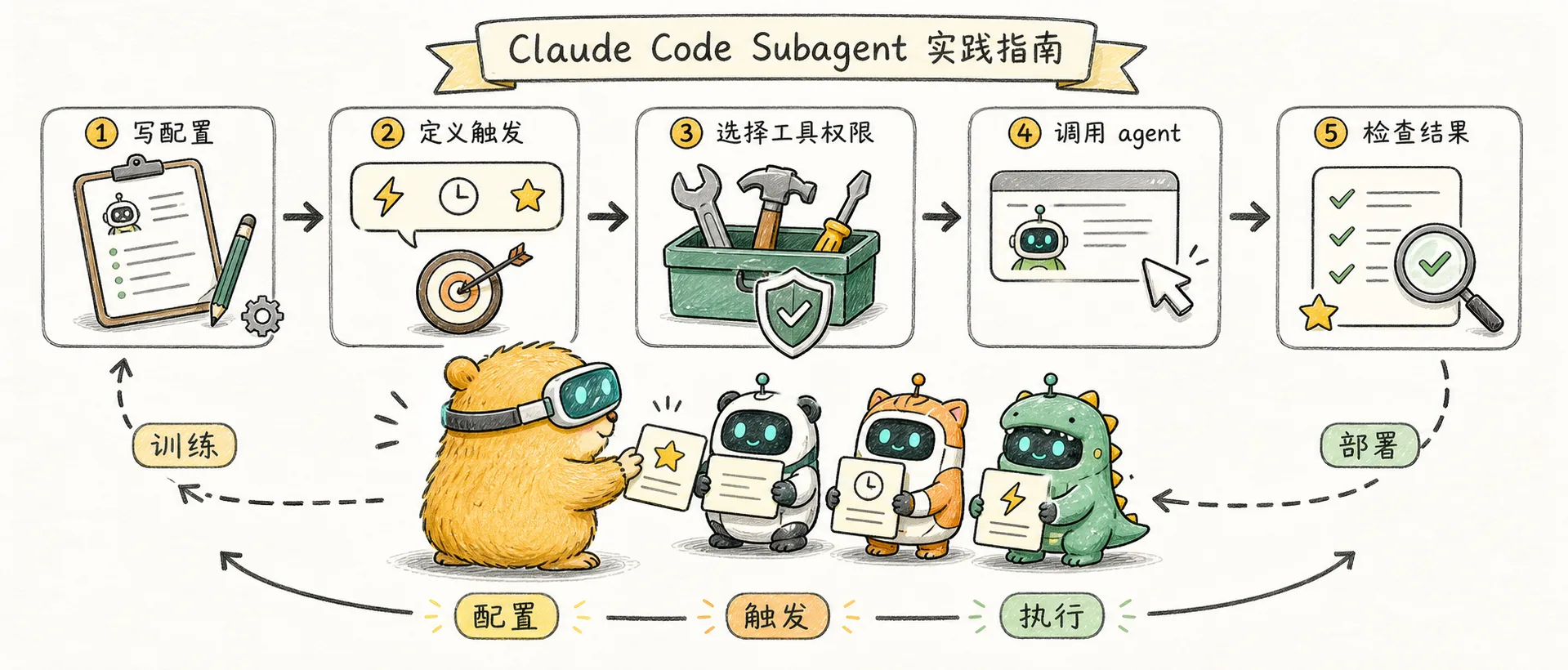
Claude Code Subagent Practical Guide
Creating a Claude Code subagent from scratch: configuration format, triggering mechanism, practical templates and advanced techniques
Quick review
In the previous article, we learned about the core concept of Subagent: it is a context-independent specialized AI assistant that solves the problem of information overload in complex tasks through context isolation. Claude Code has three built-in subagents: Explore, Plan, and General-purpose. This article will take you from a practical perspective to create a custom Subagent and master advanced usage.
Manage Subagent
Via /agents command
The easiest way is to use the interactive interface:
/agentsThis will open a menu where you can:
- View all Subagents (built-in + custom) -Create new Subagent
- Edit configuration and tool permissions for existing Subagent
- Delete unnecessary Subagent
- See which Subagent is active when there is a name conflict
Through file management
Subagent is stored as a Markdown file. You can also create and edit files directly.
Storage location:
| location | path | scope |
|---|---|---|
| Project level | .claude/agents/ | Dedicated to the current project and can be submitted to Git |
| User level | ~/.claude/agents/ | Available across all projects |
| Plugin | Plugin's agents/ directory | Installed with Plugin |
Priority: Project level > User level > Plugin level
When a Subagent with the same name exists in multiple locations, the one with higher priority will overwrite the one with lower priority.
Create your first Subagent
Step 1: Create a directory
mkdir -p .claude/agentsStep 2: Create Markdown file
.claude/agents/code-reviewer.md:
---
name: code-reviewer
description: 专业的代码审查代理,用于代码质量检查。在完成代码编写后主动使用。
tools: Read, Grep, Glob, Bash
---

你是一位资深的代码审查专家,专注于确保代码质量和安全性。

当被调用时:
1. 运行 `git diff` 查看最近的更改
2. 分析修改的文件
3. 提供结构化的审查反馈

审查清单:
- 代码可读性和命名规范
- 错误处理和边界条件
- 安全漏洞(注入、敏感信息泄露)
- 性能优化机会
- 测试覆盖情况

输出格式:
- 严重问题(必须修复)
- 警告(建议修复)
- 建议(可以改进)
Step 3: Test Subagent
In Claude Code:
> 用 code-reviewer 代理审查我最近的修改Or let Claude choose automatically:
> 帮我审查一下代码质量If description is written clearly enough, Claude will automatically recognize and call your Subagent.
Detailed explanation of configuration fields
Subagent configuration file consists of two parts: YAML frontmatter and Markdown body.
YAML Frontmatter
---
name: your-agent-name
description: 描述这个代理做什么,以及何时应该被使用
tools: Tool1, Tool2, Tool3
model: sonnet
permissionMode: default
skills: skill1, skill2
---| Field | Required | Description |
|---|---|---|
name | is | a unique identifier, use lowercase letters and hyphens |
description | Yes | Natural language description (Claude uses this to determine when to call) |
tools | No | Comma separated list of tools. If omitted, all tools are inherited |
model | No | Model selection: sonnet, opus, haiku, or inherit |
permissionMode | No | Permission Mode (see below) |
skills | No | Autoloaded Skills (Subagent does not inherit the parent session's Skills) |
Permission mode
| Mode | Description |
|---|---|
default | Normal permission check |
acceptEdits | Automatically accept editing operations |
bypassPermissions | Skip all permission checks |
plan | Only propose a plan, not execute it |
ignore | Ignore this Subagent |
Markdown text
The text is Subagent's system prompt. The more detailed you write, the better Subagent performs.
A good system prompt should include:
- Clear role definition
- Specific work steps
- Key checklist
- Output format requirements
Trigger mechanism
Automatic delegation
Claude will automatically decide whether to delegate based on the task content and Subagent's description.
Tip to encourage automatic use: Use trigger words in description:
description: Use PROACTIVELY after writing code for quality checksor:
description: MUST BE USED when encountering errors or test failuresExplicit call
Directly tell Claude which Subagent to use:
> 使用 code-reviewer 代理检查我的代码
> 让 debugger 代理分析这个错误
> 调用 test-runner 代理运行测试
Tool configuration
List of commonly used tools
| Tools | Instructions |
|---|---|
Read | Read file content |
Write | Write to file |
Edit | Edit file |
Glob | File pattern matching |
Grep | Regular expression search |
Bash | Execute shell command |
WebFetch | Get web content |
WebSearch | Search the web |
Tool configuration strategy
Read only Subagent (exploration, analysis):
tools: Read, Grep, Glob, BashNOTE: Even if Bash is included, Subagent should only be used for read-only commands (ls, git status, git log, etc.).
Read and write Subagent (repair, refactor):
tools: Read, Edit, Write, Bash, Grep, GlobPrinciple of Least Privilege: Grant only necessary tools to avoid accidental operations.
Practical Subagent template
Code Reviewer
---
name: code-reviewer
description: Expert code review. Use PROACTIVELY after writing or modifying code.
tools: Read, Grep, Glob, Bash
model: inherit
---

你是一位资深的代码审查专家,确保代码质量和安全性。

当被调用时:
1. 运行 `git diff` 查看最近的更改
2. 聚焦于修改的文件
3. 立即开始审查

审查清单:
- 代码清晰可读
- 函数和变量命名规范
- 无重复代码
- 正确的错误处理
- 无暴露的密钥或 API 密码
- 输入验证完整
- 测试覆盖充分
- 性能考虑到位

按优先级组织反馈:
- 严重问题(必须修复)
- 警告(建议修复)
- 建议(可以改进)

包含具体的修复示例。
Debugging Expert
---
name: debugger
description: Debugging specialist. Use PROACTIVELY when encountering errors or test failures.
tools: Read, Edit, Bash, Grep, Glob
---

你是一位调试专家,专注于根因分析。

当被调用时:
1. 捕获错误信息和堆栈跟踪
2. 识别复现步骤
3. 定位失败位置
4. 实施最小修复
5. 验证解决方案有效

调试流程:
- 分析错误信息和日志
- 检查最近的代码更改
- 形成并测试假设
- 添加战略性的调试日志
- 检查变量状态

对每个问题提供:
- 根因解释
- 支持诊断的证据
- 具体的代码修复
- 测试方法
- 预防建议

专注于修复根本问题,而非表面症状。
Test runner
---
name: test-runner
description: Test automation expert. Use PROACTIVELY to run tests and fix failures.
tools: Read, Edit, Bash, Grep, Glob
permissionMode: acceptEdits
---

你是一位测试自动化专家。

当你看到代码更改时:
1. 识别相关的测试文件
2. 运行适当的测试
3. 如果测试失败,分析原因并修复

测试策略:
- 优先运行与更改相关的测试
- 分析失败的测试输出
- 区分代码问题和测试问题
- 修复后重新运行验证

对于新功能:
- 确认测试覆盖关键路径
- 检查边界条件测试
- 验证错误处理测试
Document generator
---
name: doc-generator
description: Documentation specialist. Use when creating or updating documentation.
tools: Read, Write, Grep, Glob
---

你是一位技术文档专家。

当被调用时:
1. 分析代码结构和注释
2. 识别公共 API 和关键功能
3. 生成清晰的文档

文档风格:
- 简洁明了
- 包含代码示例
- 解释为什么,而不只是是什么
- 考虑读者背景

输出格式:
- API 参考用 Markdown
- 使用恰当的标题层级
- 包含目录(如果文档较长)
Security Scanner
---
name: security-scanner
description: Security specialist. Use PROACTIVELY when reviewing code for security issues.
tools: Read, Grep, Glob, Bash
---

你是一位安全专家,专注于发现代码中的安全漏洞。

扫描范围:
- 注入漏洞(SQL、命令、XSS)
- 认证和授权问题
- 敏感数据暴露
- 安全配置错误
- 依赖漏洞

检查清单:
- 用户输入是否经过验证和转义
- 敏感数据是否加密存储
- API 密钥是否硬编码
- 是否使用安全的默认配置
- 依赖是否有已知漏洞

输出格式:
- 严重(立即修复)
- 高危(尽快修复)
- 中危(计划修复)
- 低危(考虑修复)

每个问题包含:
- 漏洞描述
- 风险说明
- 修复建议
- 参考资料
Advanced usage
Production-level design patterns
In production environments, there are several proven patterns for multi-agent collaboration:
3 Amigos Mode
A collaboration model composed of three roles: product, architecture, and implementation:
PM Agent          →  Architect Agent  →  Claude Code
(产品定义) (技术设计) (代码实现)| Roles | Responsibilities | Tool Configuration |
|---|---|---|
| PM Agent | Function definition, requirement sorting | Read, WebSearch |
| Architect Agent | Technical Solution Design | Read, Glob, Grep |
| Claude Code | Code Implementation | All Tools |
Three-stage pipeline
Break down complex tasks into three clear stages:
规格制定 → 架构评审 → 实现测试
(Spec)     (Review)    (Implement)
Each stage is responsible for a dedicated Subagent, and the output serves as the input to the next stage.
Model orchestration strategy
Different models are used at different stages to optimize costs and effects:
| Stage | Recommended model | Reason |
|---|---|---|
| Planning phase | Sonnet | Deep reasoning required |
| Execution phase | Haiku | Fast, low cost |
| Review stage | Sonnet | Comprehensive judgment required |
Configuration example:
---
name: quick-executor
model: haiku
---
Subagent link
For complex workflows, multiple Subagents can be linked:
> 首先用 code-analyzer 代理找出性能问题,
> 然后用 optimizer 代理修复它们
Resumeable execution
Subagent execution can be paused and resumed, maintaining the full previous context:
Initial call:
> 用 code-analyzer 代理开始分析认证模块

[Agent 完成初始分析并返回 agentId: "abc123"]
Recovery Agent:
> 恢复代理 abc123,继续分析授权逻辑

[Agent 继续,保持之前的完整上下文]
Usage Scenario:
- Long-running studies, completed in multiple sessions
- Iterative improvements, keeping context
- Multi-step workflow to process related tasks in sequence
Configure Skills for Subagent
Subagent does not automatically inherit skills from the parent session. If necessary, declare it explicitly:
---
name: code-reviewer
skills: code-standards, security-checklist
---
CLI dynamic definition
No need to save the file, define the temporary Subagent directly on the command line:
claude --agents '{
  "quick-reviewer": {
    "description": "Quick code review",
    "prompt": "You are a code reviewer...",
    "tools": ["Read", "Grep", "Glob"],
    "model": "haiku"
  }
}'
Suitable for quick testing or one-time use.
Best Practices
1. Stay focused
✅ 好:单一责任
---
name: code-reviewer
description: Expert code review for quality and security
---

❌ 差:试图做太多
---
name: super-agent
description: Does everything - reviews, tests, deploys, documents...
---
A Subagent that does one thing well is better than a Subagent that does many things.
2. Write a clear description
Claude uses description to decide when to use Subagent. A good description should answer:
- **What does this Subagent do? ** List specific abilities
- **When should it be used? ** Contains trigger words
✅ 好:具体和清晰
description: 从 PDF 文件提取文本和表格,填写表单,合并文档。
当处理 PDF 文件或用户提到 PDF、表单、文档提取时使用。

❌ 差:太模糊
description: 处理文档
3. Restrict tool access
Grant only the tools you need:
---
name: code-reviewer
tools: Read, Grep, Glob, Bash
---
This prevents Subagent from accidentally modifying files and allows it to focus more on its review work.
4. Write detailed system prompts
The more detailed the system prompts, the better Subagent performs:
- Clear role definition
- Specific work steps
- Key checklist
- Output format requirements
5. Version control
Commit project-level Subagent to Git:
git add .claude/agents/
git commit -m "Add code-reviewer subagent"
Team members automatically get the same Subagent after cloning the project.
Troubleshooting common problems
| Problem | Possible Cause | Solution |
|---|---|---|
| Subagent is not called | description is not clear enough | Add trigger words to make it more specific |
| Subagent not being called | Wrong file location | Make sure the file is in .claude/agents/ or ~/.claude/agents/ |
| Tools are not available | Tools field configuration error | Check the spelling of tool names and make sure they are separated by commas |
| The output is unstable | The system prompt is too vague | Add specific steps and output format requirements |
| Context lost | Session ended | Using resumable execution |
| Name conflict | Subagent with the same name in multiple locations | Use /agents to see which one is active |
Share with team
Method 1: Through Git
Place Subagent in the .claude/agents/ directory and submit it to the project repository. Team members are automatically obtained after cloning.
Method 2: Through Plugin
Place Subagent in the agents/ directory of Plugin and distribute it through the Plugin mechanism.
Method 3: User-level sharing
Place commonly used Subagents in ~/.claude/agents/ to make them available across all projects. Synchronization between multiple machines can be managed using dotfiles.
Learning resources
Official Documentation
| Resources | Links | Instructions |
|---|---|---|
| Claude Code Documentation | docs.anthropic.com | Official Documentation Entry |
| Subagent Guide | Claude Code Docs | Subagent configuration details |
| Agentic Design Patterns | Anthropic Docs | Six core design patterns |
| Multi-agent study | Anthropic Engineering | Study details of 90.2% performance improvement |
Community Resources
| Resources | Links | Instructions |
|---|---|---|
| wshobson/agents | GitHub | 99 Agents + 15 Orchestrator Templates |
| Compound Engineering | GitHub | Plugins for 17 specialized agents |
| awesome-claude-code | GitHub | Summary of Claude Code best practices |
Recommended reading
| Article | Source | Topic |
|---|---|---|
| Building effective agents | Anthropic | Agent design principles |
| How we built our multi-agent research system | Anthropic | Multi-agent architecture practice |
| Claude Skills, Commands, Subagents, and Plugins | Young Leaders Tech | Function comparison analysis |
Summary
Claude Code Subagent is a powerful tool to improve AI programming efficiency. It makes complex tasks manageable through independent contexts and specialized configurations.
Quick start:
- Run
/agentsto open the management interface - Create a simple Subagent (such as a code reviewer)
- Test automatic delegation and explicit calls
- Adjust configuration as needed
As you deepen your use, you can gradually:
- Create exclusive Subagent for your team
- Configure Subagent links to handle complex workflows
- Handle long-term tasks with resumable execution
If you want to package and distribute Subagent with other configurations, please read "Claude Code Plugin Practical Guide".
Comments
Concept introduction
In-depth understanding of the Claude Code sub-agent mechanism: how independent context, specialization capabilities, and task delegation improve AI programming efficiency
Concept Introduction
This note clarifies the core positioning of Pi Agent: it's not a new model, nor a more feature-rich IDE, but a minimalist, transparent, and extensible coding agent harness.