
I Made a Raycast Version of Clash
My old client kept crashing, and all I needed was to start it, enable system proxy, manually pin nodes, automatically select the fastest node, and schedule rules. So, I moved Clash's daily control plane into Raycast.
As everyone knows, for a programmer, if you can't connect to the external network, you can't work.
This sounds like a joke, but often it's true. GitHub won't open, documentation is inaccessible, AI coding assistants can't connect, package managers fail to download, and the workflow grinds to a halt.
So I've always needed a stable proxy client.
But I don't know when it started, the software I used to use frequently crashed. Every time it crashed, I had to reopen it, confirm if the system proxy was active, and check if the node was still alive. The most annoying part wasn't that a certain website wouldn't open, but that I didn't know where the problem actually lay.
Did the client not start? Was the system proxy off? Was the node down? Were the rules wrong? Or was the browser not using the proxy at all?
What I really wanted wasn't a full-featured, large client.
I don't need to check logs daily, nor do I need complex settings or a persistent window. I just need a few high-frequency actions:
- Start on boot.
- System proxy automatically enabled.
- Unified management of multiple subscriptions.
- Frequently used nodes can be manually pinned or automatically select the fastest.
- Rules can be quickly adjusted.
- When problems arise, I can identify which layer is broken.
Since these actions are all short, why not put them directly into Raycast?
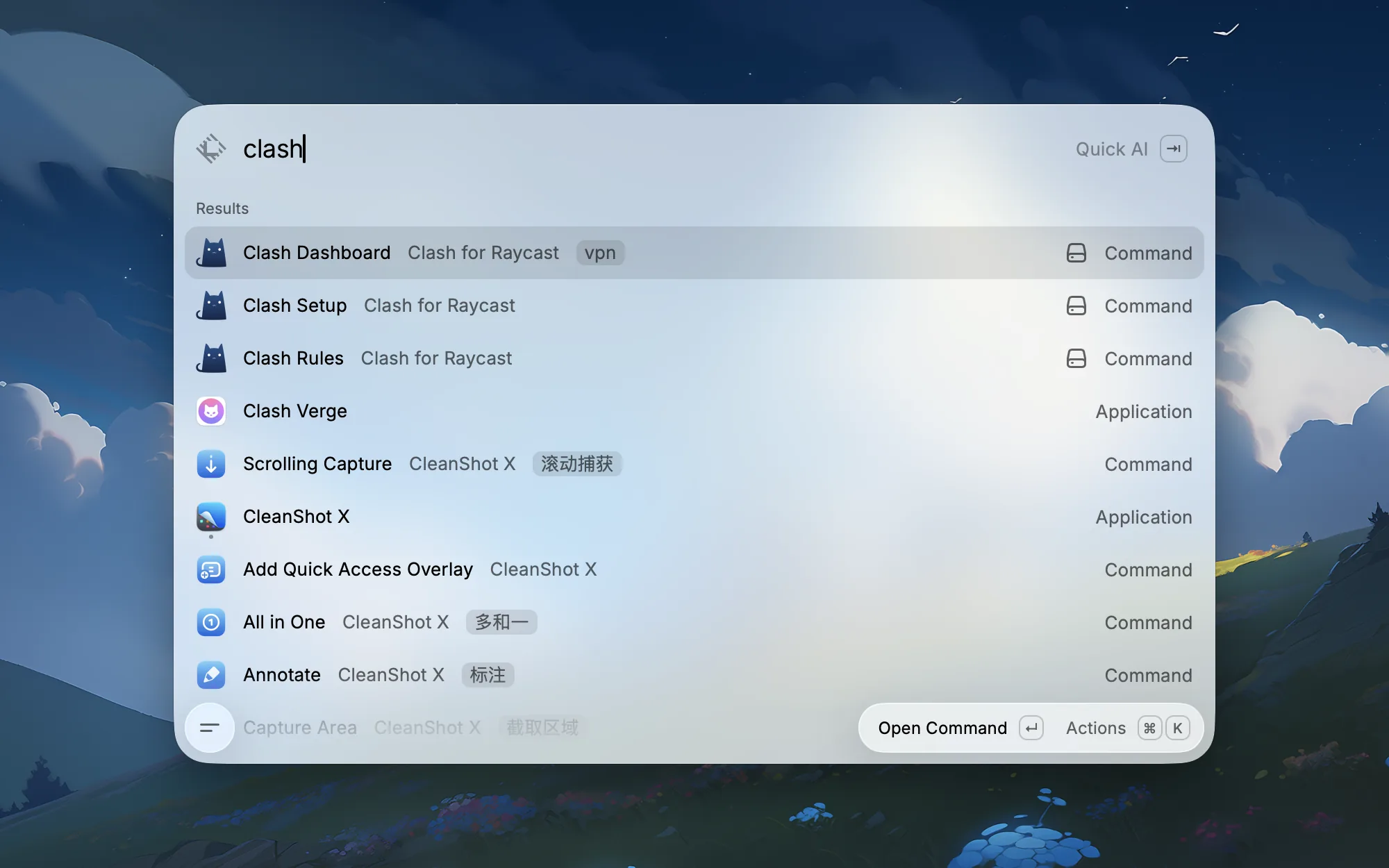
So I made a plugin: Clash for Raycast.
Not a Full Client
This project was never intended to rewrite a complete Clash client.
There are already many mature options. Clash Verge Rev is a full GUI, supporting cross-platform, TUN, enhanced configurations, and visual editing of nodes and rules. FlClash takes a cross-platform approach for desktop and mobile. ClashX is more like a traditional macOS menu bar client.
These products solve the problem of a "complete proxy client."
I wanted to solve something else: when a proxy is just infrastructure in a development workflow, can the control plane be shorter?
Every day, I already launch applications, search for commands, execute scripts, and manage development tools in Raycast. For me, a proxy tool should also be like a command, not an independent window that I need to switch to and study.
So this plugin only retains three entry points:
| Command | What it's for |
|---|---|
Clash Setup | Installs core, generates configuration, starts background service, checks health status |
Clash Dashboard | Views status, switches routes, manages subscriptions, tests nodes, switches node modes, toggles system proxy |
Clash Rules | Views rules, adds custom rules, adjusts rule order |
This isn't about more features, but a shorter path.
First, Complete Initialization
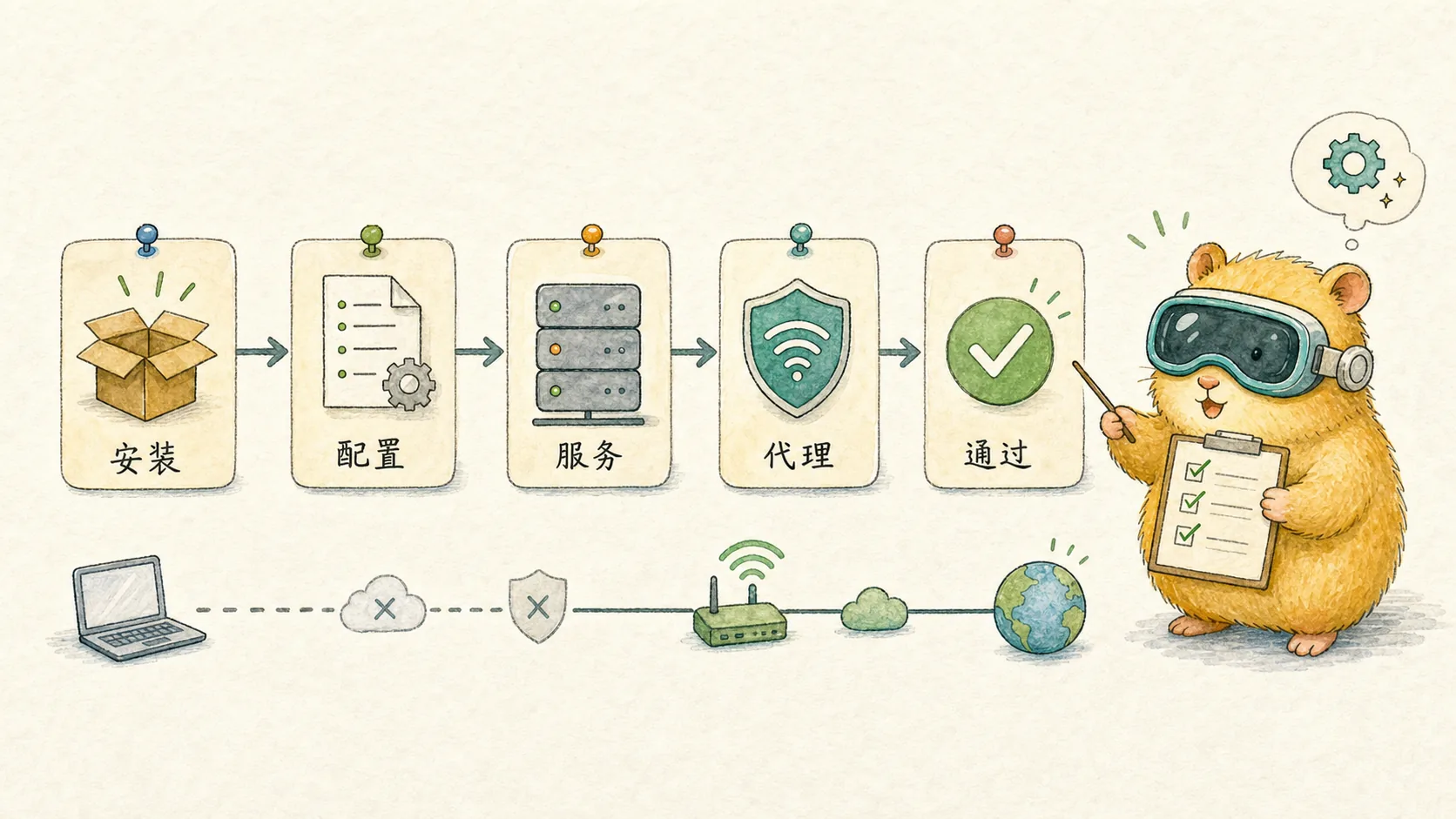
After installing the plugin, the first entry point should be Clash Setup.
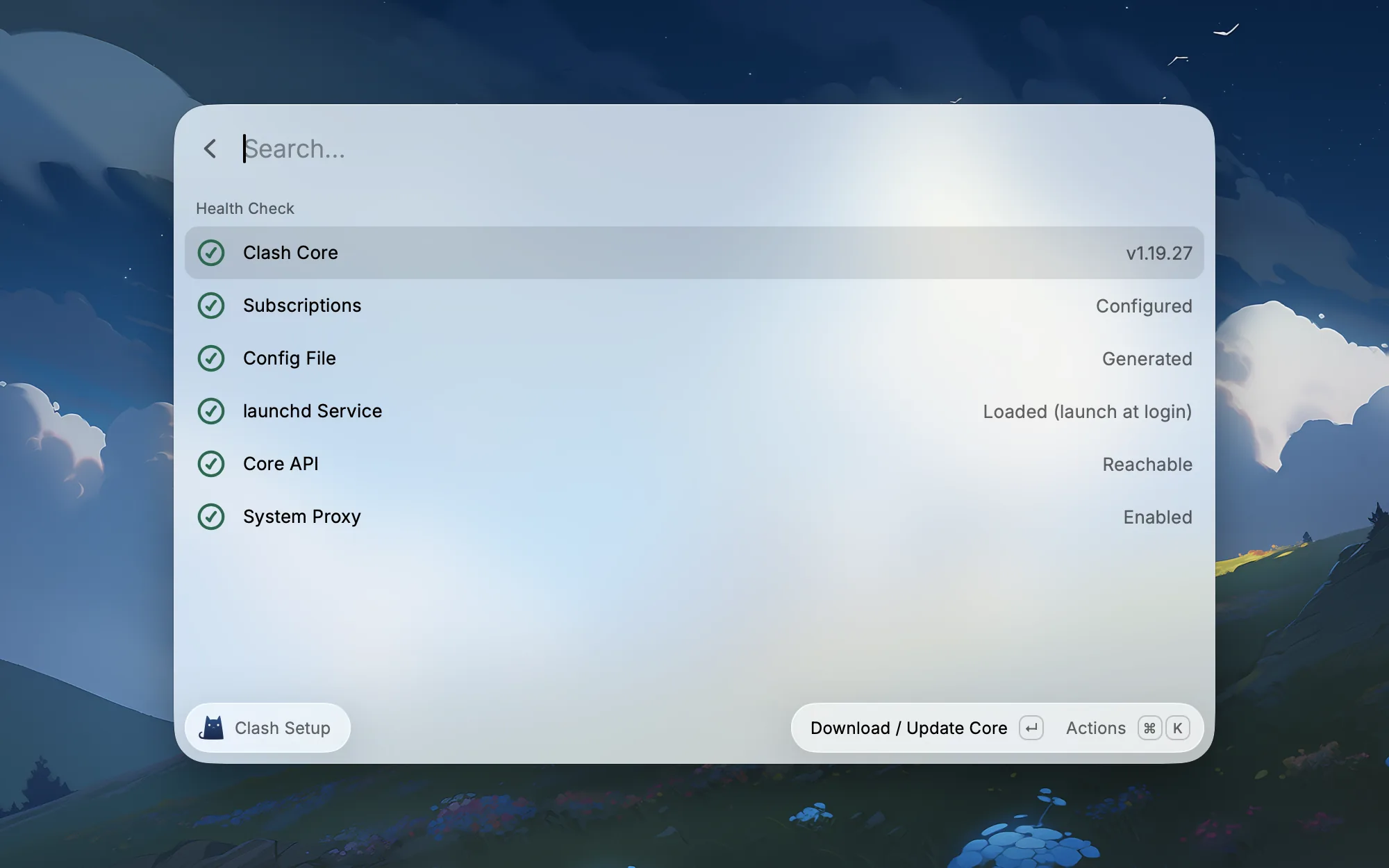
It's responsible for getting the infrastructure up and running: installing the core, generating the configuration, starting the background service, and checking the Core API and system proxy.
Once this step is complete, daily use will revert to Clash Dashboard and Clash Rules. If network issues arise later, I'll return here first to see which layer isn't ready.
First, Check Status
What I need most is a central control panel.
Previously, when encountering network problems, I had to guess: was the system proxy off, was the core not running, was there a port conflict, were the rules misconfigured? Now, opening Clash Dashboard immediately shows the critical status.
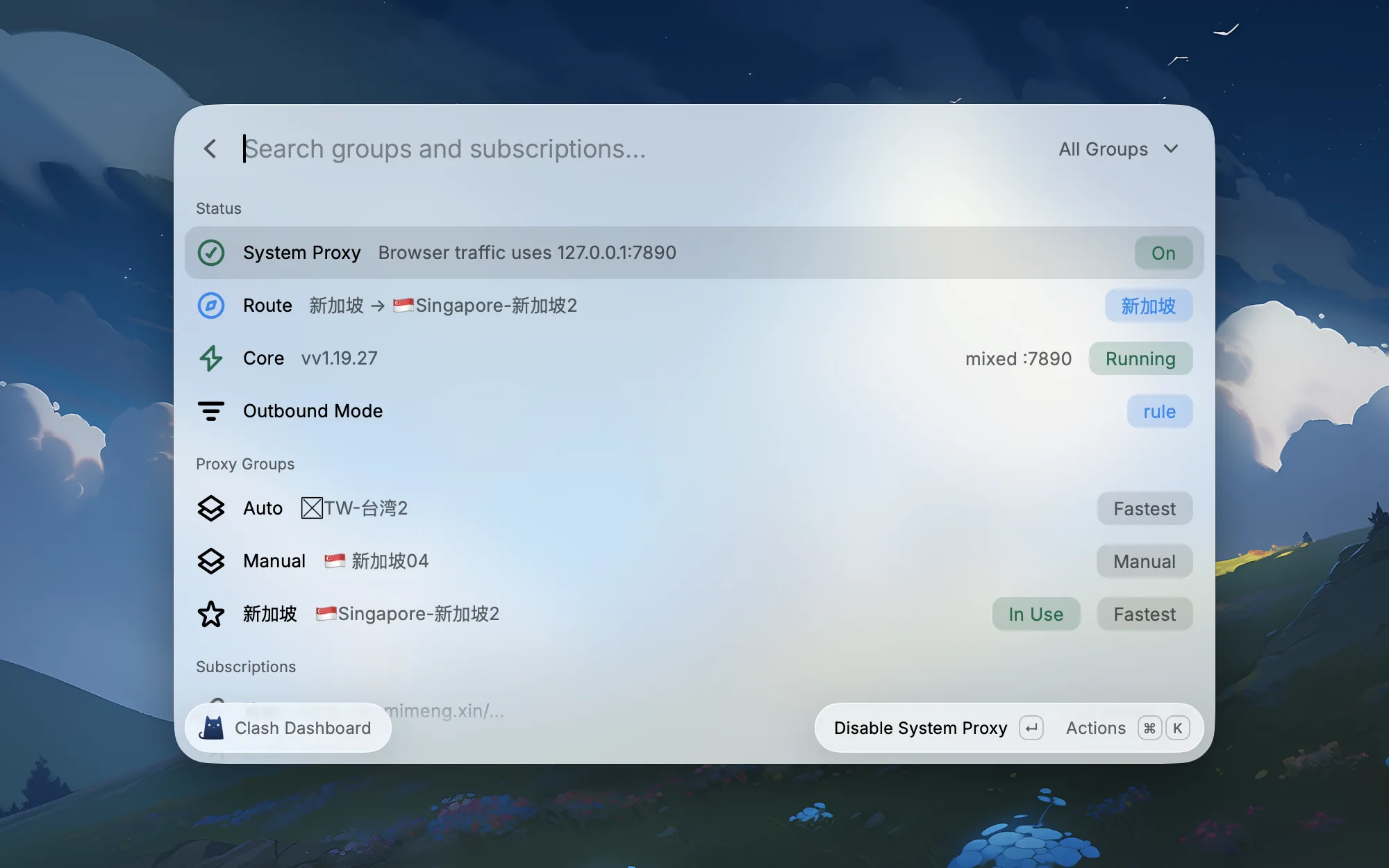
This page doesn't aim for comprehensive information, only for me to quickly determine if I can work now.
Is the system proxy on or off, what is the current route, is the core running, is it in rule mode or another mode, which common proxy group is currently selected—this information is sufficient.
If I just want to temporarily switch to a certain route, I don't need to open the full client. In Raycast, select the route, press Enter, and it's done.
Then, Select Nodes
My most desired feature is actually fixed routes.
For example, I often want to use a Singapore node. But "using Singapore" actually refers to two completely different scenarios.
One is when I already know which node is stable and want to fix it, not wanting the client to switch around. The other is when I only care which node in this group is the fastest, hoping it selects automatically based on latency.
So my real need isn't simply "automatic selection," but rather putting all Singapore nodes from all subscriptions into one group, and then deciding based on the day's work status: manually pin, or automatically select the fastest.
This is custom proxy groups.
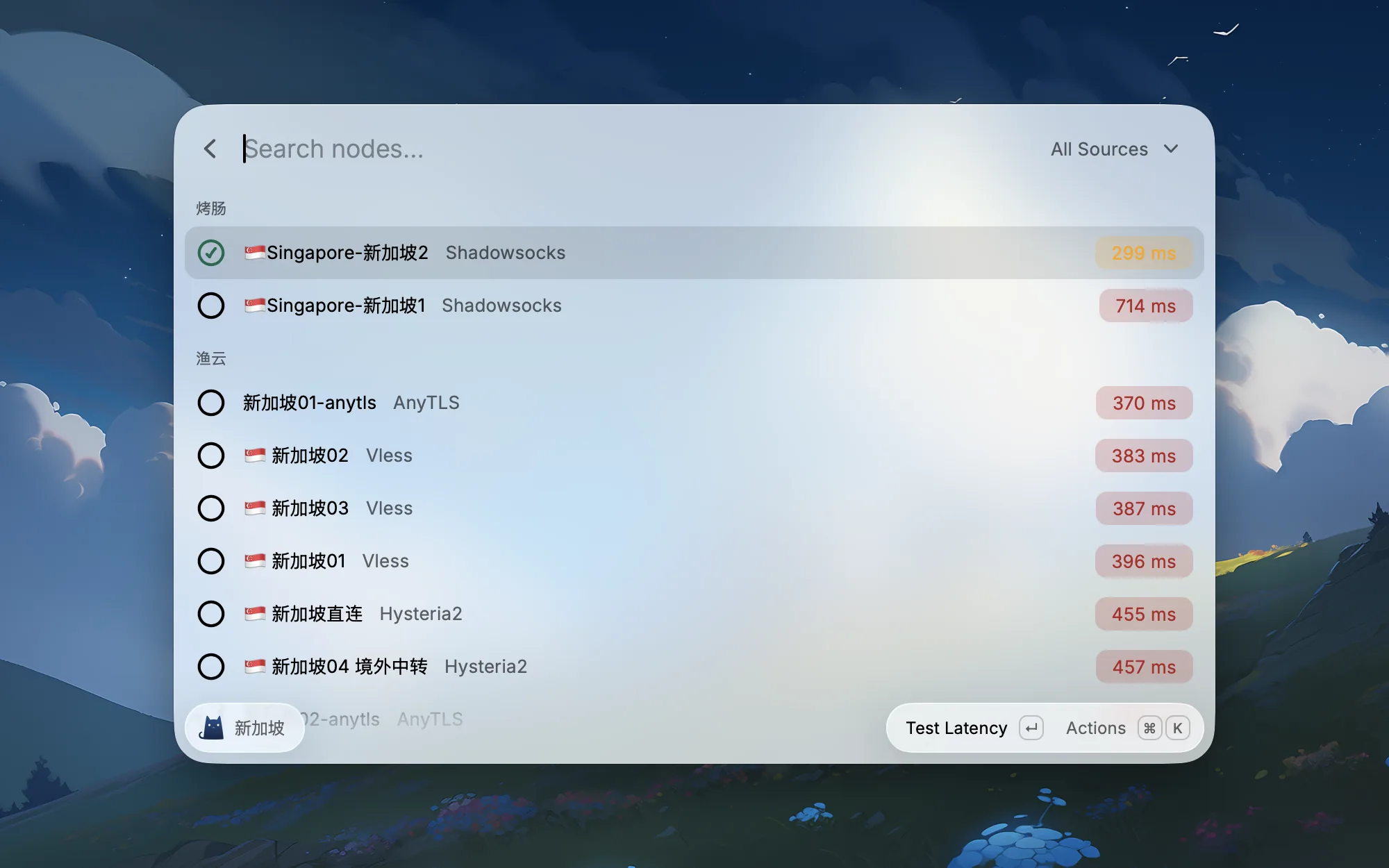
Custom groups only retain two modes:
| Strategy | Meaning |
|---|---|
Manual Select | I manually select a node, suitable when a stable, fixed route is needed |
Always Fastest | Automatically selects the fastest among the chosen nodes, suitable when only latency matters |
This aligns better with my usage habits than exposing all strategies.
Sometimes I want to say: "Use this node today, don't change it." Sometimes I want to say: "Use Singapore today, you pick the specific node for me."
Both of these actions should be completed on the same node page, rather than forcing me back to the configuration file to modify proxy groups.
Rules Must Be Easy to Adjust
Another high-frequency issue is rules.
Often, it's not that the node is broken, but that the rules are routing traffic in the wrong direction. For example, if a certain development tool, AI service, or overseas documentation site isn't covered by the rule set, it ends up going direct, leading to failures that are difficult to diagnose.
So I created a Clash Rules page.
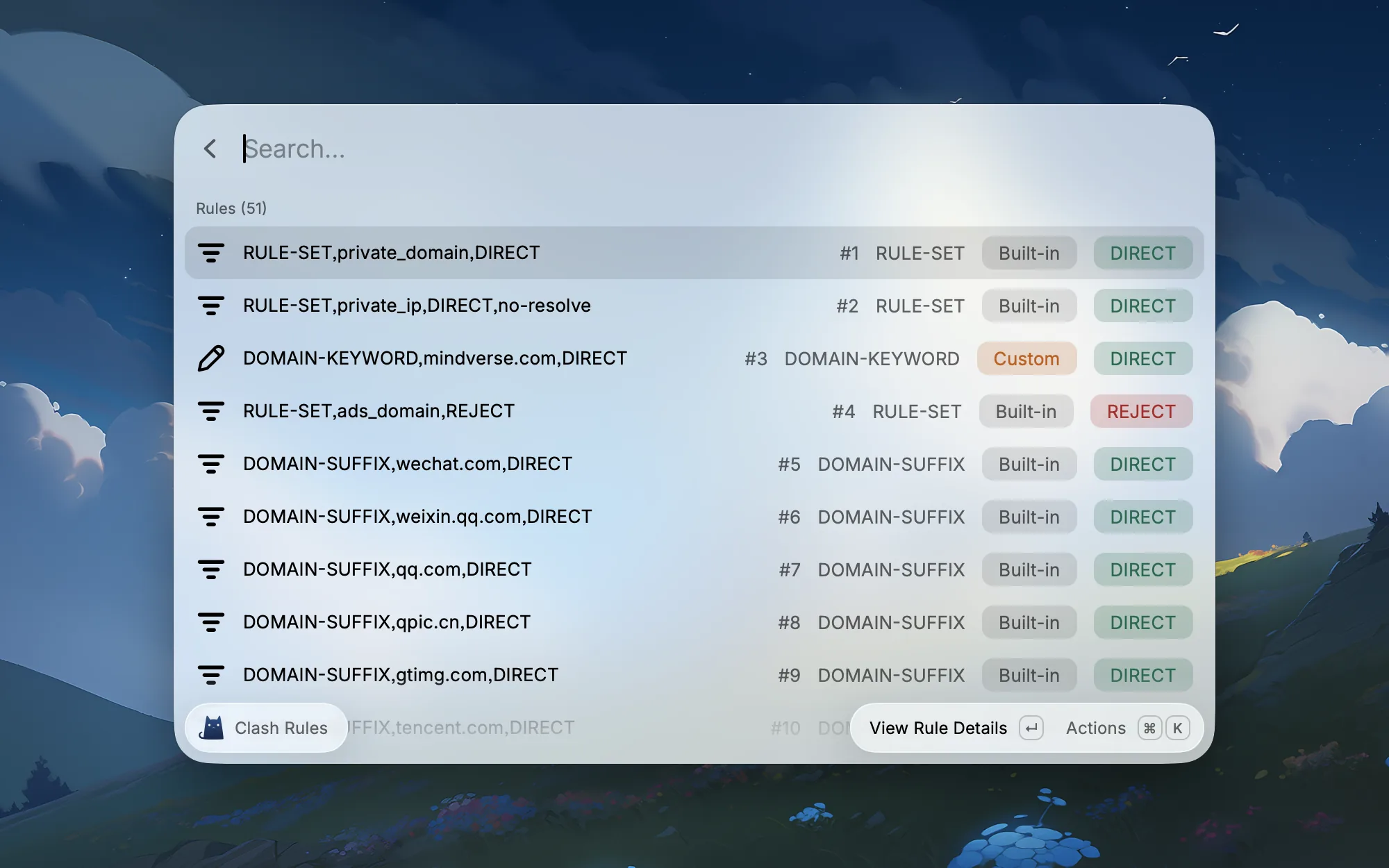
It's not meant to replace a full configuration editor, but simply to put the most commonly used actions into Raycast:
- View rule order.
- See if a rule goes
DIRECT,PROXY, orREJECT. - Add a custom rule.
- Adjust the position of a custom rule.
- Open the rule set source.
Because mihomo's rules match from top to bottom, the rule order itself affects the outcome. This page isn't about "redesigning rules," but about letting me quickly understand why current traffic is routed a certain way.
The rules themselves aren't reinvented; they primarily follow common configuration ideas from mature clients: built-in rules handle basic traffic splitting, custom rules provide temporary additions, and finally, unknown traffic defaults to PROXY.
Why Raycast
The most important design trade-off for this plugin wasn't Clash, but Raycast.

If I had made it a full client, I would inevitably start working on a menu bar, settings page, traffic graph, configuration editor, TUN, synchronization, and log panel. All of those could be done, but they weren't my biggest pain points.
My pain point was the overly long operation path.
What I wanted was:
- Search
clashand see the entry points. - After installation, check the core, configuration, and system proxy thoroughly.
- Open the Dashboard and immediately know the current network status.
- Switching routes like executing a command.
- Singapore nodes can be manually pinned or automatically select the fastest.
- Rule issues can be quickly fixed with a new rule.
- When a fault occurs, I can first check the health status.
This is why Raycast is suitable for it.
It's not a "more complete" Clash client, but a Clash control panel "closer to my work entry point."
How It Feels After Completion
This project reaffirmed something for me: in the age of AI, many personal tools are worth redoing.
Previously, such a need would likely be abandoned. The client occasionally crashes, just bear with it; nodes are hard to select, switch manually; rules are hard to adjust, change them in the configuration file; system proxy drifts, restart the client.
Because building a tool specifically for oneself was too costly.
Now it's different.
You can recombine existing capabilities: mihomo handles the proxy core, Raycast handles the entry point, launchd handles the background service, macOS system proxy handles system integration, and the plugin turns them into a convenient workflow.
Clash for Raycast is such a tool for me.
It's not a bigger Clash.
It's my own network switch.
Project Address
The source code has been uploaded to GitHub: wuyuxiangX/clash-for-raycast.
Related Posts
Raycast: My Favorite Mac App
From a simple launcher to a full-blown productivity hub — a power user's guide to the best Raycast extensions for developers and everyday Mac use.
I Built a Raycast Extension to Monitor Claude Code
From scratch to shipped in one evening: how I built Claude Code Monitor, a Raycast extension for session tracking, usage analytics, and extension management.
My UI Design Inspiration: 6 Go-To Reference Sites
From Mobbin to Checklist Design, here are the 6 design reference sites I open most often when working on product design.