
Prototype: Answering a Design Question with Throwaway Code
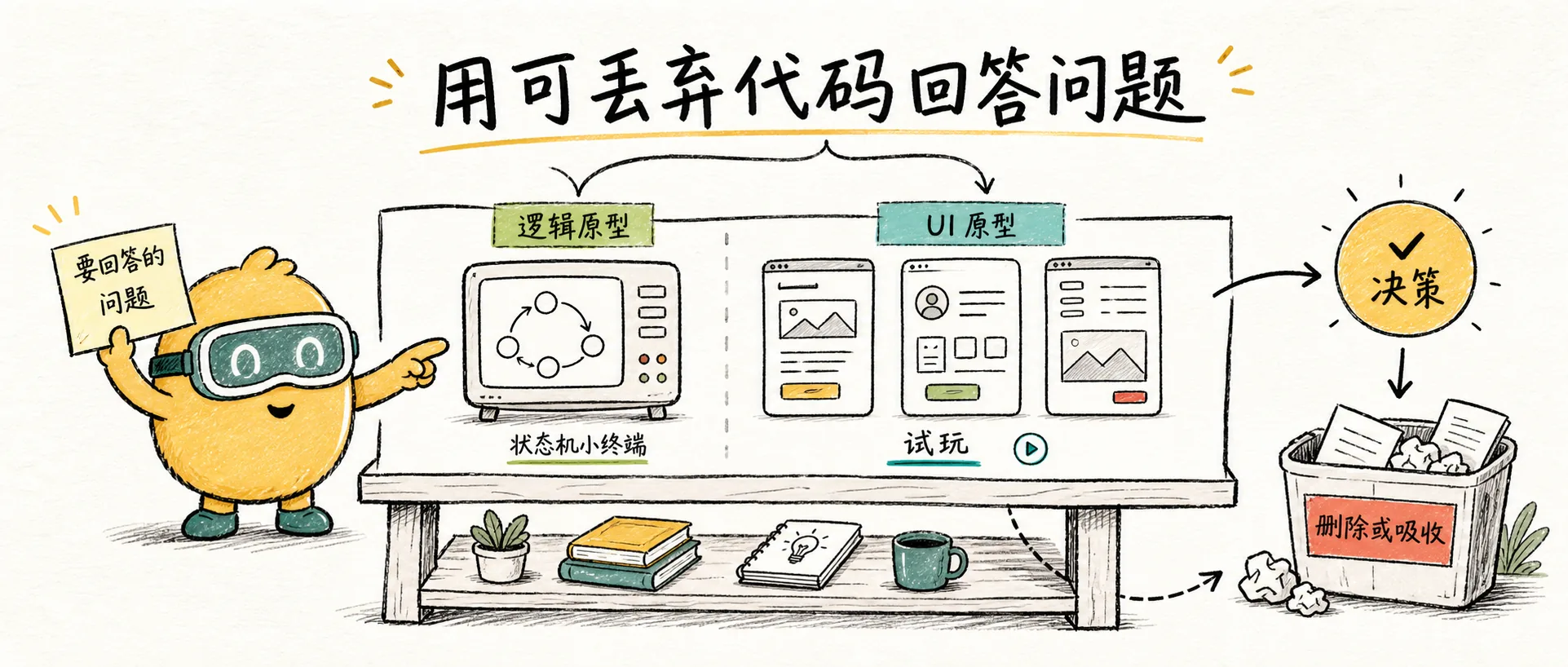
Deconstructing Matt Pocock's /prototype skill: Prototypes are not low-quality implementations, but throwaway code written to answer a question. It branches into logic state machine prototypes and UI multi-solution prototypes.
Prototypes Are Not "Just Write Something Quick"
The first sentence of the /prototype definition is crucial:
A prototype is throwaway code written to answer a question.
This separates prototypes from "lazy implementations." A prototype is not a precursor to production code, nor a half-finished product that will be gradually refactored into a formal version. It should be marked as throwaway from day one.
Therefore, the key to /prototype is not writing fast, but first clarifying:
What question is this prototype intended to answer?
Two Branches
Matt categorizes prototypes into two types, with completely different outputs.
| Question to Answer | Branch | Output |
|---|---|---|
| Are the logic, state machine, or data models reasonable? | Logic prototype | A runnable terminal application |
| What should this interface look like? | UI prototype | Multiple UI solutions switchable within a route |
This distinction is highly practical. Many teams say "let's build a prototype" without clarifying whether they want to validate the visual appearance or the state transitions. These two goals require entirely different approaches.
Logic Prototype: Exposing State in the Terminal
If the question is "Is this state machine correct?" or "Can these business rules be implemented?", the prototype should be a small command-line program.
Its characteristics:
- In-memory state, no reliance on a real database.
- Starts with a single command.
- Prints the complete relevant state after each operation.
- Covers edge cases that are difficult to deduce on paper.
- No tests, no exception handling, no framework abstraction.
Example: You're designing a subscription state flow.
Don't modify production code directly. First, create a subscription-prototype.ts that allows users to select options in the terminal:
1. start trial
2. pay
3. cancel
4. expire
5. refund
6. print state
After each step, print the current entitlement, trial quota, paid state, and next renewal. You'll quickly discover that some state combinations haven't been fully considered.
The value of this type of prototype is: turning abstract rules into operable objects.
UI Prototype: Multiple Aggressive Solutions in a Single Route
If the question is "How should the interface be designed?", the prototype should generate several significantly different UI variations, rather than tweaking the same solution three times.
The /prototype UI branch requires:
- Multiple variations within a single route.
- Switching via URL search parameters or a bottom floating switch bar.
- Clear differences between the proposed solutions.
- Prototype code that is close to the future real page, but with clear naming indicating it's a prototype.
- Avoid premature integration with real data and persistence.
The difference from standard AI UI generation is that it doesn't ask the AI for the "best solution" at once. Instead, it allows you to compare several directions using a real browser.
For example, for a dashboard's empty state, don't just ask the AI to change the copy. Have it generate:
- A: Table-based, dense, emphasizing next actions.
- B: Task-oriented, with a checklist on the left and a preview on the right.
- C: Guided, highlighting a primary CTA and historical examples.
Then, you can switch between these within the same route, rather than trying to visualize them from three screenshots in a chat.
All Prototypes Must Be Deletable
Among the general rules for /prototype, the most important is "deletable":
- Filenames or paths should clearly indicate it's a prototype.
- Do not default to connecting to a production database.
- Do not write generic abstractions.
- Do not implement excessive error handling.
- Delete it after completion, or absorb the learned conclusions into the formal code.
If a prototype cannot be deleted, it has already become a liability in production code.
This is particularly important in AI programming. AI is adept at writing prototypes that "look usable," leading humans to be reluctant to delete them, resulting in a codebase filled with temporary code that no one dares to touch.
What Remains After the Prototype
Prototype code is not worth keeping, but the answers are.
Matt suggests documenting the following in a persistent location:
- The question the prototype aimed to answer.
- Observed conclusions.
- The chosen direction.
- Directions that were abandoned.
- If necessary, convert these into ADRs, issues, PRDs, or commit messages.
In other words, the output of /prototype is not code, but decisions.
When Not to Use It
Do not use /prototype in these scenarios:
- Requirements are already clear and only implementation is needed.
- Bugs have reproducible steps; use
/diagnoseinstead. - Refactoring direction is clear; use
/tddfor protection during implementation. - UI polish is minor and doesn't warrant multiple solution variations.
- You don't have time to delete or absorb the prototype.
The cost of a prototype is not in writing it, but in its conclusion. Without a conclusion, don't start.
A Useful Prompt
You can invoke it like this:
/prototype

I want to verify if this checkout state machine is reasonable. Please use the logic branch.
Only create a throwaway terminal prototype, do not connect to a real DB.
Print the complete state after each operation.
Or:
/prototype

I want to compare 3 information architectures for the project details page. Please use the UI branch.
Place it in a prototype route within the existing routing system, providing a bottom switch bar.
Do not modify production components.
The most important aspect here is clarifying "the question to be answered." As long as this question is clear, the prototype is less likely to go off track.
Relationship with Grill Me
/grill-me is suitable for refining decisions through questioning; /prototype is suitable for refining decisions through hands-on experience.
Some questions can be resolved by asking, such as "Should anonymous comments be moderated?". Some questions require hands-on testing, such as "Will this drag-and-drop sorting state machine actually be difficult to use?". The latter is where prototyping is appropriate.
Therefore, I place it at a branching point in the workflow:
Vague Idea
  ↓
/grill-me
  ↓
If experience or validation is still needed
  ↓
/prototype
  ↓
Retain conclusions, delete prototype
  ↓
/to-prd or /tdd
Resources
prototype Source File
用可丢弃原型回答逻辑、状态、业务规则或 UI 设计问题。
Next article: Improve Codebase Architecture: Refactoring Shallow to Deep Modules.