
AI 시대의 TDD: Codex 실용 매뉴얼
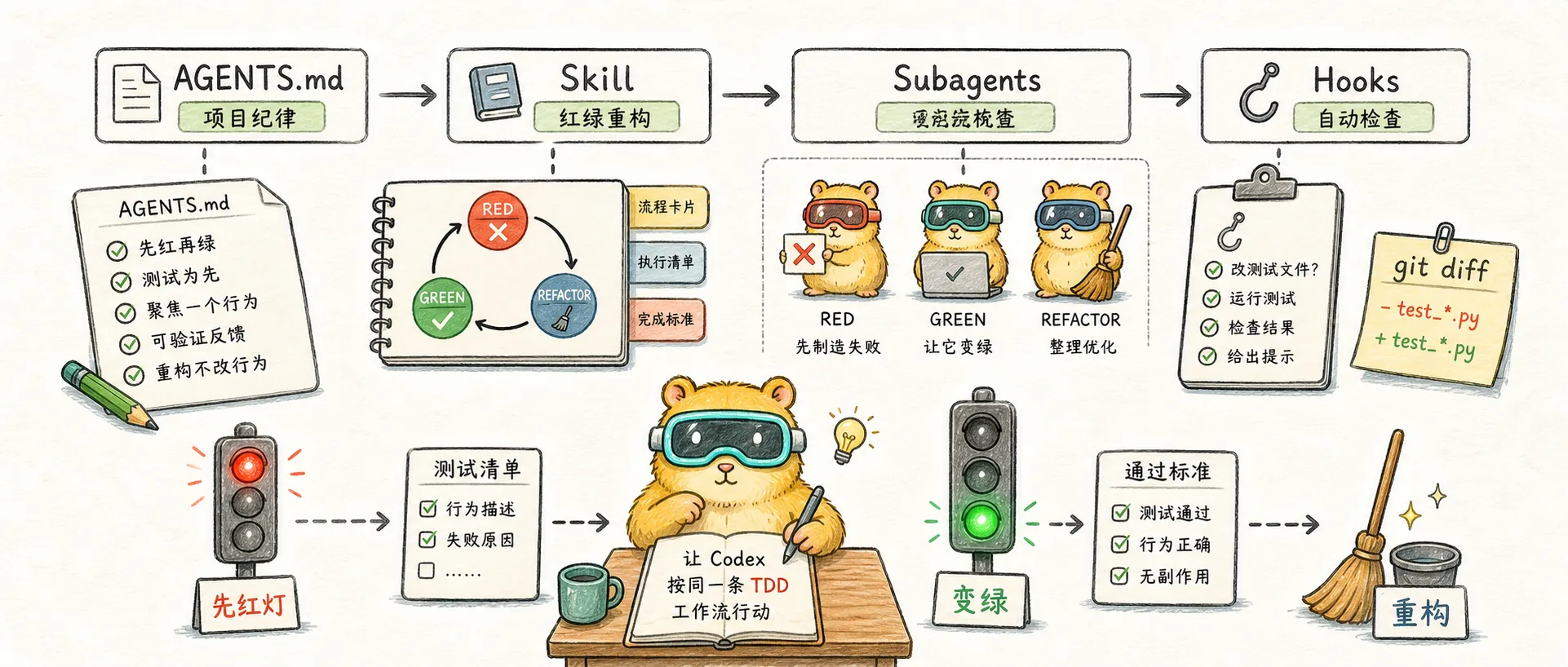
Codex에서 TDD를 재현 가능한 워크플로로 전환: AGENTS.md를 사용하여 프로젝트 분야를 작성하고, 기술을 사용하여 빨간색 및 녹색 리팩토링을 강화하고, 하위 에이전트를 사용하여 단계를 분리하고, 후크를 사용하여 테스트 차이점을 확인합니다.
먼저 지도를 주세요
개념 내용: AI 프로그래밍에서 TDD의 가치는 "먼저 테스트를 작성하는" 의식이 아니라 먼저 검증 가능한 빨간색 표시등을 만든 다음 구현을 통해 이를 녹색으로 바꾸는 것입니다.
이 문서에서는 Codex를 구현하는 방법에 대해 설명합니다.
“어떤 서류를 일치시켜야 합니까?”라고 즉시 묻지 마십시오. 더 나은 질문은 다음과 같습니다.
매번 동일한 TDD 작업 흐름에서 Codex가 작동하도록 하려면 어떻게 해야 합니까?
이 워크플로는 네 가지 수준으로 나눌 수 있습니다.
| 계층 구조 | 뭐하는거야 | 어디 | 언제가 적절한가 |
|---|---|---|---|
| L1 | 프로젝트 분야 작성 | AGENTS.md | 모든 프로젝트에는 |
| L2 | 응고과정 | .agents/skills/tdd-codex/SKILL.md | 요구 사항을 충족하기 위해 TDD를 반복적으로 사용 |
| L3 | 격리 단계 | .codex/agents/*.toml | 복잡한 업무, 테스트와 구현 사이의 상호 오염 우려 |
| L4 | 자동 알림 | .codex/hooks.json | AI가 비밀리에 테스트를 수정하는 것을 두려워하는 중요한 창고 |
사용 가능한 가장 작은 버전은 L1 + L2입니다.
완전한 방어선은 L1 + L2 + L3 + L4입니다.
1. 먼저 '완성'이 무엇인지 정의해보세요
완성 표준이 없다면 Codex는 "작성된 코드"를 "완료"로 쉽게 처리할 수 있습니다.
TDD 시나리오에서는 완료 기준이 더 구체적이어야 합니다.
매 라운드마다 증거가 전달되어야 합니다.
Codex가 매 라운드마다 다음 6가지 항목을 보고하도록 합니다.
Behavior: 这一轮实现哪个行为
Test: 测试文件和测试名
Command: 跑了什么命令
RED: 失败原因是否符合预期
GREEN: 通过结果是什么
REFACTOR: 是否重构,为什么
이는 "완료"보다 훨씬 더 유용합니다.
먼저 구현을 작성한 다음 합리적으로 보이는 테스트를 추가하는 대신 모델이 실제로 빨간색과 녹색 주기를 거쳤음을 알려줍니다.
한 라운드에서는 하나의 행동만 처리됩니다.
이것은 매우 중요합니다.
Codex가 전체 테스트 매트릭스를 한 번에 생성하도록 하지 마십시오. 그것은 "수평 배치 테스트"가 될 것입니다.
RED: test1, test2, test3, test4, test5
GREEN: 一次写一个大实现
원하는 것은 세로로 자르는 것입니다.
RED test1 -> GREEN impl1 -> REFACTOR
RED test2 -> GREEN impl2 -> REFACTOR
RED test3 -> GREEN impl3 -> REFACTOR
구현의 첫 번째 라운드에서는 문제에 대한 이해가 바뀔 것입니다. 모든 테스트를 한 번에 작성하지 마세요.
2. L1: AGENTS.md에 규율을 작성합니다.
AGENTS.md은 Codex가 프로젝트에 들어갈 때 읽는 설명 파일입니다.
OpenAI 공식 문서에 따르면 Codex는 먼저 전역 설명을 읽은 다음 프로젝트 루트 디렉터리에서 현재 디렉터리까지 읽습니다. 각 레이어는 AGENTS.override.md을 먼저 읽고, 그렇지 않으면 AGENTS.md을 읽습니다. 현재 디렉터리에 더 가까운 설명은 나중에 나타나므로 우선 순위가 더 높습니다. 기본 병합 제한은 32 KiB이므로 여기에 긴 튜토리얼을 작성할 수 없습니다.
프로젝트 교통 규칙과 같아야 합니다.
AGENTS.md은 TDD가 무엇인지 Codex에 가르칠 책임이 없습니다. 이 프로젝트에서 허용되지 않는 동작은 무엇인지 명확하게 작성하는 것만 담당합니다.
이 단락을 직접 넣을 수 있습니다.
# TDD Rules

- For new behavior and bug fixes, use red/green TDD.
- RED: write exactly one failing behavior test first.
- Run the smallest relevant test command and confirm the failure is expected.
- Do not edit production implementation during RED.
- GREEN: write the minimum production code required to pass the current failing test.
- Never modify, delete, skip, or weaken tests to make implementation pass.
- REFACTOR only after tests are green.
- Keep structural changes and behavior changes separate.
- Report Behavior, Test, Command, RED, GREEN, and REFACTOR for each cycle.
추가 프로젝트 명령:
# Verification

- Use `pytest` or the smallest relevant pytest command for Python behavior tests.
- Use `npm run types:check` only when this blog site's MDX or TypeScript changes.
- Use the smallest targeted command during RED/GREEN loops.
- If a command is slow, explain what targeted command was used first and what full command remains.
백과사전으로 써서는 안 된다
잘못된 AGENTS.md은(는) 다음으로 채워집니다.
- TDD의 역사
- 모든 테스트 철학
- 다양한 프레임워크 튜토리얼
- 복잡한 프롬프트 템플릿
- 다양한 언어로 완전한 사양
이러한 것들은 정말로 중요한 규칙을 희석시킵니다.
내 제안은 다음과 같습니다. AGENTS.md 상주 규율만 적용하세요. 긴 프로세스에 기술을 사용하십시오.
3. L2: 프로세스를 코덱스 스킬로 만들기
AGENTS.md은 "기본 규율"을 해결하고 기술은 "전체 프로세스"를 해결합니다.
Codex에 "do it by TDD"라고 자주 말할 때, 이 문장을 프로젝트 수준의 기술로 업그레이드해야 합니다.
디렉토리 구조
여기에 넣으세요:
.agents/
  skills/
    tdd-codex/
      SKILL.md
Codex는 현재 디렉터리부터 .agents/skills까지 스캔합니다. 웨어하우스 루트 디렉터리의 기술은 팀에서 사용하는 워크플로에 적합합니다.
최소 사용 가능 SKILL.md
---
name: tdd-codex
description: Implementing or fixing maintainable code with Codex using strict red-green-refactor TDD. Use for new behavior, bug reproduction, behavior tests, or safe AI coding.
---

# TDD Codex Workflow

Use one behavior slice per cycle.

## Phase 0: Scope

Identify one observable behavior.
Name the public API, user flow, or integration boundary under test.
Do not edit production code.

## Phase 1: RED

Write exactly one failing behavior test.
Prefer public behavior over implementation details.
Run the smallest relevant test command.
Confirm the failure is expected.
Stop and report:
- Behavior
- Test file
- Command
- Failure reason

## Phase 2: GREEN

Write the minimum production code to pass the current failing test.
Never modify, delete, skip, or weaken tests to pass.
Do not add speculative features or abstractions.
Run the same test command.
Report the passing result.

## Phase 3: REFACTOR

Only refactor after tests are green.
If the code is already simple, skip.
If refactoring, make one structural change at a time.
Run tests after each refactor.
Do not change behavior.

## Cycle Report

Return:
- Behavior:
- Test:
- Command:
- RED:
- GREEN:
- REFACTOR:
- Next slice:
호출 방법
이제부터 다음과 같이 말할 수 있습니다.
用 tdd-codex skill 做这个需求。
每轮只处理一个行为。
先 RED,确认失败后停下来,不要直接写实现。
또는 더 짧게:
用 tdd-codex。先写红灯,等我说 go。요점은 프롬프트가 얼마나 아름다운가가 아니라 매번 Codex를 동일한 트랙으로 다시 가져오는 것입니다.
4. L3: 하위 에이전트를 사용하여 빨간색과 녹색 재구성을 분리합니다.
모든 작업에 하위 에이전트가 필요한 것은 아닙니다.
그러나 작업이 복잡하고, 테스트가 구현에 의해 쉽게 오염되고, 리팩토링이 통제를 벗어나기 쉬운 경우에는 RED, GREEN, REFACTOR를 여러 에이전트로 분할하는 것이 더 안정적입니다.
언제 해체할 가치가 있나요?
분해에 적합:
- 권한, 청구, 상태 머신 -다중 모듈 기능
- 버그가 매우 숨겨져 있으므로 먼저 재발 테스트를 작성해야 합니다.
- 모델은 항상 친환경을 얻기 위한 테스트로 변경됩니다.
- 테스트 품질 검토만 담당하는 사람을 원합니다.
분해에 적합하지 않음:
- 가젯 기능
- 카피라이팅 변경
- 순수한 시각적 미세 조정
- 일회성 스크립트
에이전트를 해체하는 데 드는 비용은 현실입니다. 격리의 이점이 통신 비용보다 클 경우에만 사용하십시오.
RED agent
# .codex/agents/tdd-test-writer.toml
name = "tdd_test_writer"
description = "RED phase agent. Writes one failing behavior test and stops before implementation."
sandbox_mode = "workspace-write"

developer_instructions = """
You own only the RED phase.
Write exactly one behavior-focused test for the requested slice.
Prefer public APIs and user-visible behavior over implementation details.
Run the smallest relevant test command.
Confirm the test fails for the expected reason.
Do not edit production implementation.
Do not add multiple tests at once.
Return Behavior, Test, Command, and RED failure reason.
"""
GREEN agent
# .codex/agents/tdd-implementer.toml
name = "tdd_implementer"
description = "GREEN phase agent. Implements the minimum production code to pass the current failing test."
sandbox_mode = "workspace-write"

developer_instructions = """
You own only the GREEN phase.
Read the failing test and relevant production code.
Write the minimum implementation required to pass the current test.
Never modify, delete, skip, or weaken tests to make them pass.
Do not add speculative features, helpers, configuration, or abstractions.
Run the relevant tests and return the command plus passing output.
"""
REFACTOR agent
# .codex/agents/tdd-refactorer.toml
name = "tdd_refactorer"
description = "REFACTOR phase agent. Improves structure only after tests are green."
sandbox_mode = "workspace-write"

developer_instructions = """
You own only the REFACTOR phase.
Start by running the relevant tests to confirm the code is green.
Look for duplication, unclear names, needless branching, or misplaced responsibility.
Skip refactoring when the code is already simple.
If you refactor, make one structural change at a time.
Run tests after each refactor.
Never change behavior in this phase.
"""
메인 세션 명령 방법
按三阶段 TDD 做这个 slice:
1. tdd_test_writer 只写一个失败测试,并确认 RED。
2. 等我确认后,tdd_implementer 写最小实现,并确认 GREEN。
3. tdd_refactorer 判断是否需要结构重构。
不要批量铺测试。
不要在 GREEN 阶段修改测试。
여기서 중요한 점은 컨텍스트를 분리하는 것입니다. 테스트를 작성하는 사람들은 구현 세부 사항에 영향을 받지 않도록 노력해야 합니다. 구현을 작성하는 사람들은 수동으로 테스트할 수 없습니다. 리팩토링하는 사람들은 새로운 행동을 도입할 수 없습니다.
5. L4: Hooks를 사용하여 테스트 비교에 집중
규칙에만 의존하는 경우에도 모델이 여전히 범위를 벗어날 수 있습니다.
가장 일반적인 국경 간 시도는 테스트가 빨간색이고 모델이 테스트를 녹색으로 바꾸기 위해 변경하는 것입니다.
Hooks의 가치는 "완전히 안전"하다는 것이 아니라 이 작업을 즉시 노출시키는 것입니다.
Codex 후크 활성화
먼저 구성에서 기능 플래그를 엽니다.
# ~/.codex/config.toml 或 <repo>/.codex/config.toml
[features]
codex_hooks = true
Codex는 활성 구성 레이어 옆에 있는 후크를 찾습니다. 일반적인 위치:
~/.codex/hooks.json~/.codex/config.toml<repo>/.codex/hooks.json<repo>/.codex/config.toml
프로젝트 레벨에서는 웨어하우스를 따라갈 수 있으므로 <repo>/.codex/hooks.json을 먼저 사용하는 것이 좋습니다.
hooks.json
{
  "hooks": {
    "PostToolUse": [
      {
        "matcher": "apply_patch|Edit|Write",
        "hooks": [
          {
            "type": "command",
            "command": "bash \"$(git rev-parse --show-toplevel)/.codex/hooks/watch-test-edits.sh\"",
            "timeout": 10,
            "statusMessage": "Checking test file edits"
          }
        ]
      },
      {
        "matcher": "Bash|apply_patch|Edit|Write",
        "hooks": [
          {
            "type": "command",
            "command": "bash \"$(git rev-parse --show-toplevel)/.codex/hooks/run-fast-check.sh\"",
            "timeout": 120,
            "statusMessage": "Running fast checks"
          }
        ]
      }
    ]
  }
}
테스트 파일이 수정되었는지 확인
# .codex/hooks/watch-test-edits.sh
#!/usr/bin/env bash
set -euo pipefail

changed_tests="$(
  git diff --name-only |
    grep -E '(^|/)(__tests__|tests?)/|\.(test|spec)\.[cm]?[jt]sx?$|_test\.go$|test_.*\.py$' || true
)"

if [ -n "$changed_tests" ]; then
  cat <<EOF
{
  "continue": false,
  "stopReason": "Test files changed. Review before continuing.",
  "systemMessage": "检测到测试文件被修改:\n$changed_tests\n\n测试文件可以改,但必须说明为什么改。先停下来确认:这是补充规格,还是为了凑绿而改测试?"
}
EOF
fi
빠른 확인 실행
# .codex/hooks/run-fast-check.sh
#!/usr/bin/env bash
set -euo pipefail

root="$(git rev-parse --show-toplevel)"
cd "$root"

if [ -f pyproject.toml ] || [ -f pytest.ini ] || [ -d tests ]; then
  pytest
elif [ -f package.json ]; then
  if npm run | grep -q "types:check"; then
    npm run types:check
  elif npm run | grep -q "check"; then
    npm run check
  fi
elif [ -f go.mod ]; then
  go test ./...
fi
후크를 신격화하지 마세요
후크는 전체 시행 경계가 아닌 가드레일입니다.
일반적인 경로를 상기시키고 차단할 수는 있지만 검토, CI 및 인간의 판단을 대체할 수는 없습니다. 특히 테스트를 실제로 수정해야 하는 경우 올바른 접근 방식은 테스트를 영원히 금지하는 것이 아니라 모델 설명을 요구하는 것입니다.
为什么要改测试?
这是新需求、新边界,还是旧测试写错?
生产实现有没有被同步验证?
6. TDD-Guard에 대해 어떻게 생각하시나요?
TDD-Guard는 살펴볼 가치가 있지만 Codex 설치 제안으로 받아들이지 마십시오.
클로드코드 플러그인 루트입니다. 핵심 아이디어는 AI가 TDD를 위반하는 것을 방지하는 것입니다. 특히 테스트를 친환경적으로 변경하는 것을 방지하는 것입니다.
Codex로 마이그레이션할 때 경로를 복사하는 대신 아이디어를 빌릴 수 있습니다.
| 클로드 코드 루트 | 코덱스 루트 |
|---|---|
CLAUDE.md | AGENTS.md |
.claude/agents/*.md | .codex/agents/*.toml |
| 클로드 플러그인/TDD-Guard | 후크 + git diff 확인 + CI |
| 슬래시 명령 | 기술이나 프롬프트 |
Codex 측에서 보다 현실적인 조합은 다음과 같습니다.
AGENTS.md 写纪律
skill 固化流程
subagents 隔离角色
hooks 检查测试 diff
CI 做最后兜底
이는 필수 경계와 정확히 동일하지는 않지만 개별 프로젝트와 대부분의 팀 프로젝트에는 충분합니다.
7. 전체 연습: slugify
이제 작은 기능을 사용해 살펴보겠습니다.
요구사항:
实现 slugify(text: string): string。
把英文标题转成 URL slug。
이 예가 작다고 생각하지 마십시오. TDD는 작은 예로부터 리듬을 이해해야 합니다.
0단계: 코드를 작성하지 않고 먼저 경계에 대해 물어보세요.
Codex가 다음을 작성하기 위해 서두르지 않도록 하십시오:
我想实现 slugify(text: string): string。
先不要写代码。
请先问我 5 个边界问题,覆盖大小写、空格、标点、unicode、空字符串。
然后把确认后的规格写成 SPEC.md。
사양은 다음과 같습니다.
# slugify SPEC

- "Hello World" -> "hello-world"
- trim leading/trailing spaces
- collapse repeated spaces into one hyphen
- remove punctuation
- normalize "Café" -> "cafe"
- empty input returns empty string
1단계: 첫 번째 빨간불
读取 SPEC.md。
只实现第一条行为:"Hello World" -> "hello-world"。
先 RED:只写一个失败测试,运行它,确认失败。
不要写生产实现。
이상적인 출력:
Behavior: basic title becomes lowercase hyphenated slug
Test: tests/test_slugify.py
Command: pytest tests/test_slugify.py -q
RED: failed because slugify is not defined
그래야만 계속할 수 있습니다.
2단계: 최소한의 녹색
goCodex는 최소한의 구현을 작성합니다.
def slugify(text: str) -> str:
    return text.lower().replace(" ", "-")
그런 다음 다음을 보고하십시오.
GREEN: pytest tests/test_slugify.py -q passed
REFACTOR: skipped, implementation is still simple
Next slice: trim leading/trailing spaces
3단계: 두 번째 빨간불
继续下一条:去掉首尾空格。
先 RED,只写一个测试。
테스트:
def test_slugify_trims_spaces():
    assert slugify("  Hello World  ") == "hello-world"
현재 구현이 -hello-world-을 출력하면 빨간색 표시등이 true입니다.
그런 다음 녹색:
def slugify(text: str) -> str:
    return text.strip().lower().replace(" ", "-")
4단계: 추상화를 서두르지 마세요.
이 시점에서 많은 AI는 normalizeInput, removePunctuation, toAscii를 그리고 싶어할 것입니다.
아직 서두르지 마세요.
TDD의 디자인은 상상이 아니라 테스트 압력으로 밀어내야 한다. 유니코드, 구두점, 빈 문자열을 추가하고 구조적 압박이 실제로 발생할 때까지 기다린 다음 리팩토링하세요.
8. 일일 사용량 간편 확인
새로운 기능
用 TDD 实现这个需求。
每轮只处理一个行为。
先写一个失败测试并运行确认 RED。
不要写生产实现,直到我说 go。
버그 수정
先写一个能复现这个 bug 的失败测试。
确认它因为这个 bug 失败后,再写最小修复。
不要改测试来适配当前实现。
복잡한 기능
先不要写代码。
请给出 TDD 分解计划:
- 外圈集成测试是什么
- 内圈每个行为 slice 是什么
- 每轮用什么命令验证
- 哪些地方不能 mock
等我确认后再开始 RED。
Review
Review 这次改动,重点看:
- 是否先有失败测试
- 测试是否测行为而不是实现
- 是否存在为了通过而弱化测试
- 结构改动和行为改动是否混在一起
- 是否缺少外圈集成测试
9. 최종 체크리스트
Codex에게 TDD를 해달라고 요청할 때마다 이 표를 이용해 마지막에 확인해보세요.
| 질문 | 자격기준 |
|---|---|
| 정말 인기가 많은가 먼저 | 실패한 명령과 실패 이유가 있습니까? |
| 빨간색이 맞나요 | 실패 이유는 목표 행동의 부족에 해당 |
| 라운드당 하나의 행동만 수행 | 일괄 테스트 없음 |
| GREEN 시험이 변경되었나요? | 녹색으로 변경된 테스트가 없습니다 |
| 테스트는 동작을 테스트하는가 | 내부 구현 세부 사항에 의존하지 않습니다 |
| 혼합된 동작이 리팩토링되었습니까? | 구조적 변화와 행동 변화를 분리 |
| 완전한 검증이 있습니까 | 대상 테스트 및 필요한 전체 검사가 실행되었습니다 |
이 테이블이 통과할 수 없다면 서두르지 말고 병합하세요.
추천 리소스
AGENTS.md
Official guide to global, project, and nested instruction files.
Agent Skills
Official guide to packaging reusable workflows as skills.
Subagents
Official guide to custom agents and subagent workflows.
Codex Hooks
Official guide to deterministic scripts during the Codex lifecycle.
TDD-Guard: Automated TDD enforcement for Claude Code
Claude Code plugin route for TDD enforcement. Codex users should borrow the guardrail idea, not the install path.